

- Routing: Determines which agent handles a request based on user intent, session state, or custom conditions. The supervisor evaluates routing rules on every message.
- Context propagation: Gives the target agent the data it needs without asking the user to repeat themselves. Context does not transfer automatically. You must pass it explicitly.
- Control flow: Determines whether the calling agent keeps control after routing or transfers it permanently. This controls how results flow back and whether the user notices a transfer.
Types of orchestration
The platform supports four orchestration patterns:
Sample Multi-Agent Orchestration
Configure orchestration
You can configure orchestration in two ways: using Studio or using the ABL editor. Both methods are equivalent and interchangeable.Using the Agent Platform Studio
- Navigate to the Agents page to view all agents in the project.
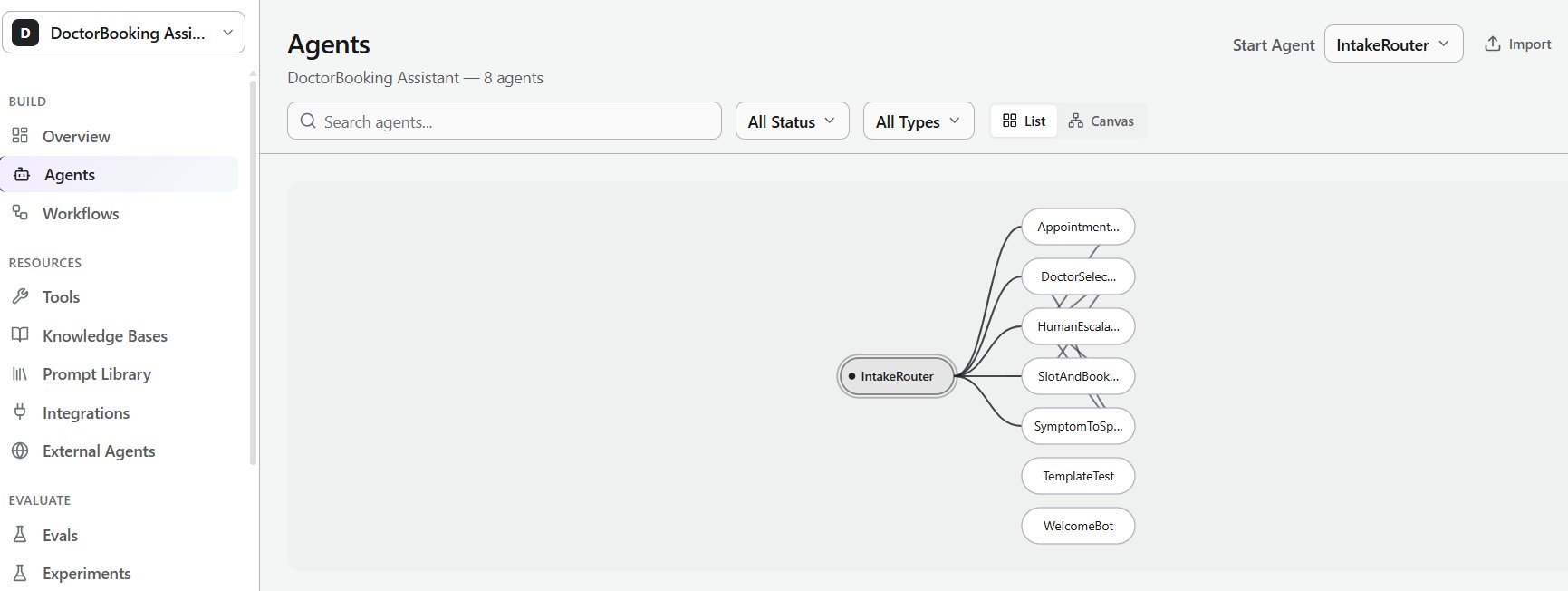
- Use the Canvas view to visualize relationships between agents.
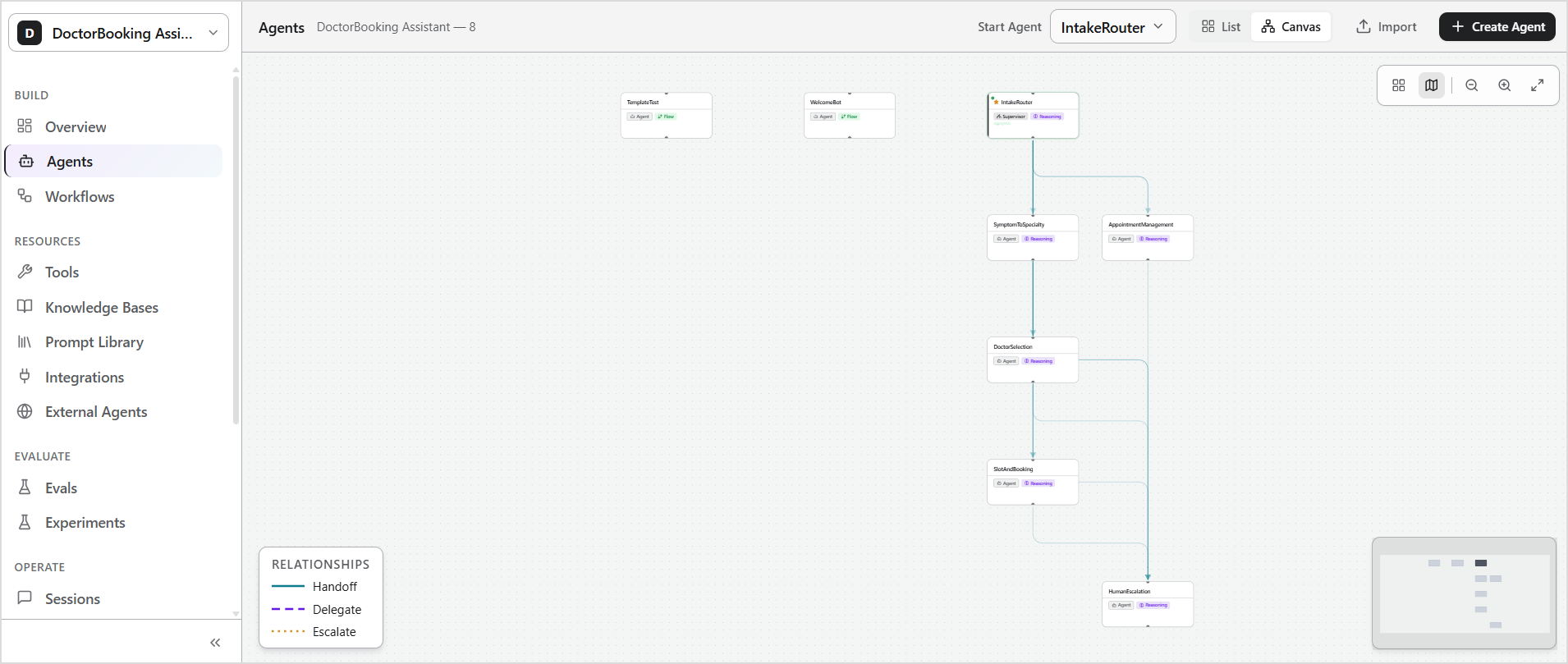
- Select an agent to open its configuration page.
- Configure handoffs or delegation under the Coordination section.
- Save your changes.
Using the ABL editor
- Open the agent and switch to ABL view.
- Define the orchestration logic using ABL constructs such as:
SUPERVISORHANDOFFDELEGATE
- Compile and save your changes.
- Updates apply immediately after a successful compilation.
The UI and ABL are interchangeable. Changes made in ABL appear in the UI, and changes made in the UI appear in ABL.
Orchestration patterns
Supervisor
A supervisor is a special agent that acts as the central router for a multi-agent system. It does the following:- Receives every incoming message.
- Routes each message to a specific agent based on user intent, session state, channel, or custom conditions.
- Performs pre-routing actions, such as fetching data or checking authentication state, before forwarding the request to a specialized agent.
How it works
When a user sends a message, the supervisor:- Receives the message as the active agent.
- Optionally performs a pre-routing action using tools.
- Evaluates its
HANDOFFrules top to bottom. - Routes the message to the first agent whose
WHENcondition matches. - Regains control when the child agent completes with
RETURN: true. - Handles the message directly if no
HANDOFFrule matches andcanRespondDirectlyis enabled. Otherwise, it returns an error.
How to set up
Define a supervisor using theSUPERVISOR keyword in the ABL file.
Examples
1. Travel SupervisorHandoff
A handoff transfers the conversation from one agent to another. The original agent stops handling the request at the point of handoff. A handoff can originate from a supervisor routing to a specialist agent, or directly from one agent to another for peer-to-peer routing. In both cases, the target agent receives the context and continues the conversation from that point.How it works
- The calling agent evaluates its
HANDOFFrules. - When a condition is met, the conversation transfers to the target agent.
- The target agent receives the context defined in the
CONTEXTblock. RETURNmust be set tofalsefor handoff orchestration.
How to set up
Configure the handoff in the originating agent, which is the agent that initiates the transfer.- In the Studio, open the agent and add a handoff under the Coordination section.
- Alternatively, define the following properties in the ABL editor.
Use
HANDOFF for machine-to-machine agent routing only. Use ESCALATE when the target agent is a human operator.
RETURN_HANDLERS actions
CLEAR- Removes the listed session variables before continuing.CONTINUE- Resumes normal routing after the return.RESUME_INTENT- Re-evaluates the user’s intent and re-routes.
Examples
1. Handoff from SupervisorDelegate
Delegation is a call-and-return pattern. The parent agent sends a task to a child agent, waits for the result, and then continues its own processing with the returned data. The delegation is transparent. The user does not see it.How it works
- The parent agent evaluates its
DELEGATEconditions. - When a condition matches, the parent sends the defined
INPUTto the sub-agent. - The sub-agent processes the task and returns its result through its
COMPLETEproperty. - The parent agent maps the returned values to its own session variables using
RETURNS. - The parent agent continues processing using the result, as defined in
USE_RESULT. - If the sub-agent fails or times out,
ON_FAILhandles the error.
How to set up
Configure the delegation in the originating agent, which is the agent that initiates the transfer.- In the Studio, open the agent and add Delegate under the Coordination section.
- Alternatively, define the following properties in the
DELEGATEblock in the ABL editor.
Examples
1. Set up delegate from an agent.Fan-out
Fan-out sends a task to multiple agents simultaneously and aggregates their results, such as searching flights and hotels in parallel. The parallel execution is transparent. The user sees a single combined response.How it works
- A user message matches the
WHENcondition on multipleHANDOFForDELEGATErules simultaneously. - All matching agents run in parallel.
- Each agent runs independently and returns its results.
- Results merge back into the calling agent’s state.
- The calling agent responds with the aggregated result.
- If one agent fails, its
ON_FAILhandler runs independently and the other agents continue.
How to set up
You can implement fan-out in two ways:- Via Supervisor HANDOFF: Define multiple
HANDOFFrules with the sameWHENcondition andRETURN: true. Each matching rule triggers a separate agent. UseRETURN_HANDLERSto merge results as each agent returns. - Via DELEGATE: Define multiple
DELEGATEentries with overlappingWHENconditions. Each delegate runs independently and returns its result to the parent agent viaRETURNS. Use distinct variable names inRETURNSfor each delegate to prevent one result from overwriting another.
Examples
1. Via Supervisor HANDOFF - Route to multiple agents from a supervisor In the following example, whenintent.category == "plan_trip" matches, all three handoff rules trigger. Each agent runs independently and returns results to the supervisor via RETURN: true. Child return data merges back into the supervisor state before the named return handler continues orchestration.
DELEGATE entries with overlapping WHEN conditions can execute in parallel. Each delegate returns its results independently.
ON_FAIL handler. If one supplier is unavailable, the agent proceeds with partial results from the others.
Difference between handoff and delegate
Difference between delegate and fan-out
The key distinction is parallelism and scope. Use delegation when you need a result from one sub-agent before the parent can continue. Use fan-out when you need results from multiple independent agents simultaneously — for example, searching flights and hotels at the same time.Context propagation between agents
No data is automatically shared between agents. Every piece of data that a target agent needs must be explicitly passed using one of three mechanisms: session variables, conversation history, or persistent memory grants.
Memory-based Context Sharing
Points to note
Routing and handoff behavior
HANDOFFrules evaluate top-to-bottom. First match wins. Place specific conditions before general ones.HANDOFFis for agent-to-agent routing only. UseESCALATEwhen the target is a human operator or a queue.RETURNdefaults to false. SetRETURN: trueexplicitly when you need a call-and-return pattern.- The default history strategy is
auto. Opt intosummary_onlyfor strict no-transcript transfer.
Variables and data
- Null or undefined variables are not passed at handoff time. Set all required variables before the handoff condition fires.
- In a
DELEGATEINPUTmap, the left side is the sub-agent’s parameter name and the right side is the parent’s session variable. Reversing them causes empty input. - In fan-out, if two delegates write to the same
RETURNSvariable, one overwrites the other. Use unique names per delegate output. - Persistent memory requires explicit
memory_grantsin theCONTEXTblock. Without it, the target agent cannot read the value.
Reliability
- Always set
TIMEOUTon everyDELEGATEblock. Without it, a stalled sub-agent blocks the parent indefinitely. - Track
handoff_countin session memory and escalate when it reaches 3 or 4 to prevent routing loops.
Troubleshoot issues
Routing and Handoff
Context and Variables
Delegation and Fan-out