

Session Lifecycle
A session moves through the following set of states from creation to eventual archival.Session identification and metadata
Every session has a unique Session ID. Sessions are always scoped to a tenant and a project. To view sessions, go to Projects > Sessions.Session details
Click a session row to open the detail panel. It lists the following details.Engagement
Overview
It summarizes session metadata, timing, and connection-timeout behavior.Traces
The Traces tab shows a chronological, step-by-step execution log of what the agent did during the session - decisions made, tools called, memory changes, and the final response. Trace summary header
The rest of the Traces tab renders as a single collapsible timeline for the trace, with one row per agent step and a chronological sequence of colored event cards within each step.
Turn timing
Each turn reports where its time went, so you can find the step that slowed a response without reading every event.Hook tool calls
When a lifecycle hook invokes a tool through aCALL action, the call appears in the trace as its own tool call, tagged with the hook type. Each one shows the URL, request, response, duration, and whether the call succeeded or failed. Use these entries to confirm that a hook ran and to see what it sent and received.
Errors
Lists errors or warnings recorded in the session.Data
This tab shows the field collection status from the agent’s gather flow and data in the session context.Voice
The Voice tab only appears for voice-channel sessions. Use it to investigate call quality, latency, speech performance, network conditions, and call termination details.IR
The IR tab shows the compiled definition of the agent that produced this session. This information represents the deployed agent definition, not the runtime state captured in the session.Performance
The Performance tab shows model- and tool-invocation-level performance data for the session. LLM & Tools: Summarizes every LLM call and tool call made during the session. Expand each event to view the payload. Logs: Shows a raw, timestamped execution log for the session - a flat, chronological stream of system-level events.Call recording
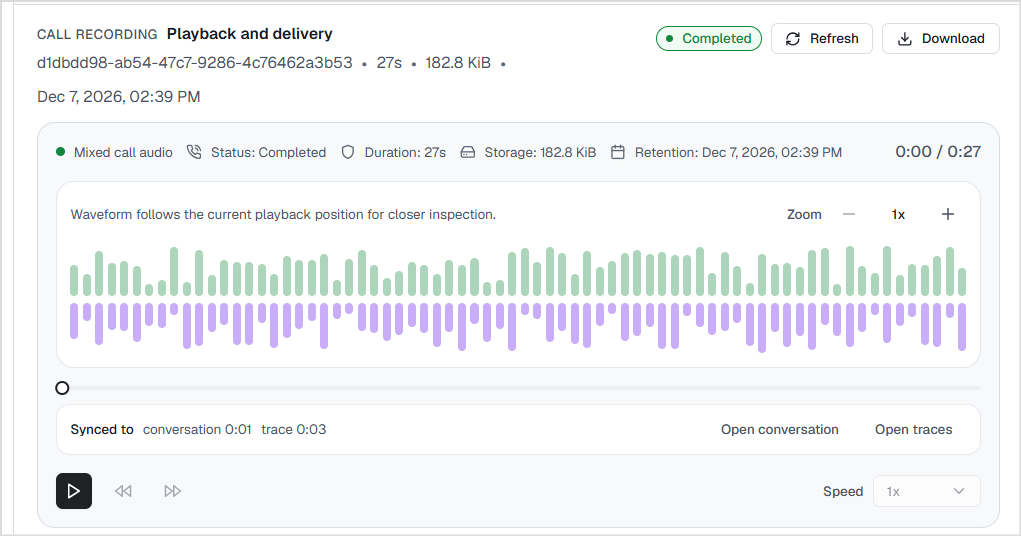
Use the Call Recording to review completed voice conversations. It helps you verify what was said during a call, correlate the audio with the conversation and execution traces, investigate issues, and download recordings for offline review when available. To view or play a recording, the following conditions must be met:- Call recording must be enabled for the project. Learn how to enable recordings for a project.
- You must have the View Recordings permission to view, play, and download the recordings. By default, this permission is granted to all system roles.
Recording States
Recording processing typically completes within a few minutes, but can take up to 15 minutes for longer recordings. Use Refresh to check the latest status.
- The waveform visually represents the conversation.
- Green bars represent the caller audio.
- Purple bars represent the agent audio.
- The Synced to indicator shows the conversation timestamp that corresponds to the current playback position.
- Use Open conversation to navigate directly to the matching message in the Conversation tab.
- Use Open traces to jump to the corresponding point in the Traces tab.
Play a recording
Click Play to start playback. The recording loads on the first play request, so initial playback may take a few moments.Download a recording
Click Download to save the recording locally. The Download button is available only when the recording status is Completed.Recording retention period
Completed recordings are retained until the Retention date shown in the Call Recording panel. When the retention period expires:- The recording is permanently deleted.
- The recording entry remains in the session history, but its status changes to Deleted.
- Deletion runs as a scheduled process, so recordings may remain available for up to one hour after the displayed retention time before they are removed.
Use call recording
Use call recordings to investigate issues with a voice call.- Listen to the recording.
- Jump to the corresponding conversation.
- Open the trace at the same timestamp.
- Review Performance for slow model or tool calls.
- Inspect Voice telemetry for latency or network issues.
Compliance considerations for recordings
- Tell the caller yourself. The platform doesn’t play a “this call is recorded” announcement or show the caller a recording indicator. If your region requires consent or a notice, add it to your agent’s opening prompt.
- Storage location. Recordings are stored in the storage configured for your workspace. Use your own storage account if the audio must stay in a specific region.
Troubleshoot if recording doesn’t start
Check these in order - the first “no” is usually the cause.- Does Workspace Settings show the Call Recording section? If not, contact support team to add the feature to your workspace.
- Is the workspace-level switch turned on and saved? If not, ask your account admin to enable it.
- Does the project Settings menu show Recording? If not, the workspace switch is off.
- Is Enable call recording on for the project, and did you click Save changes?
- Was the call started after you saved the setting? Recording only applies to new calls.
- Did you wait about 15 minutes and click Refresh?
Turn recording off
API access
Session details are also available via APIs. See session APIs.Session Closure
Closing a session finalizes the conversation and is essential for platform operations.What happens when a session closes
When a session closes, regardless of how it is closed, the platform performs the following lifecycle operations:- Persists any pending conversation data.
- Records the session disposition and final status.
- Publishes a session completion event for downstream services.
- Finalizes billing metrics. A session is the billable unit. Session duration and engaged time are calculated when the session closes.
- Finalizes reporting metrics. The session
dispositionandstatusfields are used to derive reporting metrics such as containment, resolution, and abandonment rates. - Releases session resources associated with the conversation.
Closing a session
A session can be closed by the agent, automatically by the platform, or when a conversation is transferred to another system. Whenever a session is closed, the platform records the following fields for the session:disposition— why the conversation ended.status— current state of the session.
disposition field can have the following values. The status is automatically derived from the disposition.
Closing from agent DSL
The most common way to end a session is for the agent to determine that the conversation is complete. You define the completion conditions in the agent using theCOMPLETE: block. When one of the conditions is met, the agent sends the configured final response and closes the session with the disposition and status as completed.
- In a multi-agent workflow, place the COMPLETE block in the agent that owns the conversation. If a COMPLETE executes in a child agent that is designed to return control to its parent, it completes only that child agent’s work and returns to the parent. It does not end the overall conversation. To end the conversation, define the COMPLETE block in the supervisor agent or in a dedicated closing agent that does not return.
- Conditions are evaluated in the order they are defined. The first matching condition is applied.
- The final response is delivered to the user before the session closes.
- The session is closed with the disposition and status as
completed.
TERMINAL: false is specified in a COMPLETE block, the current interaction ends, but the session remains active. The response is sent to the user, and their next message starts a new interaction within the same session. Learn More.
Automatic session closure
The platform automatically closes sessions when they exceed configured inactivity or configured session lifetime limits, or when channel-specific events indicate that the conversation has ended. The platform can automatically close a session when it exceeds either of the following limits:- Idle timeout: The maximum period of user inactivity before the session is closed.
- Maximum session age: The maximum lifetime of a session, regardless of activity.
timeout disposition and the ended status.
For asynchronous messaging channels such as WhatsApp, SMS, and email, a session may remain active across long periods of inactivity. The platform does not split these conversations into multiple sessions. Instead, it internally tracks active engagement periods or engagement segments for billing and reporting while maintaining a single session.
- The recorded end time reflects when the session actually became inactive, not when the timeout was detected.
- The default values of the idle timeout and max age vary by plan.
terminal_source: sdk_idle_timeout and the timeout disposition. Sessions explicitly ended by the application or the user are recorded with terminal_source: sdk_end_session and the completed disposition.
Use these fields in the Query builder in Analytics explorer to build queries that :
- Identify sessions that timed out because users became inactive.
- Distinguish application-initiated session closures from inactivity timeouts.
- Measure SDK session abandonment and user completion trends.
Sessions and agent transfers
When a conversation is transferred to a human agent or another external system, the session disposition is set to ‘transferred and status is set to 'escalated.
The session lifecycle after the external system completes the conversation on their end depends on the routing configuration.
- When Post-Agent Action is set to End Conversation, the session is terminated and the disposition depends on the end reason the contact centre sends:
Post-agent action is Return to bot. The conversation session is not closed. It remains active and no final
disposition is recorded.
- Transfer metadata is written onto the session.
- The status changes from
escalatedback toactive. - The bot resumes handling messages as usual. The session is closed later when the conversation ends through the agent, automatic timeout, or another transfer that terminates the conversation.