

- Review workflow and agent tasks
- Claim unassigned tasks
- Complete approval requests
- Submit the required input for Data Entry tasks
How Inbox tasks are created
Inbox tasks are created when workflows or agents require human participation during execution. Tasks can be generated from:- Human task nodes
- Agent escalations triggered through
ESCALATE
Access Inbox
Go to your project and select Operate > Inbox. The Inbox page displays human-in-the-loop tasks and agent escalations assigned to you or available to claim for you.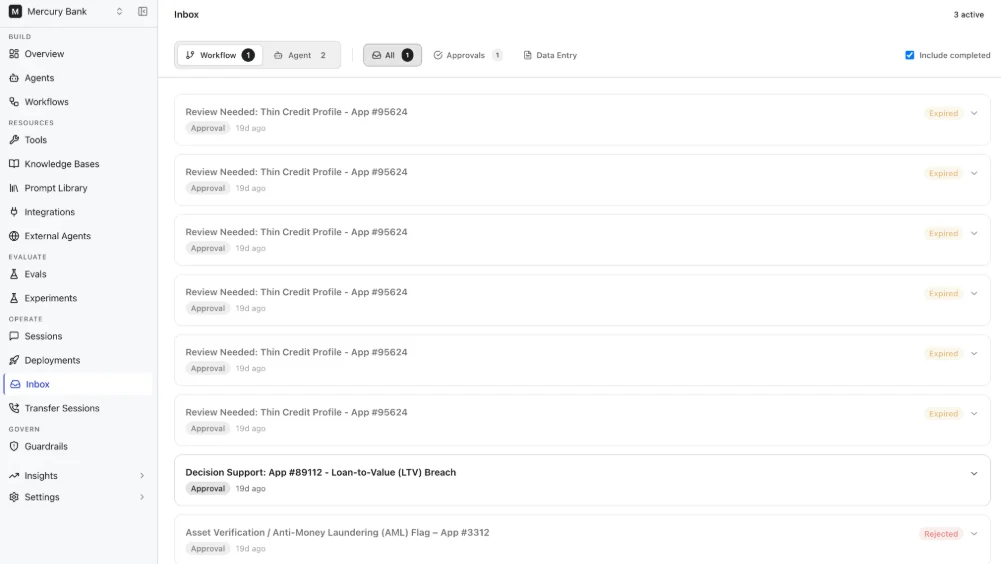
Claim tasks
Inbox supports both assigned and unassigned human tasks. Tasks can be assigned either to everyone or to specific users. When a task is assigned to Everyone:- The task appears as unclaimed in the Inbox.
- Users must claim the task before acting on it.
Complete Data Entry tasks
Data Entry tasks collect user input during workflow execution. Data Entry forms are rendered directly inside the inbox. When structured user input is required, configure form fields in the Data Entry task definition. See Agent Collaboration and Handoff. To complete a Data Entry task:- Open the task in the Inbox.
- Enter the required values.
- Click Submit Data.
Tasks configured with timeouts display a countdown timer in the Inbox while waiting for user action.
Complete Approval tasks
Approval tasks allow users to review workflow requests before workflow execution continues. Approval tasks display:- Approval subject
- Approval message
- Associated workflow information
Workflow execution and task progression
Human-in-the-loop tasks are synchronized with workflow execution. When workflow execution reaches a human task node, a task is created in the Inbox. Workflow execution resumes after the task is completed. If workflow execution reaches another human task node, a new task is created in the inbox.Human-in-the-loop workflows support durable execution. The platform preserves workflow state while waiting for user action, allowing workflow execution to resume from the paused step after the task is completed.