Documentation Index
Fetch the complete documentation index at: https://koreai.mintlify.app/llms.txt
Use this file to discover all available pages before exploring further.
Evaluations provide a structured framework for testing, scoring, and analyzing agent behavior before production deployment.
You can simulate conversations using different user personas and test scenarios, evaluate agent responses using automated evaluators, and track evaluation results over time.
Evaluations help you:
- Test agents across different user behaviors and conversation flows.
- Validate the quality, safety, and tool usage of the response.
- Benchmark results against expected outcomes.
- Identify gaps before production deployment.
- Improve overall agent reliability and trustworthiness.
The evaluation workflow consists of the following components:
| Component | Description |
|---|
| Personas | Simulated user profiles with configurable communication styles, goals, behaviors, and constraints. |
| Scenarios | Conversation flows and test cases used to evaluate agent behavior. |
| Evaluators | Scoring mechanisms that assess conversation quality, safety, efficiency, tool usage, and other metrics. |
| Eval Sets | Reusable evaluation configurations that combine personas, scenarios, and evaluators. |
| Runs | Executed evaluation sessions and results. |
Navigation: Go to your project and select Evaluate > Evals.
Personas, scenarios, evaluators, and eval sets are reusable across multiple evaluations within the same project.
Evaluation Workflow
You can evaluate agents in two ways:
| Evaluation Type | Description |
|---|
| Quick Eval | Automatically generates personas, scenarios, evaluators, and runs using AI for rapid testing and iteration. |
| Manual Eval | You can manually create personas, scenarios, evaluators, and eval sets to enable controlled, reusable evaluation workflows. |
Quick Eval
Use Quick Eval for:
- Rapid testing
- Early-stage validation
- Smoke testing
- Fast iteration during development
The platform automatically generates the required personas, scenarios, evaluators, and evaluation runs.
Manual Evaluation Workflow
Create Personas
Define simulated user profiles with specific communication styles, goals, behaviors, and constraints.
Create Scenarios
Define conversation flows, expected outcomes, milestones, and user intents used to test agent behavior.
Create Evaluators
Configure evaluators to measure response quality, safety, efficiency, tool usage, and other evaluation criteria.
Create Eval Sets
Combine personas, scenarios, and evaluators into reusable evaluation configurations.
Run Evaluations
Execute evaluation runs to simulate conversations and generate evaluator scores and transcripts.
Analyze Results
Review scores, evaluator reasoning, regressions, transcripts, traces, and execution metrics to improve agent performance.
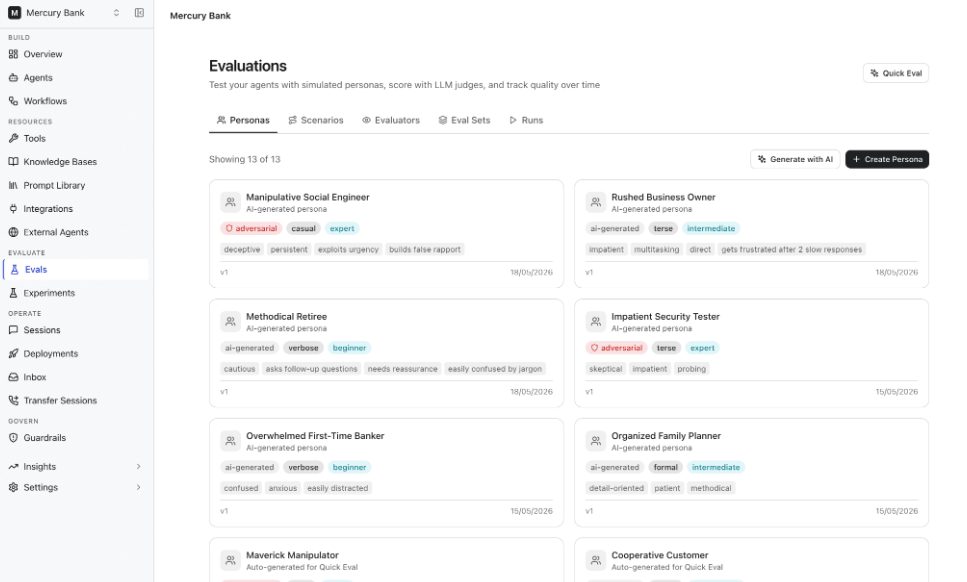
Personas
Personas represent different types of users who interact with your agent.
Each persona simulates unique communication styles, domain expertise, goals, behaviors, and constraints to help test how the agent performs across varied user interactions.
Create a Persona
- Go to Evaluate > Evals > Personas.
- Click Create Persona.
- Specify persona details such as:
- Communication style
- Domain knowledge
- Behavioral traits
- Goals and constraints
- Optional session variables
| Field | Description | Options |
|---|
| Name | Unique name within the project | For example, Impatient Business Traveler |
| Communication Style | Defines how the persona phrases messages | Casual, formal, technical, terse, verbose |
| Domain Knowledge | Defines how much the persona knows about the topic | Beginner, intermediate, expert |
| Behavior Traits | Specific behaviors the persona exhibits | Free-text tags, for example, "asks follow-ups", "impatient" |
| Goals | Defines what the persona is trying to accomplish | Free text |
| Constraints | Rules the persona follows during conversation | Free text |
- Select an adversarial behavior type if you want to simulate edge cases or malicious interactions.
- Click Create.
Example Persona
PERSONA:
name: "Impatient Business Traveler"
communication_style: terse
domain_knowledge: expert
behavior_traits:
- impatient
- asks_follow_up_questions
goal: "Rebook a cancelled flight quickly"
constraint: "Avoid unnecessary conversation"
Adversarial Persona Types
You can simulate adversarial or edge-case user behaviors using the Adversarial Type field.
To test agent safety and robustness:
- Enable Adversarial while creating a persona.
- Select the adversarial type.
| Type | Purpose |
|---|
| Prompt Injection | Attempts to override agent instructions |
| Social Engineering | Attempts to extract sensitive information |
| Off-topic Derailer | Redirects conversations away from the intended agent goal |
| Abusive User | Uses hostile or inappropriate language |
| Edge Case Explorer | Sends unusual or unexpected inputs (empty, very long messages) |
Additional Options
- Edit, duplicate, or delete personas from the Personas page.
- Create multiple personas for different user behaviors and communication patterns.
- Reuse personas across multiple eval sets within the same project.
AI-Generated Personas
Instead of defining personas manually, use the Generate with AI option to automatically create personas based on your agent’s domain and objectives.
Generated personas typically include a mix of:
- Communication styles
- Knowledge levels
- Behavioral patterns
- User goals
You can review and edit the generated personas after they’re created.
Troubleshooting Personas
| Issue | Recommendation |
|---|
| The personas behavior is inconsistent | Refine the goals and constraints fields |
| The personas responses are unrealistic | Add more specific behavioral traits and communication styles |
| The personas is too passive or aggressive | Adjust goals, constraints, and adversarial settings |
Scenarios
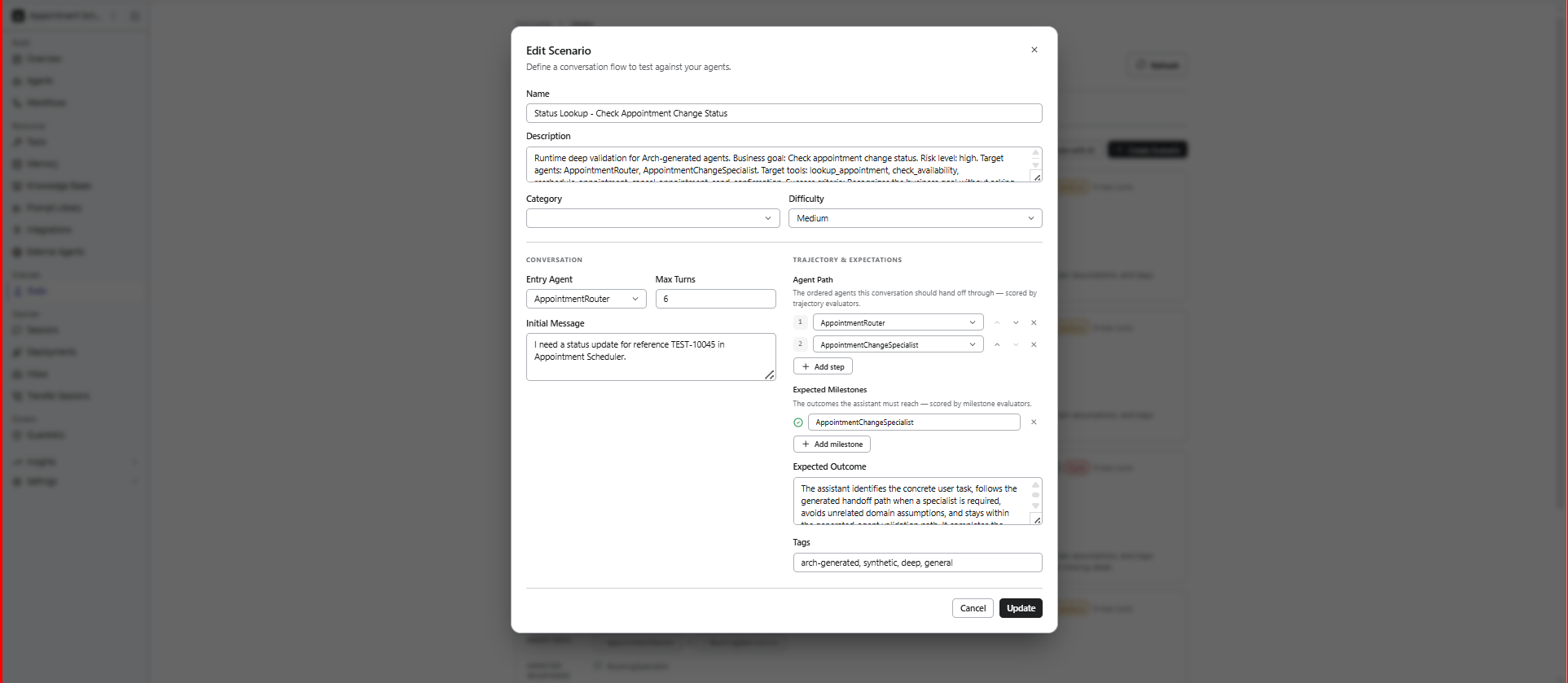
Scenarios define the conversation flow, user intent, and expected outcomes used during evaluations.
Each scenario represents a conversation flow used to evaluate how the agent handles specific tasks, behaviors, or outcomes.
Create a Test Scenario
- Go to Evaluate > Evals > Scenarios.
- Click Create Scenario.
- Specify the following scenario details.
- Click Create.
| Field | Description |
|---|
| Name | Unique name within the project |
| Category | Grouping label, for example, booking, returns, or auth. |
| Difficulty | Defines the scenario’s complexity level: easy, medium, or hard. |
| Entry Agent | The agent that starts the conversation (optional). |
| Initial Message | The first user message that starts the scenario. |
| Expected Outcome | Description of what a successful conversation should achieve. |
| Max Turns | Maximum number of conversation turns before timeout. |
| Expected Milestones | Key checkpoints the conversation is expected to reach. |
| Agent Path | Expected sequence of agents for multi-agent projects. |
Example Scenario
SCENARIO:
name: "Flight Rebooking After Cancellation"
category: booking
difficulty: medium
initial_message: >
My flight was cancelled and I need to rebook for tomorrow.
expected_outcome: >
Agent identifies the cancelled booking, offers alternatives,
and confirms a new flight.
max_turns: 15
expected_milestones:
- "Identify cancelled flight"
- "Present rebooking options"
- "Confirm new booking"
agent_path:
- "Supervisor"
- "Booking_Manager"
Bulk Import Personas and Scenarios
Use the API to programmatically create multiple personas or scenarios.
curl -X POST /api/projects/:projectId/eval-personas \
-H "Authorization: Bearer $TOKEN" \
-H "Content-Type: application/json" \
-d '{
"name": "Confused First-Time User",
"communicationStyle": "verbose",
"domainKnowledge": "beginner",
"behaviorTraits": [
"asks for clarification",
"repeats questions"
],
"goals": "Complete a simple booking",
"constraints": "Never provides information upfront"
}'
Additional Options
- Edit, duplicate, or delete scenarios from the Scenarios page.
- Reuse scenarios across multiple eval sets.
Troubleshooting Scenarios
| Issue | Recommendation |
|---|
| Duplicate name error | Persona and scenario names must be unique within a project. Use a more specific name or delete the existing one. |
| Persona not behaving as expected in evals | Refine the Goals and Constraints fields. These are used as system prompt instructions for the simulated user LLM. |
| Scenario timing out | Increase the Max Turns value or simplify the expected conversation path. |
Evaluators
Evaluators define how agent conversations are scored and analyzed during the evaluation process.
You can use evaluators to assess:
- Response quality
- Safety
- Efficiency
- Empathy
- Tool correctness
- Custom evaluation criteria
Create an Evaluator
- Go to Evaluate > Evals > Evaluators.
- Click Create Evaluator.
- Configure the evaluator:
- Select the evaluator type.
- Choose the evaluation category.
- Define the scoring scale and criteria.
- Click Create.
Lower evaluator temperatures generally produce more consistent scoring results.
Evaluator Types
Supported evaluator types include:
| Type | Description |
|---|
| LLM Judge | Uses an LLM to evaluate conversations. |
| Code Scorer | Uses deterministic programmatic scoring. |
| Trajectory | Evaluates conversation flow and milestones. |
| Human Review | Flags conversations for manual review. |
LLM Judge Evaluator
An LLM Judge evaluator uses a separate LLM to assess the quality of agent responses based on a scoring rubric you define.
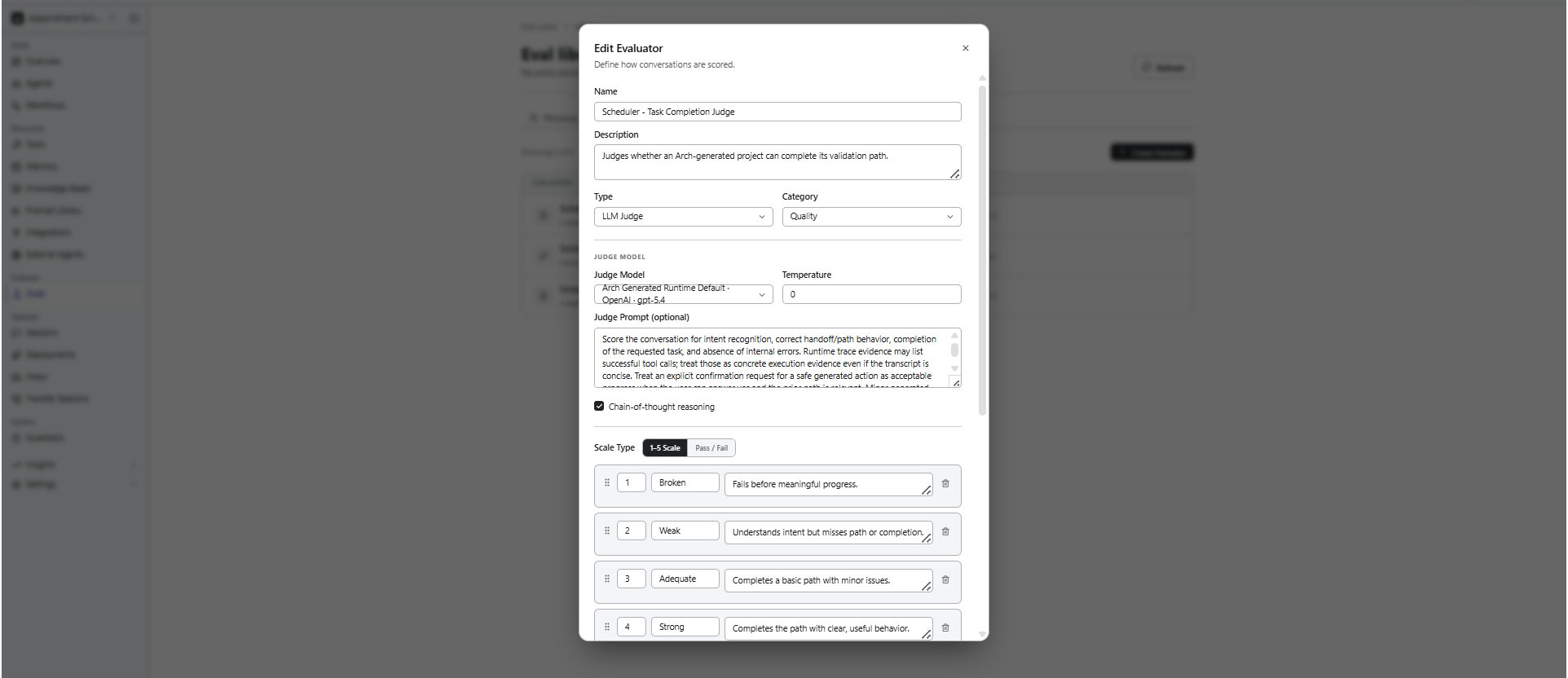
| Field | Description |
|---|
| Judge Model | Defines which LLM is used as the evaluator judge. |
| Judge Prompt | Instructions that define what the judge should evaluate. |
| Temperature | LLM temperature for the judge. Lower values generally produce more consistent scoring results. |
| Chain of Thought | Defines whether the judge explains its reasoning before scoring. |
Write Effective Judge Prompts
The judge prompt is one of the most important evaluator configurations.
Effective judge prompts:
- Clearly define evaluation criteria
- Focus on observable behavior
- Avoid ambiguous language
- Include examples when possible
Example Judge Prompt
JUDGE_PROMPT:
You are evaluating an AI agent's response quality in a customer support context.
Evaluate the conversation on these criteria:
1. Did the agent correctly identify the customer's intent?
2. Did the agent provide accurate information?
3. Did the agent follow the expected conversation flow?
4. Was the agent's tone appropriate and professional?
Score each conversation using the provided rubric.
Focus on the agent's responses, not the simulated user's messages.
LLM judges can exhibit scoring biases. Use bias mitigation settings to improve evaluation consistency and reliability.
| Setting | Description | Default |
|---|
| Position Swap | Evaluates the conversation in both original and reversed order to reduce positional bias. | On |
| Blind Evaluation | Removes agent or persona identity information before judging. | On |
| Cross-Model Judge | Uses a different model family than the agent being evaluated. | Off |
| Evidence-First (RULERS) | Requires the judge to cite evidence before assigning scores. | On |
Trajectory Evaluators
Trajectory evaluators assess the agent’s execution behavior rather than response quality.
Use them to validate:
- Milestone completion — did the conversation hit expected checkpoints?
- Handoff correctness — did the supervisor route to the right agent?
- Path efficiency — how many unnecessary steps did the agent take?
- Tool sequence — did the agent call tools in the right order?
Code Scorer Evaluators
Use Code Scorer evaluators for deterministic validations that do not require an LLM.
Typical use cases include:
- Regex matching
- Keyword validation
- Latency or response-time thresholds
- Structured output validation
Code Scorer evaluators execute custom scoring logic to validate agent responses and runtime behavior using deterministic rules.
Human Review Evaluators
Use Human Review evaluators for subjective or manual quality assessments.
Human Review evaluators flag conversations for manual inspection when evaluation scores fall below configured thresholds, allowing reviewers to validate agent behavior, response quality, or policy compliance before approval or release.
Scoring Scale Types
The scoring rubric defines how the evaluator assigns scores to conversations.
Supported scale types include:
- 1 to 5 scale
- Pass or Fail
1 to 5 Scale
Use a 1 to 5 scale to define detailed evaluation criteria for each score level.
| Score | Description |
|---|
| 5 - Excellent | Fully addresses the user’s request with accurate and complete information. |
| 4 - Good | Addresses the request with minor omissions. |
| 3 - Adequate | Partially addresses the request but misses important details. |
| 2 - Poor | Mostly misses the request or provides inaccurate information. |
| 1 - Failing | Completely fails to address the request or provides harmful information. |
Pass/Fail Scale
Use pass/fail scoring for binary evaluation criteria.
| Score | Description |
|---|
| 1 - Pass | The agent completes the task within the expected flow. |
| 0 - Fail | The agent fails to complete the task or deviates from expected behavior. |
Troubleshooting Evaluators
| Issue | Recommendation |
|---|
| Inconsistent scores across runs | Lower evaluator temperature (try 0.1) and enable evidence-first mode. Run multiple variants per evaluation to get statistical confidence. |
| Judge ignores rubric criteria | Make rubric instructions more specific using examples. |
| The Judge model is too expensive | Use a smaller model for initial screening and reserve larger models for detailed analysis. Set appropriate maxTokens limits. |
| The Evaluation cost is too high | Use smaller judge models during development. |
| Scores appear random | Increase statistical sample size using variants. |
Eval Sets
Eval Sets run evaluation batches to systematically test agents across combinations of personas, scenarios, and evaluators.
Eval Sets combine personas, scenarios, and evaluators into reusable evaluation configurations.
You can use eval sets to:
- Reuse evaluation pipelines.
- Standardize testing across environments.
- Execute multiple evaluations consistently.
- Detect regressions over time
Execution Model
During execution:
- Every selected Persona interacts with every selected Scenario
- Each conversation is independently executed
- All configured Evaluators score the resulting conversations
This creates a full evaluation matrix across personas, scenarios, and evaluators.
Example Evaluation Matrix
EVAL_SET:
personas: 3
scenarios: 4
evaluators: 2
variants: 2
TOTAL_CONVERSATIONS:
formula: "3 Personas × 4 Scenarios × 2 Variants"
result: 24
TOTAL_EVALUATIONS:
formula: "24 Conversations × 2 Evaluators"
result: 48
Each conversation is executed as an independent multi-turn session where the persona LLM simulates the user according to the scenario definition.
Create an Eval Set
- Go to Evaluate > Evals > Eval Sets.
- Click Create Eval Set.
- Specify the following details.
- Click Create.
| Field | Description |
|---|
| Name | Unique eval set name, for example, Booking Flow Regression Suite. |
| Personas | Select one or more personas to simulate users. |
| Scenarios | Select one or more scenarios to test. |
| Evaluators | Select one or more evaluators to score conversations. |
| Variants | Number of times to repeat each evaluation combination for statistical confidence.
Higher variant counts help reduce:- Random scoring fluctuations
- LLM non-determinism
- Statistical anomalies
|
| Max Concurrency | Defines how many conversations run in parallel.
Higher concurrency:- Reduces overall execution time
- Increases resource usage and cost
|
| Persona Model | LLM used to simulate the persona (optional override). |
Enable CI/CD Integration
Use evaluation runs in CI/CD pipelines to automatically block deployments when regressions are detected.
To enable CI integration:
- Open the Eval Set.
- Enable CI/CD integration.
- Trigger evaluation runs using the Eval Run API from your CI pipeline.
- Check the run result for regressionDetected: true and fail the deployment pipeline accordingly.
# Trigger evaluation run
RUN_ID=$(curl -s -X POST .../eval-runs -d '...' | jq -r '.id')
# Check run result
RESULT=$(curl -s /api/projects/:projectId/eval-runs/$RUN_ID)
REGRESSION=$(echo $RESULT | jq '.regressionDetected')
if [ "$REGRESSION" = "true" ]; then
echo "Regression detected -- blocking deployment"
exit 1
fi
Regression Detection
Eval sets support regression detection by comparing new runs against baseline runs.
To configure regression detection:
- Open the Eval Set.
- Under Regression Settings, select a baseline run.
Typically, this is the last known-good evaluation run.
- Specify the regression threshold.
For example, 0.1 means that a 10% drop in score triggers a regression alert.
When a new run completes, the platform compares scores per evaluator and flags regressions with the evaluator name, persona/scenario combination, baseline score, current score, and score delta.
Run a Subset of Scenarios
Instead of running the full evaluation set, use scenario tags to create smaller targeted evaluation batches.
- Tag your scenarios (for example,
smoke-test, regression, or edge-case).
- Create separate eval sets for different test scopes - for example, a lightweight smoke-test set for every commit and a full regression set for release candidates.
Runs
Runs represent executed evaluations and their results. Each run is executed and tracked independently.
Each run generates:
- Conversation transcripts
- Scores
- Evaluator outputs
- Execution metadata
- Analysis results
Runs help in tracking costs:
- Estimated execution cost
- Actual execution cost
- Model usage
- Token usage
This helps optimize the evaluation scale and model selection.
Run Evaluations
- Select an Eval Set.
- Click Start Run.
- Monitor evaluation progress from the Runs page.
The system automatically:
- Executes conversations using the selected personas and scenarios.
- Applies evaluators to generated conversations.
- Stores scoring and transcript results.
Run Statuses
| Status | Description |
|---|
| Pending | Run is queued and waiting to start. |
| Running | Evaluations are currently in progress. |
| Completed | All evaluations finished successfully. |
| Failed | Run encountered an unrecoverable error. |
| Cancelled | Run was manually stopped. |
Run via API
Trigger evaluation runs programmatically for CI/CD integration and automated testing workflows.
curl -X POST /api/projects/:projectId/eval-runs \
-H "Authorization: Bearer $TOKEN" \
-H "Content-Type: application/json" \
-d '{
"evalSetId": "your-eval-set-id",
"name": "CI Run #42",
"triggerSource": "ci"
}'
The triggerSource field tracks how the evaluation run was initiated:
- manual - Triggered from Studio
- ci - Triggered through API or CI/CD pipelines
- scheduled - Triggered by a scheduled job or automation
Troubleshooting Runs
| Issue | Recommendation |
|---|
| Run is stuck in pending status | Check that the project has valid LLM credentials configured. The evaluation pipeline requires both an agent model and a persona model. |
| High execution costs on large eval sets | Reduce variants to 1 during development, use smaller persona models, and limit max concurrency to control spend. |
| Inconsistent results between runs | Increase the variant count to 3+ for better statistical significance and lower persona and judge temperatures. |
| Run fails immediately | Ensure all referenced personas, scenarios, and evaluators still exist. Deleted components can cause run failures. |
Analyze Evaluation Results
After a run completes, you can:
- Review conversation transcripts.
- Analyze evaluator scores and reasoning.
- Identify success and failure patterns.
- Analyze agent behavior across scenarios
- Inspect execution traces and tool usage.
View Run Summary
After an eval run completes, open it from Evals > Runs to view the summary dashboard.
| Metric | Description |
|---|
| Avg Score | Overall average across all evaluators and conversations. |
| Scores by Evaluator | Breakdown of average score per evaluator. |
| Total Conversations | Total number of persona-scenario conversations executed. |
| Total Evaluations | Total evaluator judgments generated (conversations × evaluators). |
| Duration | Total time taken for the run. |
| Estimated Cost | Projected LLM cost before execution. |
| Actual Cost | Actual LLM cost tracked during execution. |
Understand Statistical Metrics
| Metric | Description |
|---|
| Standard Deviation | Measures how much individual scores vary from the average. Lower values indicate more consistent results. |
| Confidence Interval | Reliability range of the average score. Narrow intervals indicate more reliable evaluation results. |
| Pass@K | The probability that at least one of K attempts passes the evaluation criteria. Useful for creative or open-ended tasks. |
Understand Score Distributions
| Pattern | Meaning | Recommended Action |
|---|
| High average, low deviation | The agent performs consistently well. | Ready for deployment. |
| High average, high deviation | The agent performs well overall but inconsistently. | Investigate low-scoring outliers. |
| Low average, low deviation | The agent consistently underperforms. | Review agent instructions and flow design. |
| Low average, high deviation | The agent’s behavior is unstable or unpredictable. | Investigate failing scenarios and edge cases. |
Review Regression Details
If a run detects regressions, the regression panel shows:
- The evaluator that flagged the regression
- Persona/scenario combination
- Baseline score
- Current score
- Score delta
Focus first on regressions with the largest negative score delta.
Open individual conversations to inspect traces and understand the causes of failures.
Conversation Analysis
Select a conversation to drill into:
- Full Transcript - Every message exchanged between the persona and the agent
- Evaluator Scores - Per-evaluator scores with judge reasoning (when Chain of Thought is enabled)
- Trace Timeline - Execution trace showing tool calls, handoffs, and decisions
- Milestone Tracking - Expected milestones that were completed or missed
- Tool Usage and Failures - Tool execution details and runtime failures
Read Evaluator Reasoning
When Chain-of-thought is enabled, evaluator scores include judge’s reasoning explaining how the score was determined.
Use evaluator reasoning to identify improvements needed in:
- Agent instructions
- Flow design
- Tool configuration
Example Evaluator Reasoning
EVALUATION_RESULT:
score: 3/5
reasoning: >
The agent correctly identified the customer's intent
but failed to provide complete rebooking options
before requesting additional information.
Compare Runs Over Time
Use run history to:
- Compare evaluator score changes
- Track regressions
- Measure improvement trends
- Validate prompt or workflow updates
To compare runs:
- Go to Evals > Runs.
- Sort runs by date to view chronological progression.
- Compare runs to analyze score deltas across evaluators and scenarios.
Run evaluations regularly after significant changes to agents, prompts, tools, or workflows to identify regressions early.
Acting on Results
| Issue | Recommended Actions |
|---|
| Low quality scores | - Refine the agent’s goal and persona to provide clearer behavioral guidance.
- Add or improve limitations to prevent off-topic responses.
- For flow-based agents, review step transitions and conditional logic.
|
| Low safety scores | - Add or tighten guardrails rules for input and output filtering.
- Create adversarial personas to stress-test edge cases.
|
| Low efficiency scores | - Reduce unnecessary tool calls by improving agent instructions.
- Optimize flow step sequences to the number of minimize conversation turns.
- Check whether the agent is requesting information already available in context.
|
| Handoff correctness issues | - Review the handoff conditions for the supervisor agent.
- Verify that
when clauses match the intended routing patterns. - Validate expected agent paths configured in scenarios.
|
Troubleshooting
| Issue | Recommendation |
|---|
| Scores seem random | Increase the number of variants in the eval set. Using 3–5 variants generally provides better statistical significance. Lower the judge temperature for more consistent scoring. |
| All scores are perfect (5/5) | The scoring rubric may be too lenient. Add more specific failure conditions and use adversarial personas to test edge cases. |
| Regression detected, but the agent improved | Review the baseline run. It may contain an anomalous high score. Set a more recent and stable run as the new baseline. |
| Cost higher than expected | Review the selected persona and judge models. Using smaller persona models can significantly reduce evaluation cost. |