After your agents go live, Arch reads production traces, runs evaluations, and proposes improvements as reviewable patches — continuously, without manual triage. Each iteration raises the baseline quality across the entire project.

The Reinforcement Loop

Deployment is not the end of the pipeline — it is the start of a continuous cycle. Production evidence feeds evaluations, Arch analysis, reviewable patches, and promotion gates. The platform harness stays constant while models, tools, and workflows improve underneath. Each stage produces a defined output that feeds the next:
StageWhat Flows InWhat Flows Out
Production TracesLive agent sessionsConversation, handoff, workflow, tool, guard, and retrieval events. (For more information, see Sessions.)
EvaluationsTrace eventsQuality, safety, accuracy, cost, latency, and compliance scores. (For more information, see Evaluations.)
Arch AnalysisEval resultsRoot-cause hypothesis and proposed improvement lever.
Reviewable PatchArch analysisABL, workflow, tool, prompt, policy, or eval diff.
PromoteApproved patchDeployment behind gates, canary, or rollback.
Each approved patch is deployed to production, generating new traces that feed the next iteration.

How the Loop Closes

When Arch detects a degradation, a coverage gap, or a routing inefficiency, it:
  1. Reads trace events directly from the platform runtime — no separate session or manual trigger required.
  2. Forms a root-cause hypothesis from the trace evidence.
  3. Proposes a change as a reviewable diff: ABL, prompt, tool binding, policy, or eval.
  4. Submits the patch for compiler validation before a developer reviews the diff.
Developers must approve every change. The compiler validates the structure of each proposal before it reaches review, so broken references and incomplete policies are caught before promotion.

Design Principles

The reinforcement loop is designed around three characteristics that make continuous improvement sustainable at scale.
Loop CharacteristicDescription
Autonomous analysisArch turns signal into concrete improvement proposals. Humans set the bar and retain approval — the analysis loop runs without manual triage.
Customer-gatedEvery evaluation and promotion gate is domain-specific. You define what “good” means; the platform enforces the same process for every change.
CompoundingEach run enriches the evaluation suite. Each evaluation sharpens the next optimization. Each patch strengthens the reusable artifact.

Arch in the Project Sidebar

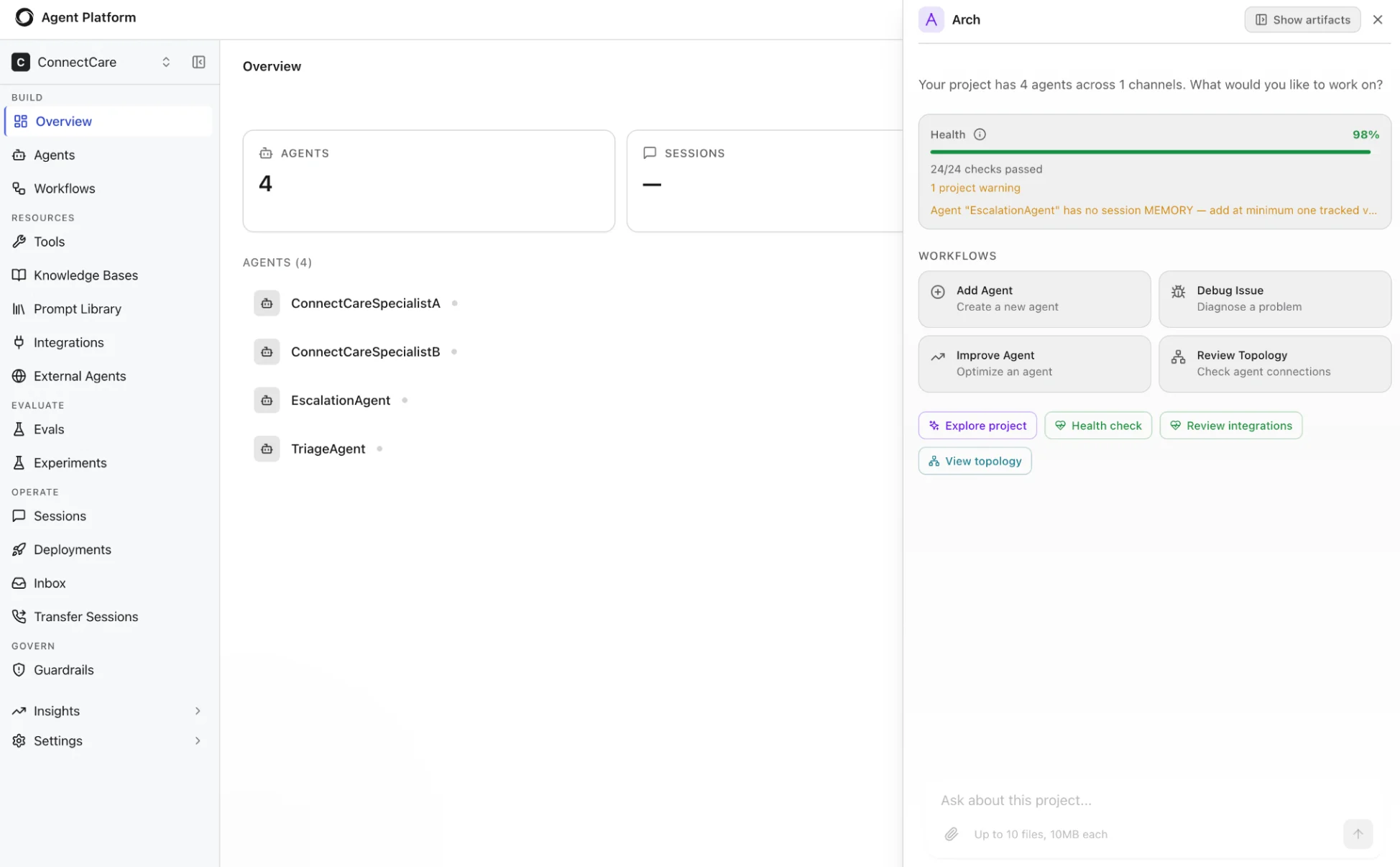
Arch lives in the project sidebar — available throughout the agent lifecycle, not just during authoring. From the sidebar, you can monitor project health, act on recommendations, and trigger workflows without context-switching. Project health monitoring and continuous improvement by Arch
FeatureWhat It Does
Project HealthRuns continuous status checks and flags specific warnings when anomalies are detected.
Suggested WorkflowsSurfaces contextual next steps — Add Agent, Debug Issue, Improve, Review Topology — based on current project state.
Quick ActionsOne-click access to Explore project, Health check, and Review integrations.
Auto RecommendationsProposes concrete fixes grounded in your actual project, such as missing session memory on a stateful agent.
Contextual HelpGrounds every suggestion in your project — not generic guidance.