Outbound calls can be made to external customers using Voice Gateway. The answering machine detection feature can be enabled on outbound calls to indicate whether a person or a machine has answered a call.When the dialed call is answered, the answering machine detection feature starts listening to the outbound call, and after a short period, sends an indication of whether a person or a machine has answered the call.This process happens in two parts:
The botId or streamId. You can access it from the bot’s General Settings page.
string, required
target
URI of the target of the outbound call. For example:
string, required
- tel:911234567890 with the country code
- sip:1234567890@1.23.345.678:1234
caller
User part for the caller ID of the outbound call. It’s the experience flow number in Contact Center AI.
string, required
notifyurl
Absolute URL of the dialer application where Voice Gateway sends notifications. If not provided, no notifications are sent.
string, optional
notifyHeaders
If these are included in the API payload, these headers will be sent along with AMD notifications to the specified notifyUrl.
object, optional
timeoutInMs
This provides improved control over how long the system should wait for the recipient to answer.
number, optional
trunk
The trunk is a carrier for the account. If not provided, It will pick the default carrier for that account.
string, optional
metadata
Data to be sent to the bot (can be used to provide information to the bot about the call, such as the name of the target).
object, optional
timers
An object containing various timeout properties. Learn more
object, optional
machinedetection
Activates machine (answering machine and fax) detection. Possible values:
string, optional
- “disconnect”: Machine detection is enabled, and the call is disconnected in amd.
- “detect”: Machine detection is enabled, and the call isn’t disconnected in amd.
- “disabled”: Machine detection isn’t enabled.
thresholdWordCount
Number of spoken words in a greeting that result in an amd_machine_detected result.
number, optional
metadata
Key-value pairs to pass contextual information to the bot.
object, optional
callControlParameter
This object enables you to specify dynamic values for the STT provider, language, and related properties, overriding the default settings configured at the application level.
object, optional
callControlParameter.sttProvider
Name of the STT provider (for example, deepgram).
string, required
callControlParameter.sttLanguage
Whether to return interim transcription results.
string, required
callControlParameter.sttLabel
Custom label to identify the STT configuration/session.
string, optional
callControlParameter.continuousASRTimeoutInMS
Time (in ms) to wait before stopping ASR after silence.
number, optional
callControlParameter.deepgramUtteranceEndMs
Silence threshold (in ms) to determine utterance end (specific to Deepgram).
To receive call status notifications, we can use the ‘notifyUrl’ property on the dial-out request.When this property is set, the Voice Gateway sends an HTTP POST request to the specified URL.Previously, the API supported notifications only for two call events: Answered-Completed or Failed. Now, we’ve expanded this to include all Answering Machine Detection (AMD) events during the call progress.
By default, all AMD events (for example, amd_machine_detected, amd_machine_stopped_speaking, amd_stopped, etc.) are sent automatically.
To avoid receiving all AMD events, you can opt out by setting amdEventsSubscription: [] in the Dialout API payload.
UUID of the conversation (matches the conversationId sent in the dial-out trigger response).
string, required
status
Call status:
string, required
- “completed”: The call was completed (disconnected) after it was answered.
- “failed”: The call ended before it was answered.
- “answered”: When a call connection is established.
reasonCode
If the status is “failed”, it provides the reason for the failure:
string, required
- “Busy here”: The target number was busy.
- “Service Unavailable”: When the server isn’t available.
- “Temporarily Unavailable”: The end-user declined or rejected the call.
If the status is “completed”, it provides the reason for the call end:
- “Caller-disconnected”: The call was disconnected from the end-user side.
- “Bot-disconnected”: The call was disconnected by the bot.
- “KoreVG-disconnected”: The call was disconnected due to amd-error.
reason
Free text describing the reason for the failure (for example, the SIP Reason header).
string, required
callconnecttime
The time when the call was connected (when the end-user picked up the phone).
string, required
callDisconnecttime
The time when the call was disconnected.
string, required
duration
The duration of the call from connectTime to the end of the call in seconds.
string, required
ringDurationInMs
Ringing to Connection Delay - It’s the time between when the call starts ringing and when the other person answers and the call connects.
number, required
connectDurationInMs
Dial to Connection Delay - This is the time elapsed from when the caller dials to when the call is answered and connected.
number, required
machinedetection
This property is included when answering machine detection is enabled (machineDetection is configured to “disconnect”) and detected, and the call ends. It provides the detection reason:
string, required
- amd_human_detected: A human is speaking.
- amd_machine_detected: A machine is speaking.
- amd_no_speech_detected: No speech was detected.
- amd_decision_timeout: No decision was made in the time given.
- amd_machine_stopped_speaking: A machine has completed the greeting.
- amd_tone_detected: A beep was detected.
- amd_error: An error has occurred.
- amd_stopped: Answering machine detection was stopped.
These values will be available in the context and can help design more effective bot flows based on call behavior during Answering Machine Detection. You can access them using:
context.session.UserSession.amdInfo
Contains the following values (some may be optional or unavailable)
amdEvents (all AMD-related events)
amdGreeting (amd_machine_detected related message)
amdReason (reason for amd_machine_detected)
amdRingDurationInMs (difference between call-in-progress and ringing/early-media)
amdConnectDurationInMs (difference between call-in-progress and trying)
context.session.UserSession.amd
Contains the following values (some may be optional or unavailable)
amd_human_detected: A human is speaking.
amd_machine_detected: A machine is speaking.
amd_no_speech_detected: No speech was detected.
amd_decision_timeout: No decision was made in the time given.
amd_machine_stopped_speaking: A machine has completed the greeting.
amd_tone_detected: A beep was detected.
amd_error: An error has occurred.
amd_stopped: Answering machine detection was stopped.
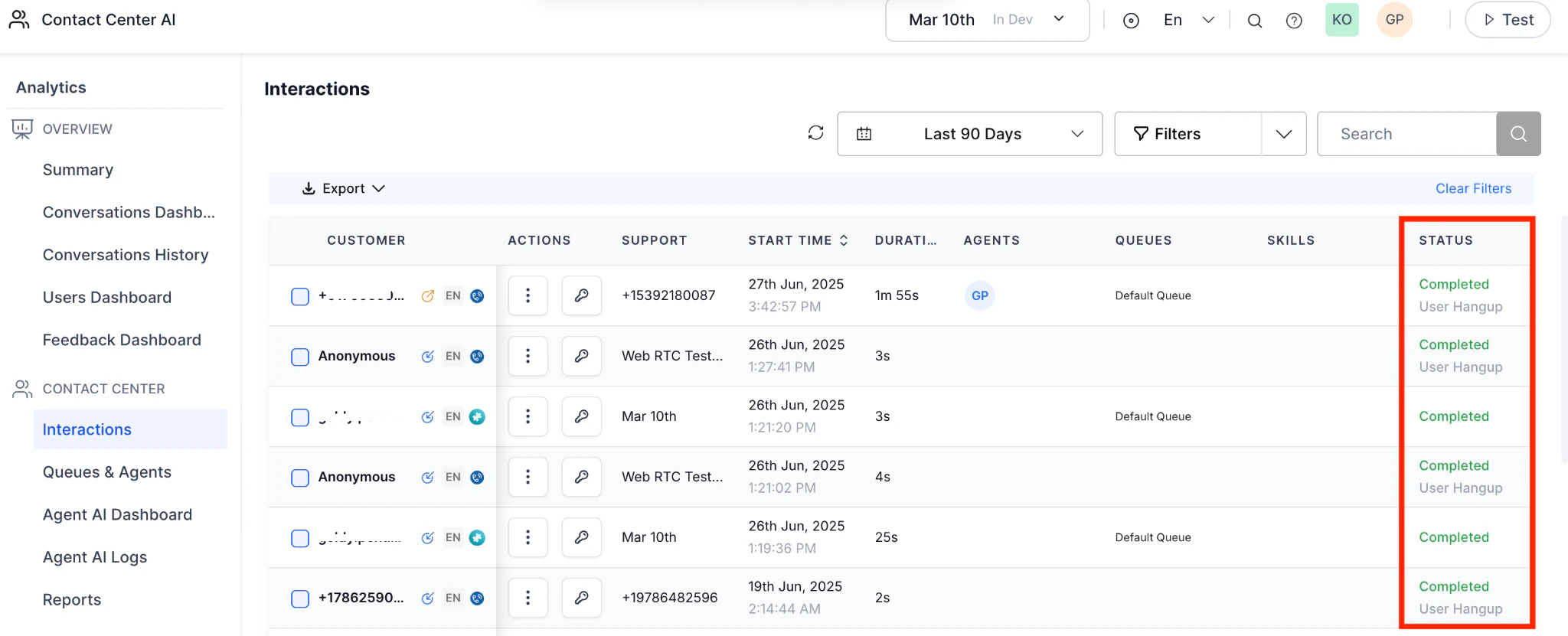
When the machineDetection parameter is set to disconnect, and the system detects a machine using either amd_machine_detected or amd_tone_detected, the call will be marked as machineDetected in the Interactions page under the Status column.\
This helps you easily identify and track calls that were disconnected due to machine detection.