Documentation Index

Fetch the complete documentation index at: https://koreai.mintlify.app/llms.txt

Use this file to discover all available pages before exploring further.

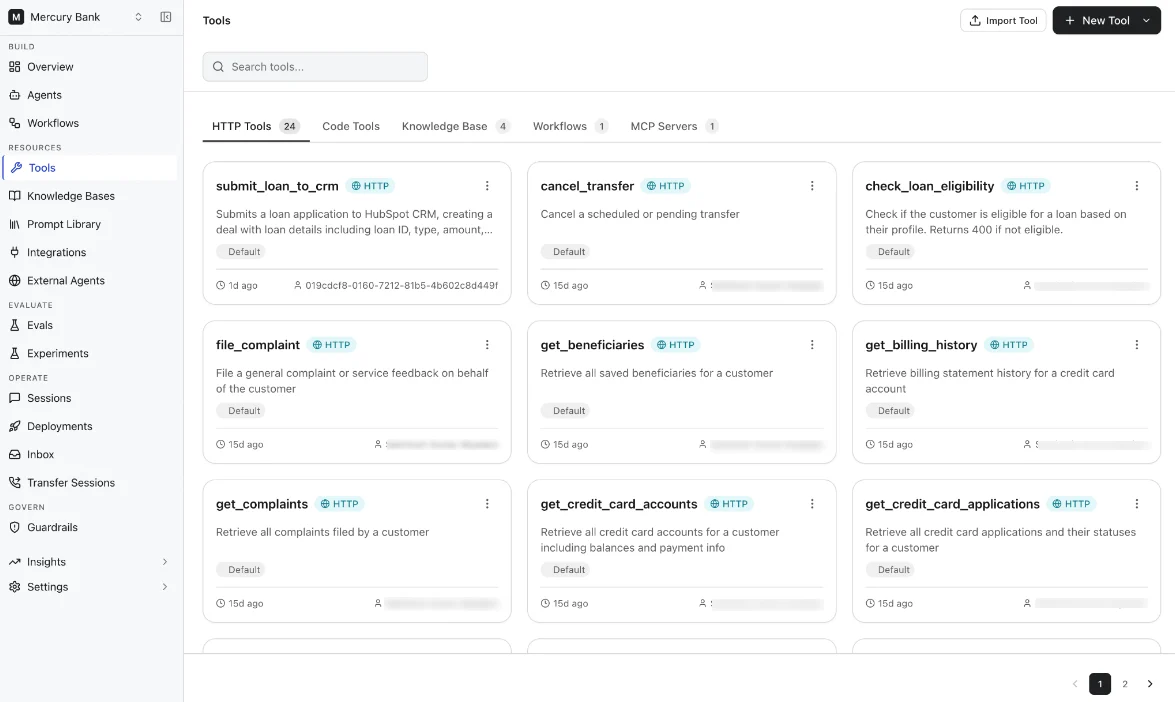
Tools extend agents’ capabilities by enabling them to retrieve data, execute logic, interact with external systems, and invoke workflows at runtime. The platform supports the following tool types:
Tool typeDescription
Workflow ToolsBuild reusable workflow-based tools using the visual workflow builder.
HTTP ToolsConnect to external APIs and services through HTTP requests.
Code ToolsExecute custom JavaScript or Python logic.
Knowledge Base ToolsRetrieve information from connected enterprise knowledge sources.
MCP ToolsConnect agents to Model Context Protocol (MCP) compatible servers and tools.
Use the Tools page to:
  • Create and manage tools
  • Register workflows as tools
  • Import and export tool definitions
For detailed configuration steps, see the documentation for each tool type.

Workflow Tools

Workflow tools allow agents to invoke reusable workflows during runtime. A workflow can be registered as a tool and attached to one or more agents. Registered workflow tools expose workflow inputs as tool parameters that agents can invoke during interactions. Workflow tools support:
  • Multi-step execution logic
  • Human approval and data-entry flows
  • Conditional branching
  • Integration actions
  • Reusable business processes
For details about registering workflows as tools and attaching them to agents, see:

HTTP Tools

HTTP tools let agents call external APIs to fetch data or trigger actions. The agent provides the required parameters, and the platform handles authentication, request construction, and response mapping. For more details, see HTTP Tools

Code Tools

Code Tools let you define custom logic using JavaScript or Python that agents can invoke as part of a workflow. They bridge the gap between LLM reasoning and deterministic, programmatic operations, enabling your agents to reliably transform data, call APIs, or run business logic. For detailed information, see Code Tools.

Knowledge Base Tools

The Knowledge Base tool enables agents to retrieve relevant information from enterprise knowledge sources during conversations. It connects the agent to one or more configured knowledge bases and allows it to search indexed content such as documents, web pages, and data from external systems. For detailed information, refer to the guide on Knowledge Base and Knowledge Tools.

MCP Tools

Enter text