

Where Autoloop helps
Autoloop helps teams identify and address issues that affect agent reliability, behavior, and readiness.- Project health: Identifies compilation and validation errors, missing tool definitions, invalid handoff targets, and disconnected flows.
- Agent behavior: Helps investigate cases where an agent skips required information, claims actions that did not occur, or has unclear completion rules.
- Quality and testing: Helps diagnose evaluation failures, tool-call errors, and scenarios that do not produce the expected outcome.
- Release readiness: Helps verify that proposed repairs pass the relevant checks before they are considered complete.
What Autoloop optimizes
Autoloop optimizes agent performance across several dimensions that contribute to overall agent quality. Each AutoLoop run is scored against the configured evaluation suite and target score. Examples of goals teams can define and measure:
These goals are measured only when the configured evaluation setup includes relevant scenarios or evaluators.
How Autoloop works
Autoloop follows an iterative optimization cycle. It evaluates agent behavior, diagnoses issues, proposes targeted changes, and verifies the results. If a change does not pass the required checks, Autoloop uses the results to guide further diagnosis and improvement.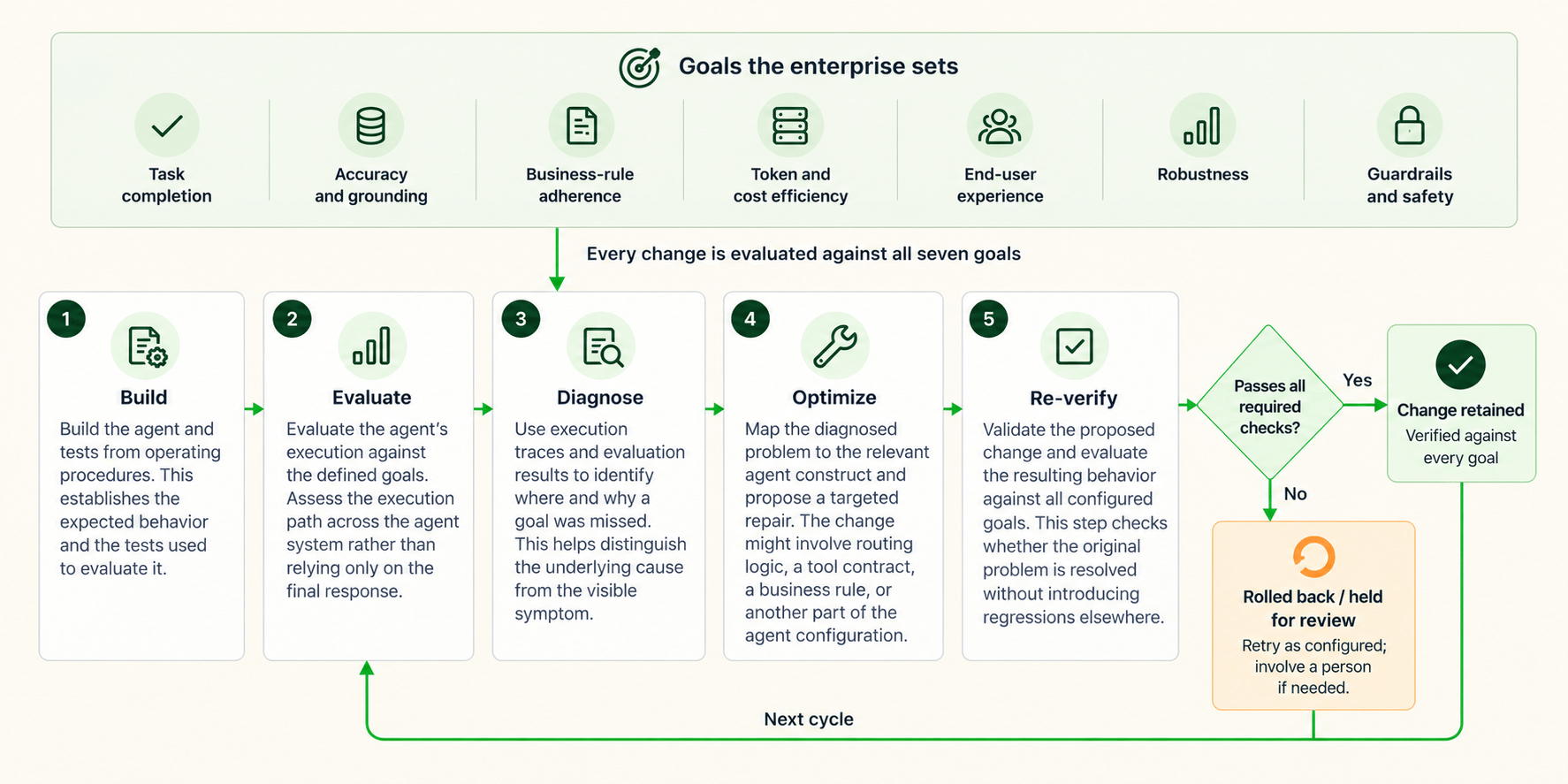
How Autoloop identifies and repairs problems
Autoloop uses execution evidence and the agent’s underlying structure to identify the cause of a failure and target the relevant part of the agent for repair.Execution traces
Autoloop uses execution traces and evaluation results to identify the causes of agent failures. These traces can capture handoffs, state changes, tool calls, and context, helping explain where an agent’s behavior diverged from its intended goal. Examining the execution path can reveal issues that are not apparent from the final conversation. For example, an agent might produce a plausible response even though it skipped a required verification step.Agent Blueprint Language (ABL)
Agents built on Artemis use Agent Blueprint Language (ABL) and are compiled. Execution steps can be mapped to the constructs responsible for the agent’s behavior. Autoloop uses this mapping to target the relevant construct instead of broadly rewriting a prompt. Depending on the issue, a proposed repair may affect routing logic, a tool contract, a business rule, or another agent construct.Readiness checks and validation
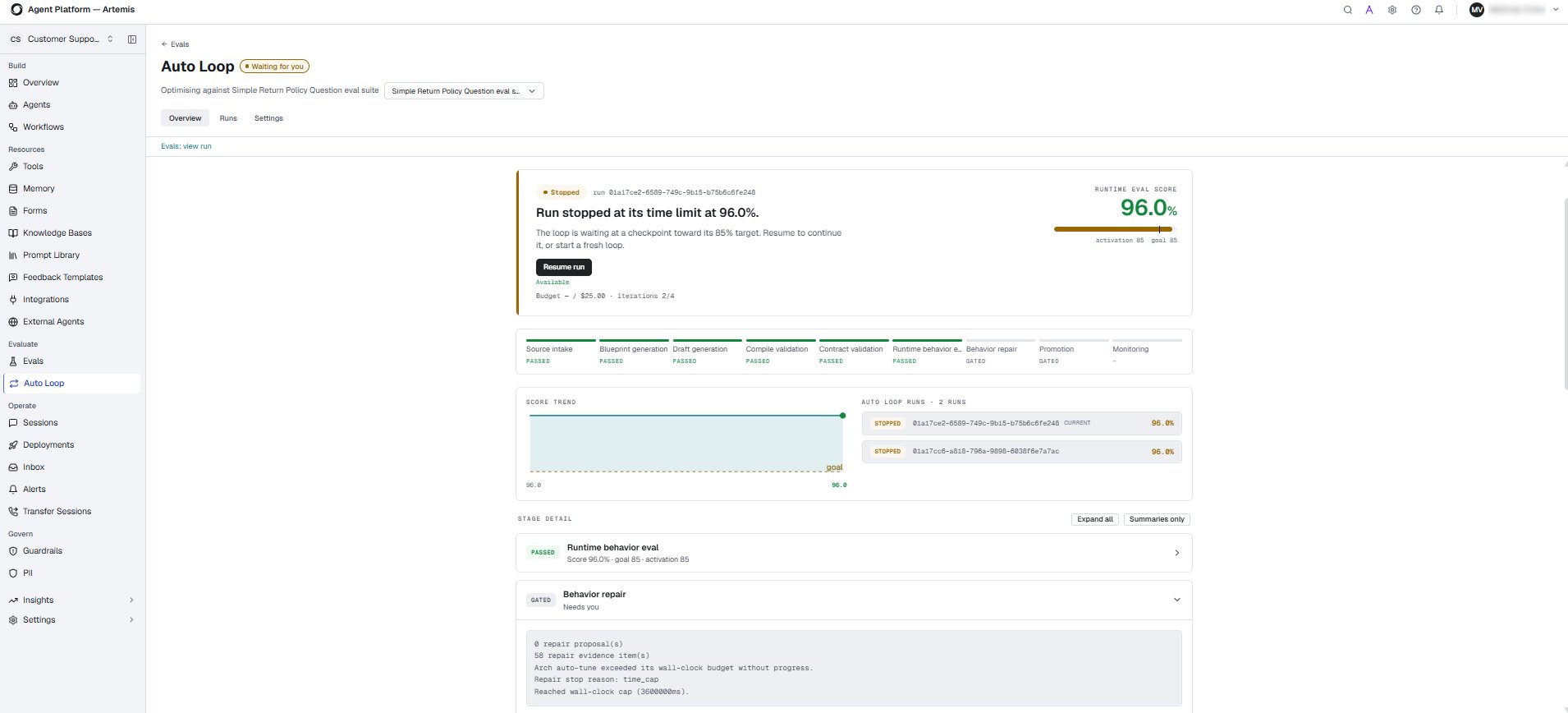
Autoloop uses a sequence of stages to assess readiness and validate changes. These include compile validation, contract validation, runtime behavior evaluation, and behavior repair. The specific checks depend on the configured evaluation suite. Each stage helps identify issues that may need to be addressed before the agent can progress. Passing one stage does not necessarily mean that all subsequent stages have passed. Autoloop uses validation results to determine whether a proposed change meets the required criteria. If a check fails, further diagnosis or changes may be required before the process can continue.Choose an operating mode
Autoloop supports three operating modes that determine how proposed changes are handled.
Choose a mode based on the level of automation and human oversight required by your team.
Autoloop lifecycle
The Autoloop interface displays the following stages in the optimization lifecycle. Each stage has a status indicating its progress or whether attention is required. The progression depends on the run state and applicable validation or approval requirements. Passing one stage does not necessarily mean that all subsequent stages have passed. Promotion moves a validated candidate into an Eval Suite or project lifecycle. Production release readiness requires separate governed production evidence. Monitoring keeps regression coverage active for promoted Eval Suites. It does not mean live monitoring of production agent behavior.Monitor runs and review diagnostics
The Autoloop interface provides run history, behavior scores, stage statuses, and diagnostic information. Use these details to understand how a run progressed, identify a failed or blocked stage, and investigate the evidence behind a failure. Review the diagnostic information before deciding whether to retry, make a correction, or seek further assistance. A behavior score provides evidence of progress against a target. It does not replace the required validation and promotion checks.Example scenario: Correcting an inaccurate order status answer
Consider a customer support agent that must answer a customer’s question about an order. The agent provides an incorrect response because it uses the wrong order status. As a result, the customer does not receive the information they need. The final conversation alone might not explain why the response was incorrect. Autoloop uses execution evidence to investigate the failure.- Evaluate the interaction. Autoloop evaluates the agent’s execution against relevant goals, including task completion, accuracy and grounding, and end-user experience.
- Examine the execution trace. Autoloop uses the execution trace to help identify where the incorrect order status was retrieved or used.
- Diagnose the cause. The execution trace helps determine whether the issue originated in the tool call, the data returned, or the agent’s handling of the result.
- Propose a targeted repair. Autoloop proposes a change to the relevant part of the agent, such as the tool configuration or the logic used to interpret the order status.
- Validate the change. Autoloop evaluates the updated agent against the configured evaluation suite and applicable validation gates. A change that corrects the response but introduces another error or violates a business rule does not meet the required criteria.
- Handle the change according to the selected mode. In Autopilot mode, changes that pass the required checks can be retained automatically. In Copilot mode, changes require the applicable human approval. In Advisor mode, Autoloop provides recommendations and supporting evidence without applying the changes.