Documentation Index Fetch the complete documentation index at: https://koreai.mintlify.app/llms.txt
Use this file to discover all available pages before exploring further.
Back to Web SDK Overview The Platform only accepts SDK clients that present valid credentials. You must register your app, obtain Client credentials, and use them to generate a signed JWT for every session.
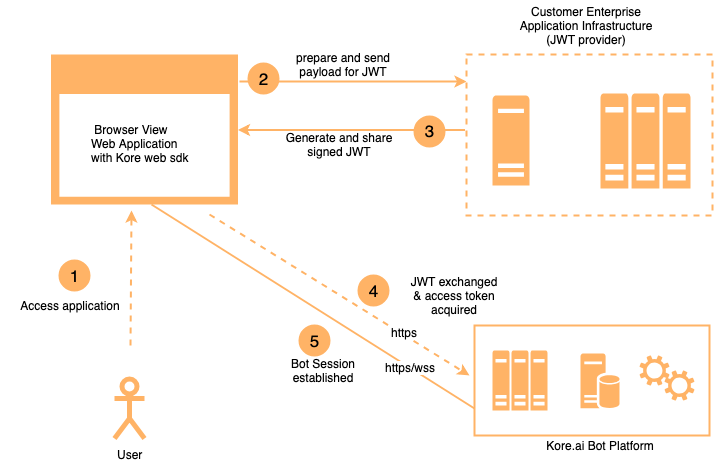
Authentication Flow
Your SDK signs a JWT with the user identity and Client credentials.
The Platform verifies the signature using the registered public key or shared secret.
Your SDK exchanges the JWT for a Bearer Token used in all subsequent API calls.
JWT Flow JWT Structure A JWT has three dot-separated parts: header.payload.signature
{ "alg" : "HS256" , "typ" : "JWT" }
Supported algorithms: Algorithm Type Key used for signing Key used for verification HS256 / HS512 HMAC Secret Key (shared) Secret Key (shared) RS256 / RS512 RSA Private Key (yours) Public Key (uploaded to Platform)
Payload { "iat" : 1466684723 , "exp" : 1466684783 , "jti" : "1234" , "aud" : "https://idproxy.kore.ai/authorize" , "iss" : "cs-xxxxxxxxxx-1234" , "sub" : "john.doe@example.com" , "isAnonymous" : false , "identityToMerge" : "john.doe@example.com" }
JWT Parameters Parameter Type Description algstring Signing algorithm: RS256, RS512, HS256, or HS512 typstring Token type — always JWT iatinteger Token issue time in seconds expinteger Token expiry time in seconds jti or kore_jti (optional)string Unique JWT ID to prevent replay attacks. Use kore_jti to bypass pre-populated jti values. audstring Audience — always https://idproxy.kore.com/authorize iss or kore_issstring Client ID generated when the app was registered. Use kore_iss to bypass pre-populated iss values. sub or kore_substring User identity (email or phone for known users; a unique random ID for anonymous users). Use kore_sub to bypass pre-populated sub values. isAnonymousboolean Set true for anonymous users. Anonymous users are not persisted on the Platform. Default: false. identityToMergestring Anonymous identity to merge into the known user. See Passing Mapped Identities .
JTI Validations When jti is included, the Platform enforces:
Expiry ≤ 1 hour — If violated:{ "errors" :[{ "msg" : "error verifying the jwt: if \" jti \" claim \" exp \" must be <= 1 hour(s)" , "code" : 401 }]}
No replay — If the same jti is reused:{ "errors" :[{ "msg" : "error verifying the jwt: possibly a replay" , "code" : 401 }]}
Hosting the JWT Generation Service The Client Secret or RSA Private Key must never be exposed client-side. Host JWT generation as a REST web service:
For the Web SDK : the service is called from the user’s browser.
For mobile SDKs : the service is called from the user’s device.
Keep the Client ID, Client Secret, and expiry logic server-side. Accept only the user ID from the client.
Open-source JWT libraries: To register your app and get credentials, see SDK App Registration .
JSON Web Encryption (JWE) Use JWE to send sensitive data alongside the user identity in the JWT. Include the data in secureCustomData or privateClaims — it becomes available in the dialog context at context.session.UserContext.privateClaims.<field>.
JWE Token Structure A JWE token has five parts: Header.EncryptedKey.IV.CipherText.AuthTag
Parameter Description algKey wrapping algorithm: RSA-OAEP or RSA1_5 encContent encryption algorithm: A128CBC-HS256, A128GCM, or A256GCM kidKey ID of the Platform’s public key (shown when JWE is enabled) typAlways JWT
Sample decoded JWE header: { "alg" : "RSA-OAEP" , "enc" : "A128CBC-HS256" , "kid" : "k-ffb4hty69-750a-44af-91c1-de0bvxxxx" , "typ" : "JWT" }
Generate a JWE Token Steps:
Choose a JWE library for your language (Python: PyJWT, Java: javax.crypto, Node.js: node-jose).
Prepare your payload — include sensitive fields under privateClaims or secureCustomData.
Choose encryption algorithms.
Use the Platform’s public key for asymmetric encryption.
Python example: import jwt payload = { "sub" : "1234567890" , "name" : "John Doe" , "iat" : 1516239022 , "privateClaims" : { "accountId" : "123412512512556" , "fusionSid" : "12125125125" , "siteId" : "124125125125" } } secret_key = "MySecretKey123" jwe_token = jwt.encode( payload, secret_key, algorithm = 'HS256' , headers = { "alg" : "A256GCM" } ) print ( "JWE Token:" , jwe_token)
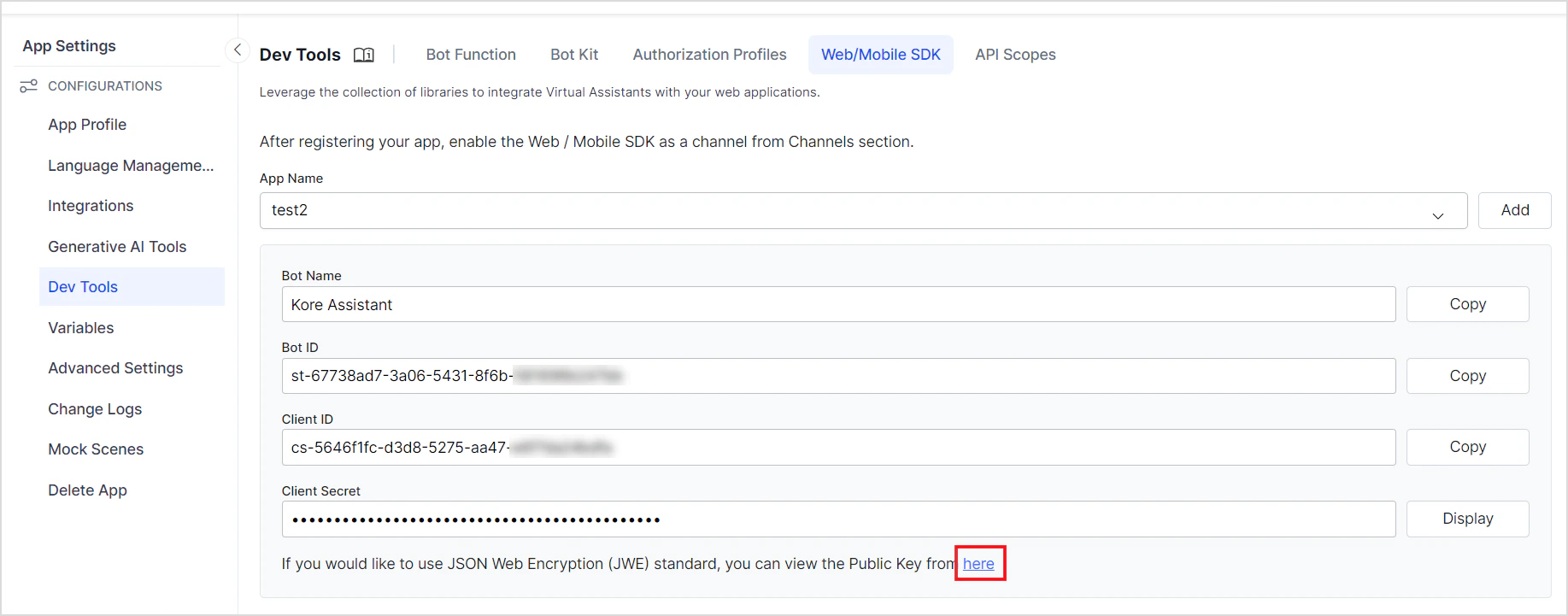
Find the JWE Public Key Enable the JWE option when creating an SDK app. The public key is displayed in JWK format.
Verify and Decrypt a JWE Token Python example: import jwt jwe_token = "eyJhbGciOiJSUzI1xxxxx..." jwe_public_key = { "e" : "AQAB" , "kid" : "de668337-....-5778944f9630" , "kty" : "RSA" , "n" : "rdqXc48aW...uNMSdIgn" } try : decoded_payload = jwt.decode( jwe_token, jwe_public_key, algorithms = [ 'RS256' ], options = { "verify_signature" : True , "decrypt" : True } ) print ( "Decoded Payload:" , decoded_payload) except jwt.ExpiredSignatureError: print ( "JWE Signature has expired." ) except jwt.DecodeError: print ( "Invalid JWE Signature or Decryption failed." )
For the full JWE specification, see RFC 7516 .