
Artifacts are structured responses that can be used to present rich templates to end users when they interact with AI Agents on the Agent Platform. Instead of the agent replying in plain text, the platform can return a structured JSON payload — alongside the text response — that the client application renders as a native UI component: a set of buttons, a card, a carousel, a form, and more. This shifts presentation control from the platform to the client. The client reads the artifacts array in the Execute API response and renders it using its own templates, channel-specific components, or custom logic — giving teams full control over what users see and how they interact. Artifacts are applicable across industries and use casesDocumentation Index
Fetch the complete documentation index at: https://koreai.mintlify.app/llms.txt
Use this file to discover all available pages before exploring further.
| Industry | Artifact Type | Example |
|---|---|---|
| Banking | Cards | Account balances, transaction summaries, credit limits |
| Telecom | Buttons | Technician appointment slots for one-tap selection |
| Hotel Booking | Carousels | Hotel listings with images, ratings, and book action |
| E-commerce | Quick Replies | Order status options, return and refund flows |
| Healthcare | Forms | Appointment booking, symptom checkers |
How It Works
Artifacts Key in the Response Payload
Artifacts array is available in the Execute API response. It accumulates structured outputs during a session. Clients access this key directly to retrieve data for rendering. Learn More.Populating Artifacts
There are two ways to produce artifact payloads.Via a Tool
The developer writes the template payload directly inside the tool logic (Code, Workflow, MCP, or Knowledge Tool). When the tool executes, its output is captured and appended to the artifacts array via output parameter routing configured at the tool level. Learn More. Developers can choose to send the complete tool output to artifacts or define named output parameters that extract specific values using a path notation. Examples:By default, tools send complete outputs only to agents and not to the artifacts array
Via a Response Processor
The Response Processor is an optional, application-level layer that executes during the response generation stage — after all tools have run and before the response is delivered to the client. It runs for every response rendered to the end user. Learn More Using the Response Processor to Generate Artifacts Developers can write artifact payloads directly inside the Response Processor code. When the processor runs, it constructs the desired payload, writes it into the artifacts key. This is particularly useful when:- The artifact needs to be assembled from multiple tool outputs or session variables rather than a single tool response.
- The payload structure depends on business logic better handled centrally at the application level.
- No tool is needed.The processor can produce artifacts independently based on input context alone.
- Reorder elements to control which artifact renders first.
- Filter artifacts based on channel, user segment, or business logic.
- Transform or enrich payload data before client delivery.
- Merge multiple tool outputs into a single consolidated artifact.
- Add metadata, wrapper keys, or channel-specific formatting.
- When a Response Processor is active, streaming is not supported. Artifacts and the text response are delivered as a complete payload after the processor finishes. If the processor fails, the original untransformed response is returned and the error is logged.
- Only one Response Processor can be attached per application. It is configured at the application level in Orchestration.
Artifacts Field Structure
Artifacts can carry any structured JSON data — key-value pairs, nested objects, arrays, or flat data records. This makes them useful in two distinct ways:- As a UI rendering payload — when the artifact contains a recognized template structure based on Web/Mobile SDK Templates , the chat widget and Playground render it as a native UI component such as buttons, cards, or carousels.
- As a data delivery mechanism — when the artifact contains custom structured data, it is returned as-is in the Execute API response for the client application to consume programmatically. There are no size limits or structural constraints on what the payload can contain in this case. In the Playground, this information is presented as a JSON block for validation.
How Rendering Works
Whether an artifact renders visually or displays as a raw JSON object depends on the client consuming the artifacts. For AI for Service SDK, type field in the artifact payload decides the rendering. Specifically for AI for Service,-
If the type field is set to
templateand thentemplate_typematches a supported template type, the platform renders it as a native UI component — both in the Playground and in the chat widget. - If the type field is absent, unrecognized, or does not match any supported template, the artifact is displayed as a formatted JSON object.
Sample Use Case — Bank Assistant App
The Bank Assistant is an agentic application built on the Agent Platform to assist customers across a range of banking needs — checking account balances, reviewing recent transactions, managing payments, exploring loan options, and getting support on credit card queries — all through a conversational interface.Use Case: Checking Account Balance
When a user requests a balance without specifying an account type, the assistant returns a button template instead of a text prompt, allowing the user to select an account directly in the chat. This is handled by the Check_Balance Code Tool, which checks if the user has multiple accounts. If only one account exists, it returns the balance directly; otherwise, it presents selectable account options.XO Web SDK — Button Template Format
This use case targets the XO Web SDK channel. The Web SDK has native support for button templates, rendered as tappable buttons within the chat widget. The developer authors this template structure directly in the tool code. The button template format for the XO Web SDK is:Tool Output Parameters — Selective Routing
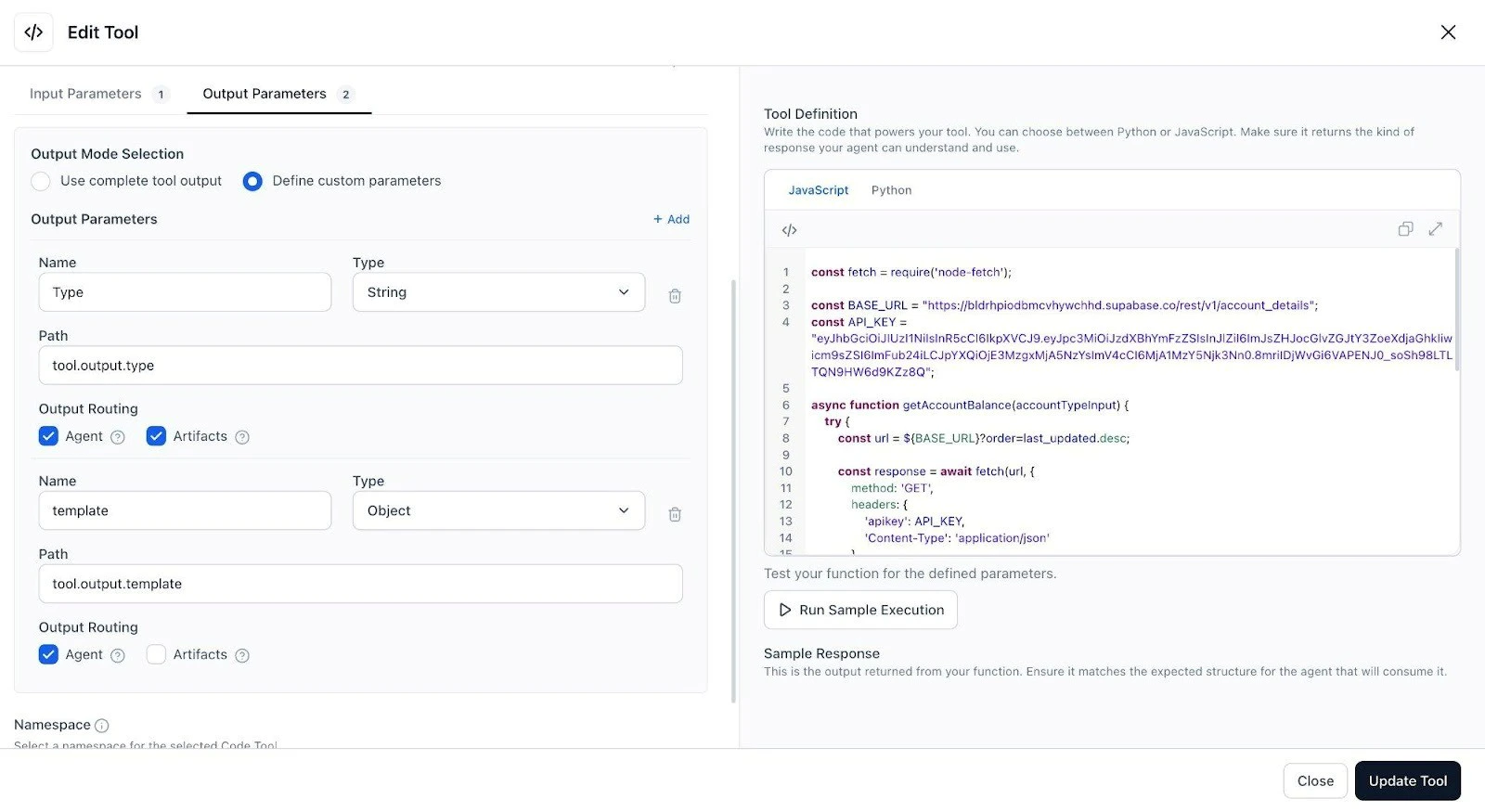
The Check_Balance tool is configured with two output parameters. The type parameter (a String identifying the template type) is routed to Agent and Artifacts. The template parameter (the full Object payload) is routed to the Agent only — the agent uses it for context but it is not pushed to the artifacts array independently.| Parameter | Type | Path | Routing |
|---|---|---|---|
| Type | String | tool.output.type | Agent + Artifacts |
| template | Object | tool.output.template | Artifacts only |
End-to-End Interaction Flow
- The user sends: “Help me check my balance.”
- No account type is specified. Check_Balance detects multiple accounts and constructs the button template payload, routing the type parameter to the artifacts array.
- AI for Service reads the first element of the artifacts array and renders it as interactive buttons: Investment, Credit, Savings, Checking.
- The user taps Savings. The postback triggers the agent again with AccountType = “Savings”.
- Check_Balance finds the Savings account and returns the balance as text: “Your Savings Account (Personal Savings) balance is $3,660.00.”
- The agent delivers this as a conversational reply. No artifact is generated this turn.
Rendered on the XO Web SDK
The screenshot below shows the full interaction as rendered on the XO Web SDK.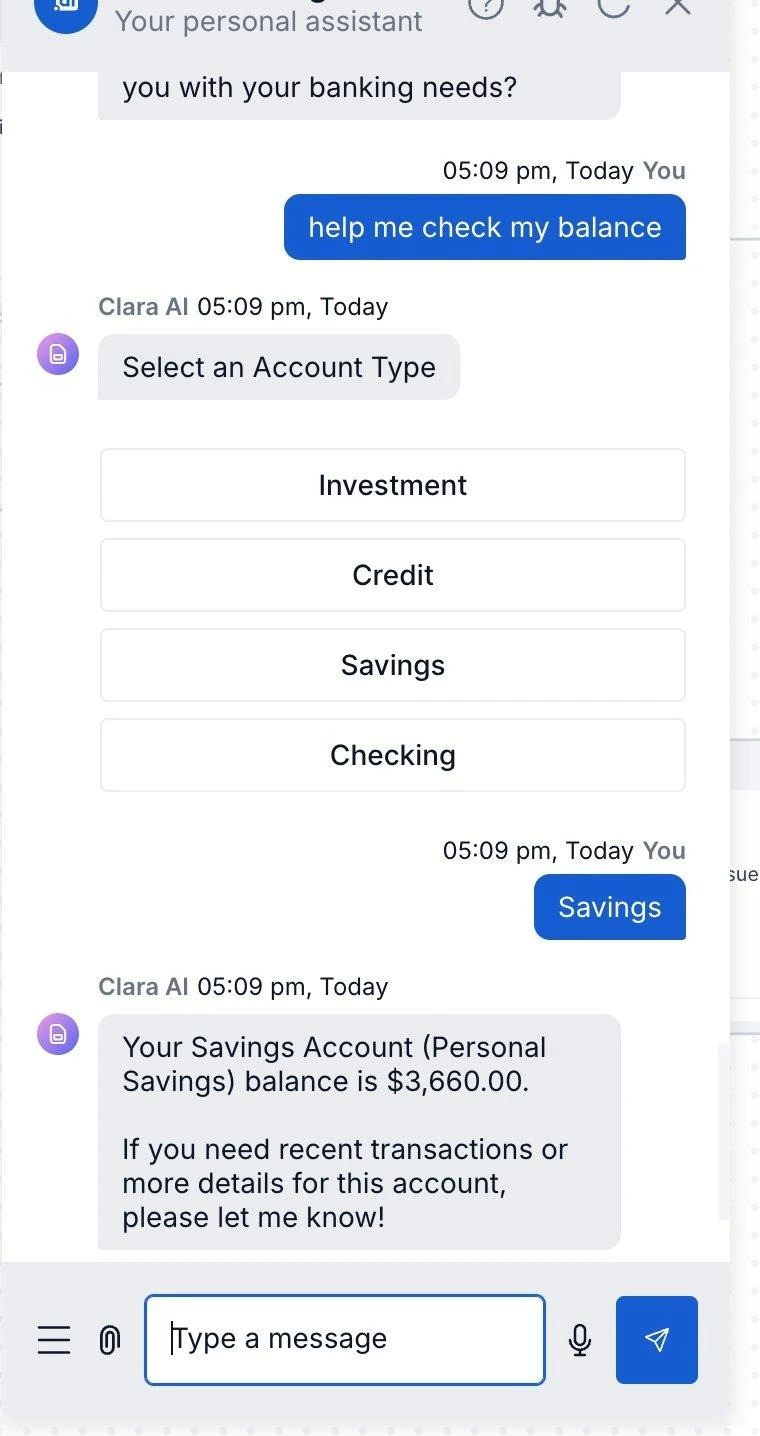
This rendering is specific to the XO Web SDK. The same artifacts array payload can be consumed by any channel integration — each interprets the type and payload fields according to its own rendering capabilities.