

Access Agent Leaderboard
Navigate to Quality AI > Agent Leaderboard.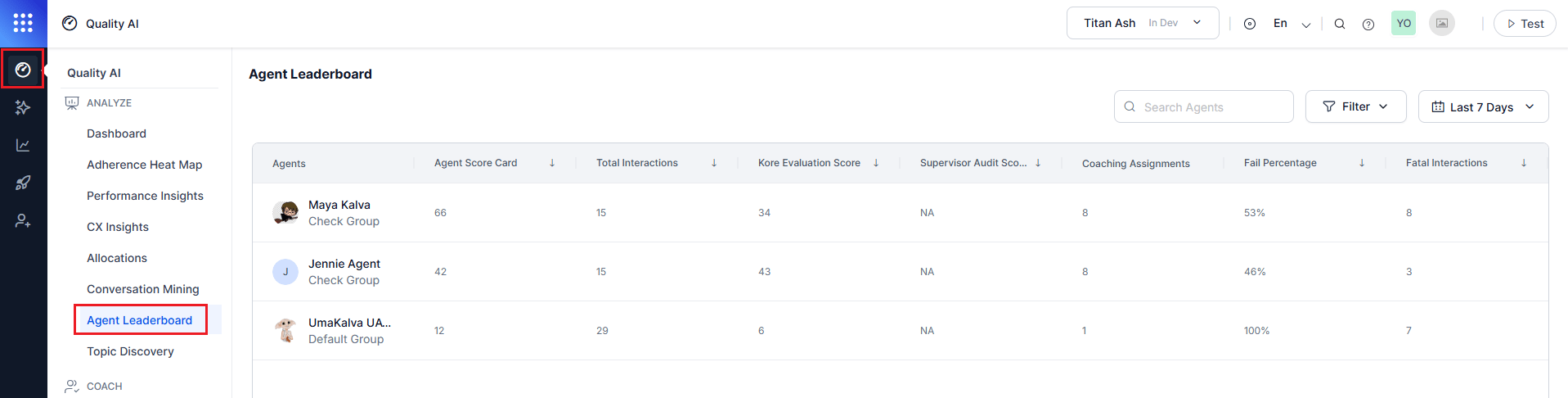
To view leaderboard data, enable Agent Scorecard and Agent Access to Scored Interactions in Quality AI General Settings.
Automated Scoring
- Enable the Agent Scorecard toggle to view automated scoring and leaderboard metrics.
- When you set a default scorecard, the system bases scores on that scorecard. Otherwise, the system calculates the average across all applicable scorecards.
Leaderboard Metrics
The leaderboard aggregates agent performance based on selected metrics.Agent Leaderboard Filters
The Agent Leaderboard uses common Quality AI controls to filter, sort, and search performance data. Scorecards are language-driven and load based on the selected language, allowing multiple scorecards per agent.Filters and Controls
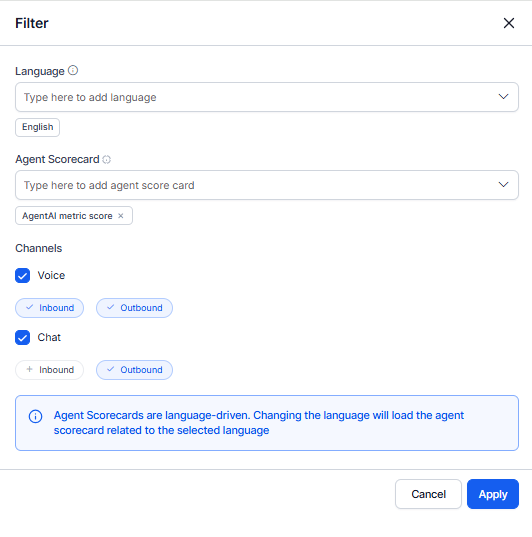
Contact Direction Behavior
The leaderboard supports direction-aware performance analysis.
This enables comparison between support (inbound) and campaign (outbound) workflows.
Scorecard Behavior (Enablement and Language-Driven)
- Enable Agent Scorecard in Quality AI General Settings to activate automated scoring and leaderboards. When disabled, the system doesn’t display interactions or metrics.
- The system loads scorecards based on the selected language and scorecard.
- The system calculates agent scores from the selected scorecards. When you configure a default scorecard, the system displays its score. Otherwise, the system displays the average across applicable scorecards.
- Changing the language reloads the associated scorecards.
- The system displays only scorecards configured for the selected languages.
- The leaderboard reflects only interactions that match the selected Language, Channel, and Contact Direction filters.
- Fatal interactions affect scores based on the evaluation form configuration.
- Supervisors can apply multiple scorecards to an agent.
View Agent Insights
The Agent Insights view provides a detailed, agent-specific dashboard for performance analysis and coaching. It includes an overview of key metrics and in-depth supervisor evaluation data. To view an agent’s performance:- Select an agent from the Agent Leaderboard to open the Agent Dashboard.
- Use the Overview tab to review performance metrics in the Agent-Specific Dashboard.
- Navigate to the Evaluation tab to view detailed supervisor evaluation insights.
Agent Dashboard - Overview (Supervisor View)
Access this view by selecting an agent from Dashboard > Agent Leaderboard. This dashboard provides a comprehensive view of individual agent performance, including:- Interaction volume and evaluation scores
- Coaching insights (strengths and improvement areas)
- Sentiment and resolution trends
- Scorecard-based performance tracking
Agent Dashboard - Evaluation
Access this view by selecting an agent from Dashboard > Agent Leaderboard and navigating to the Evaluation tab. This section provides interaction-level analysis for the selected agent, including:- Performance trends
- Sentiment and resolution insights
- Coaching assignments
- Auto QA and manual audit score reviews
- Filters for language, channel, and contact direction
- Identification of recurring issues
- Interaction bookmarking for coaching
- Creation of targeted coaching assignments
Coaching Insights (Overview Tab)
The Coaching Insights section highlights performance strengths and coaching opportunities:- Agent Attribute view (attribute-level performance)
- Evaluation Metric view (metric-level performance)
- Scorecard-based filtering
- Identification of top strengths and areas for improvement
- Access metric-level data from attributes