

This feature was enabled in v8.1 of the platform and is available only for the on-prem installation.
authCode for authenticating a service that your bot uses. This authCode may have different values in the test, uat, and prod environments. The bot can be exported and imported based on the environment, and the values need to be modified at one place in the variable configuration file. Refer here for more on Bot Variables.
Using collections, you can define multiple value sets for these variables and designate an active collection for the values to be used while bot execution. Instead of changing the values manually while moving the bot from one environment to another, you can define the values during bot development and set the active collection in different environments to use the appropriate values.
Creation
Following are the steps in creating Collections:- From the left navigation menu, select App Settings > Variables.
- Click the Environment Variables tab.
-
On the top left click the more/ellipses to access the Manage Collections.
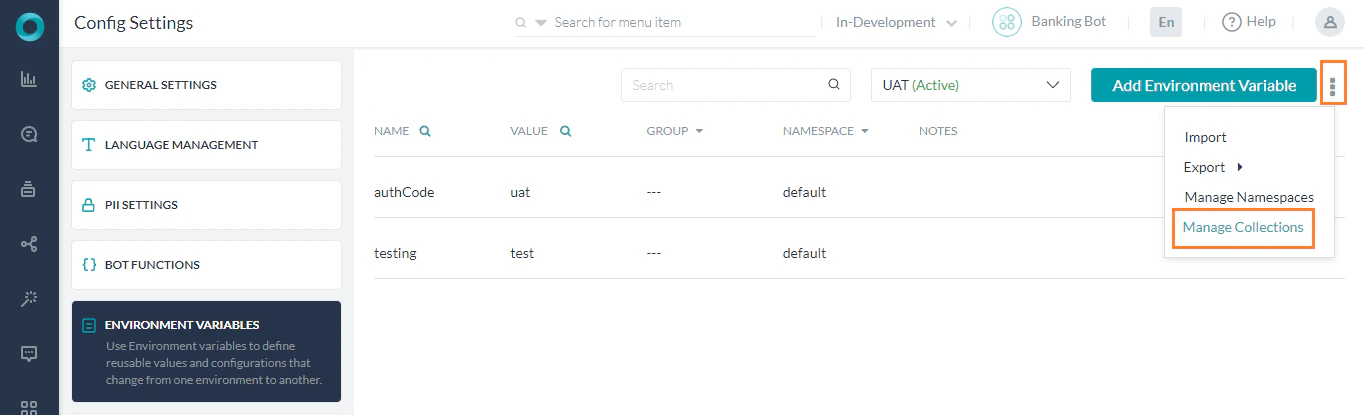
- This would open the Manage Collections page.
- Click Add New Collection.
-
Enter the following details:
- Collection Name,
- Description,
- Select the Collection you want to Clone From - This would create the new collection with all the values from the selected clone, you can later edit the values as per requirement.
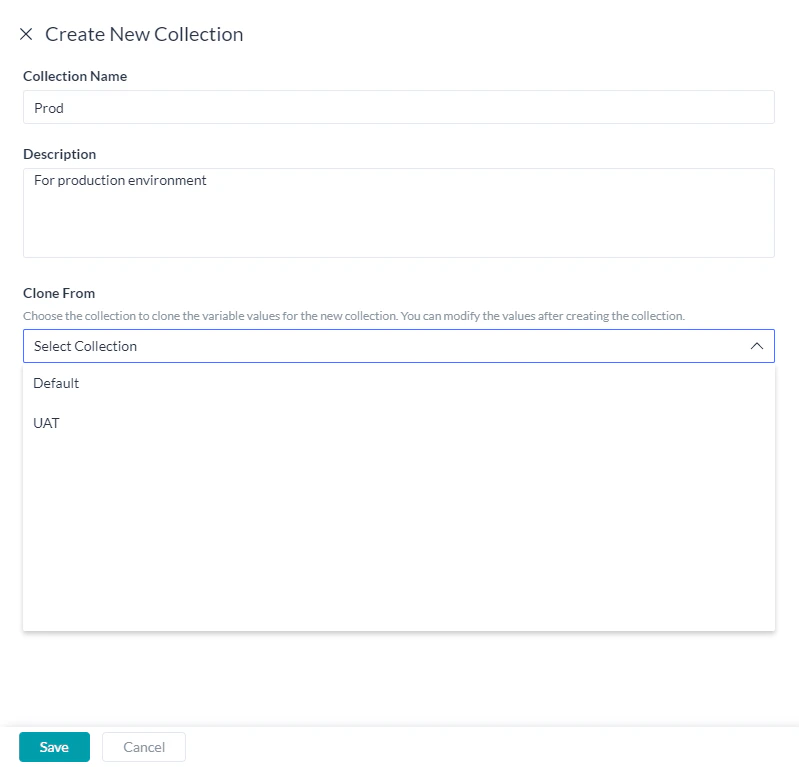
- Save the collection.
Adding Values
Create Environment Variables and add collection-specific values using the following steps:- From the left navigation menu, select Settings -> Config Settings.
- Click the Environment Variables option.
- Click Add Environment Variable. You can also use the edit icon against an existing Environment Variable to add values.
- This would open the Add/Edit Environment Variable page.
-
Enter the following details:
- Variable Name,
- Against the listed Collection Name, enter the appropriate value,
- Enter developer notes in the Notes field. While this is an optional field, entering useful notes can help the developer working on the target bot to understand and provide relevant values.
- Group can be used to categorize the variable.
- Assign a Namespace if enabled (refer here for more).
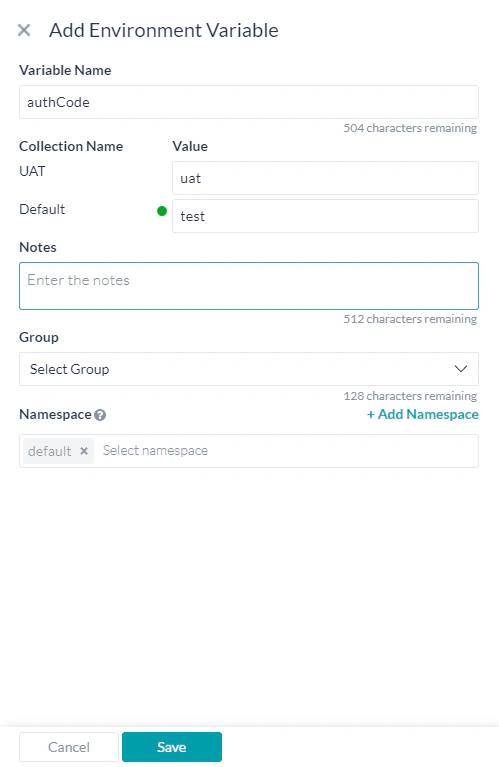
- Save the Variable.
Active Collection
- Click Manage Collections to access the Collections listing window.
-
Mark as Active any one of the Collections created. The values from the Active collection are used while executing the bot definition.
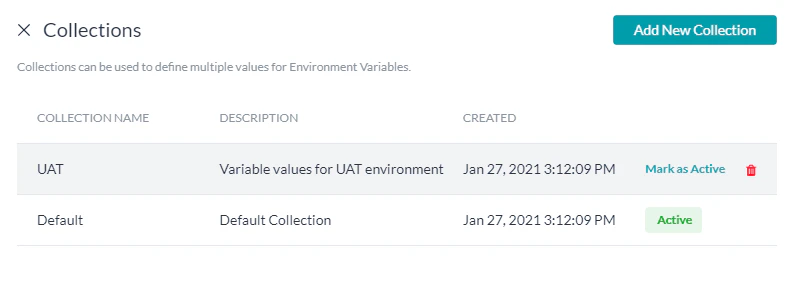
-
When exporting the bot definition, you can mark as Active the collection to be set for the target bot. The export file would contain the details of all the collections as well as the collection-specific values.
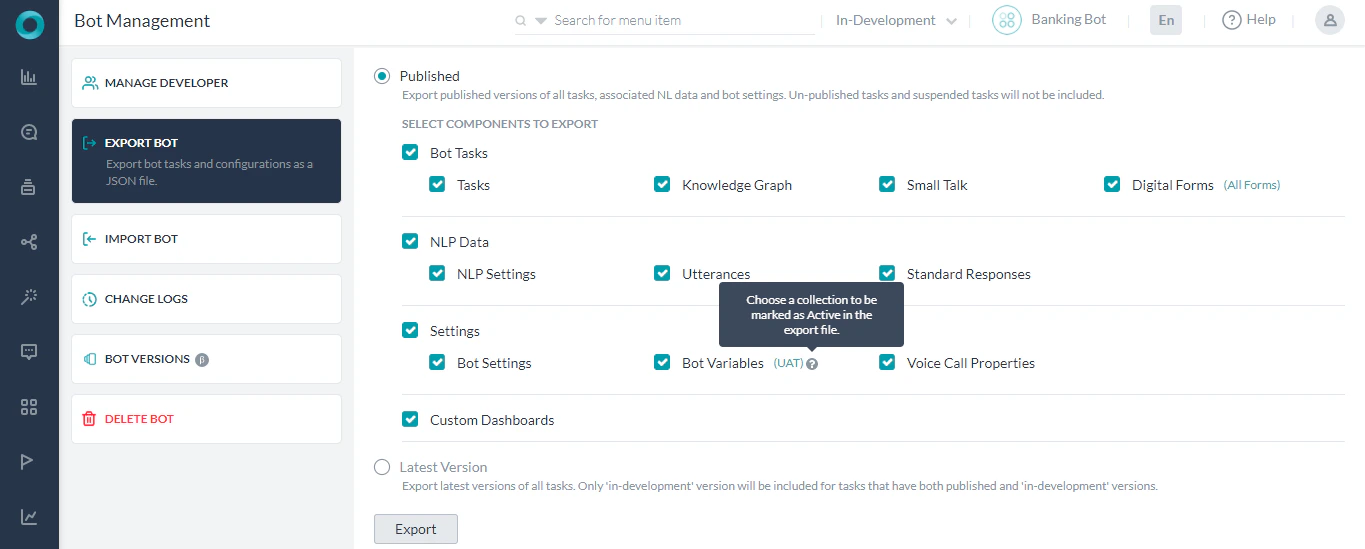
-
Bot Import:
- To a New bot - All the collections, collection-specific values, and the active collection information would be imported into the newly created bot.
- Full Bot Import - All the details as available in the export file would be imported into the newly created bot. Any existing collections and the collection-specific values would be overwritten with the details present in the export file. If the file has multiple collections but the target bot doesn’t have any collections, then the collections from the file would be imported into the target bot. If the file doesn’t have collections but the target bot has collections, then the collections would be removed from the target bot.
- Incremental Bot Import - The ‘incremental import’ will be allowed only when the collections from the file exactly match with the collections in the target bot. When the collections in the export file and bot are the same, the values from the file would override the values in the target bot, and any additional variables in the file will be imported into the target bot with the corresponding values. Any additional variables in the target bot would be retained as-is.
Import & Export
- The Bot Export file would contain the details of all the collections as well as the collection-specific values. The setting of a collection as ‘active’ would be reflected in the export file.
-
Bot Import:
- To a New bot - All the collections, collection-specific values, and the active collection information would be imported into the newly created bot.
- Full Bot Import - All the details as available in the export file would be imported into the newly created bot. Any existing collections and the collection-specific values would be overwritten with the details present in the export file. If the file has multiple collections but the target bot doesn’t have any collections, then the collections from the file would be imported into the target bot. If the file doesn’t have collections but the target bot has collections, then the collections would be removed from the target bot.
- Incremental Bot Import - The ‘incremental import’ will be allowed only when the collections from the file exactly match with the collections in the target bot. When the collections in the export file and bot are the same, the values from the file would override the values in the target bot, and any additional variables in the file will be imported into the target bot with the corresponding values. Any additional variables in the target bot would be retained as-is.
- Variable Import - The ‘variables import’ would be allowed only when the collections from the file exactly match with the collections in the target bot. When the collections in the export file and bot are the same the values from the file would override the values in the target bot. Any additional variables in the file will be imported into the target bot with the corresponding values. Any additional variables in the target bot will be retained as-is.
- Variable Export - The Variables export would include all the collections available in the bot and mapping of variables to collections. Note if the bot doesn’t have any collections but the account has ‘collections enabled’, the export would be restricted.