Documentation Index
Fetch the complete documentation index at: https://koreai.mintlify.app/llms.txt
Use this file to discover all available pages before exploring further.
The Platform supports connecting AI agents built on external platforms through two integration methods. Choose the method that best fits your external agent’s capabilities:
- A2A Protocol provides a standardized agent-to-agent communication model and is recommended when the external agent supports the A2A specification.
- Kore Agent Protocol (Proxy Agent) enables integration with external agents that don’t support A2A by using a custom request and response mapping layer. The proxy agent acts as an intermediary, relaying communication between the Platform and the external agent — handling protocol translation while preserving the performance, security, and integrity of your existing setup.
Step 1: Set Up the Agent Profile
Name
Choose a unique name that reflects the external agent’s function and makes it clearly identifiable alongside native agents.
Description
Write a description that tells the orchestrator when to route requests to this agent. Be specific about the agent’s responsibilities and how it differs from others in the application.
Avatar
Select an avatar from the available list. External agents appear alongside native agents in the user interface.
Connection Type
Choose one of the following connection methods:
- Connect through A2A Protocol — Integrates with external agents that support the A2A protocol standard.
- Connect through Kore Agent Protocol — Uses a proxy adapter to translate requests and responses between the Platform and external agents.
Connect Through A2A Protocol
The A2A (Agent-to-Agent) Protocol client implementation enables the Platform to interact with external AI agents that expose their capabilities via the A2A Protocol. The Platform can treat external agents as part of the agent ecosystem and allow the supervisor to route requests to them like native agents.
Prerequisites
The external agent must:
- Support the A2A protocol
- Expose the well-known agent card
- Be accessible via an HTTPS REST endpoint
The Agent Platform supports A2A v1.0 and A2A v0.3, over both HTTP+JSON and JSON-RPC transport bindings.
Configuration Steps
- Select Connection Type as Connect through A2A Protocol.
- Click Configure under Request Definition. This section configures how the Platform retrieves agent metadata from the external A2A agent during setup.
| Field | Description |
|---|
| HTTP Method | The HTTP method used to fetch the agent card. For A2A integrations, this is typically GET. |
| URL | The well-known URI of the external A2A agent. Example: https://agent.example.com/. This endpoint returns the Agent Card, which contains metadata describing the agent including its name, description, capabilities, and messaging endpoint. |
| Authentication Profiles | If the agent card endpoint requires authentication, select an Auth Profile from the dropdown. Select None if authentication isn’t required. |
| Headers | Add custom HTTP headers to include when retrieving the agent card. Example: Authorization: Bearer <token> |
| Response | Displays the response returned from the external agent when you click Test. Use this to verify that the agent card is retrieved successfully and conforms to the A2A specification. |
Agent Discovery
When the request is successful, the Platform retrieves the Agent Card and automatically populates key configuration fields such as agent name, description, skills, and other metadata.
Runtime Configuration
After configuring the Request Definition and saving the agent profile, configure additional runtime settings in the Configure tab.
| Setting | Description |
|---|
| Timeout | The maximum duration the Platform waits for a response from the external A2A agent. If no response is received within this time, the request fails with a timeout error. Default: 60 seconds. Allowed range: 60–300 seconds. |
| Route Response to User | When enabled, the response is sent directly to the user, bypassing the supervisor. When disabled (default), the response is returned to the supervisor for additional processing before responding to the user. |
| Authorization Method | Determines how authentication is applied when the Platform sends requests to the external agent for task invocation. Enable Use same auth as Request Definition to reuse the authentication profile from the Request Definition section(used for fetching agent card). If disabled, configure a separate authorization method for all runtime agent calls. |
| Metadata | Key-value pairs passed to the external agent with each request. Example — Key: sample, Value: 10. |
Testing the Agent
Use the Test Agent button in the top-right corner to validate the configuration. You can:
- Send sample messages to the external agent
- Verify connectivity
- Verify the responses of the external agent
Enter a test query, provide values for any metadata fields, and validate the response.
Points to Note
- The Platform can invoke external agents using the A2A protocol, but external agents cannot directly invoke native agents created within the Platform.
- The Platform communicates with A2A agents only via REST endpoints. JSON-RPC and gRPC are not supported.
- In the Adaptive Network orchestration pattern, an external A2A agent can only be configured as the last node in the workflow. External agents cannot further delegate tasks.
- Streaming responses are supported when the external A2A agent supports streaming. If streaming is enabled for the application but the external agent doesn’t support it, the response is returned as a non-streamed response.
- The Platform uses a
sessionId to track conversations internally. When interacting with external A2A agents, the Platform maps this to the context_id returned by the external agent. The task_id returned by the external agent tracks the lifecycle of a specific task. Both are stored and managed during the interaction and included in subsequent requests as required by the A2A protocol. When a task reaches a terminal state (completed or failed), the Platform clears the stored task_id and does not include it in subsequent requests, allowing the external agent to initiate a new task.
Connect Through Kore Agent Protocol
Before You Begin
- External agents must conform to the Agent Protocol. The Platform sends requests and expects responses in a defined structure. If your external agent uses a different format, build an adapter layer first. See Handling Format Variations.
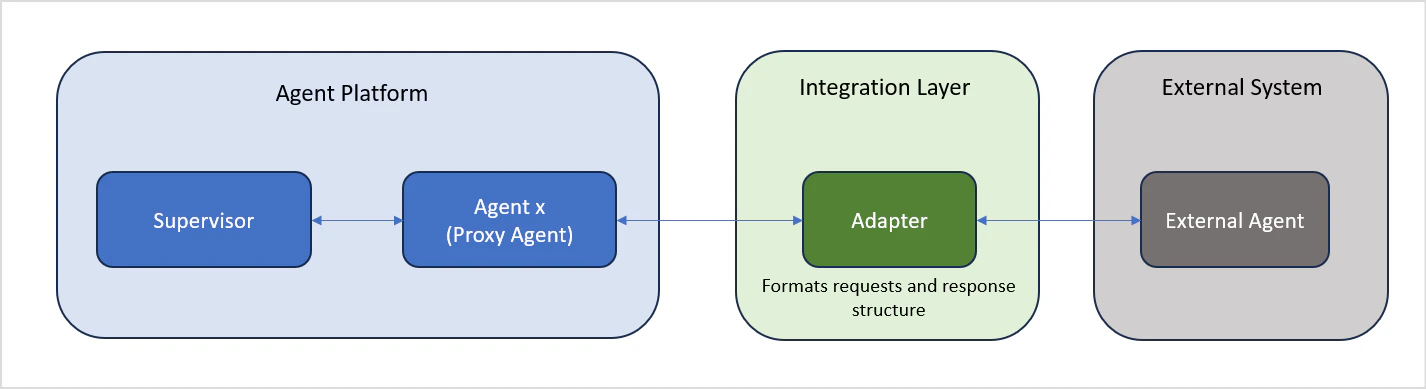
The Kore Agent Protocol enables integration with external agents that do not support the A2A standard. This approach uses a Proxy Agent architecture, in which the proxy agent acts as an intermediary that communicates with the external agent via a configurable API.
Once configured, the external agent behaves like any other agent in the Platform. The orchestrator routes user requests to it based on its capabilities.
The Kore Agent Protocol is recommended when:
- The external agent does not support the A2A protocol
- You need full control over request and response mappings
Request Definition
Define the complete API call structure the proxy agent will use to reach the external agent:
| Field | Description |
|---|
| HTTP Method | The HTTP method for the request (GET, POST, PUT, DELETE) |
| URL | The full endpoint URL of the external agent |
| Request Headers | Key-value pairs for authorization and context |
| Request Body | Payload structure for POST or PUT requests — see Request Format |
| Metadata | Key-value pairs passed to the external agent with each request |
| Response | Displays the API response when you run a test |
Asynchronous Integration
Enable this option if the external agent returns responses asynchronously. When enabled, the proxy agent exposes a callback URL that the external agent uses to deliver its response.
Timeout
Set the maximum duration (in seconds) the proxy agent will wait for a response. If no response is received within this period, the request fails with a timeout error.
Route Response to User
When enabled, the external agent’s response is delivered directly to the user, bypassing the supervisor. Use this when:
- Real-time responsiveness is a priority
- The external agent is fully trusted to handle queries independently
- Responses should be delivered as-is, without modification or enrichment
Applies to: Apps using the Adaptive Network orchestration pattern only.
Add delegation rules to define how this agent routes tasks to other agents in the application. See Adaptive Network Orchestration for details.
Review and Create
Review all configuration settings, then click Create to register the external agent in your application.
The proxy agent communicates with external agents using a defined structure. Your external agent must accept requests and return responses in the formats described below.
Request Format
The proxy agent sends requests to the external agent in the following structure:
{
  "sessionIdentity": [
    {
      "type": "sessionReference",
      "value": "string"
    },
    {
      "type": "userReference",
      "value": "string"
    }
  ],
  "input": [
    {
      "type": "text",
      "content": "User Input"
    }
  ],
  "debug": {
    "enable": "string",
    "debugMode": "string"
  },
  "stream": {
    "enable": "string",
    "streamMode": "string"
  }
}
| Field | Required | Description |
|---|
sessionIdentity | Yes | Maintains session continuity across conversation turns |
input | Yes | The user’s input passed to the external agent |
debug | No | Enables debug mode. Set enable to true and debugMode to "thoughts" |
stream | No | Enables response streaming. Set streamMode to "token" or "messages" (only messages is currently supported) |
metadata | No | Passes metadata into sessionMeta memory for the duration of the session |
{
  "messageId": "msg-123",
  "output": [
    {
      "type": "text",
      "content": "Final answer"
    }
  ],
  "debug": [
    {
      "type": "thought",
      "content": "Analyzing the query..."
    },
    {
      "type": "thought",
      "content": "Processing data..."
    }
  ],
  "sessionInfo": {
    "status": "idle | busy | error",
    "conversationState": "COMPLETED | ACTIVE | ERROR",
    "userReference": "string",
    "sessionReference": "string",
    "userId": "string",
    "sessionId": "string",
    "runId": "string",
    "appId": "string",
    "output": {
      "type": "text | image | file | audio",
      "content": "string"
    }
  }
}
| Field | Description |
|---|
output | The response content from the external agent |
debug | Debug information, included when debug mode is enabled |
sessionInfo | Session state and metadata. When streaming, partial output events are sent first; the complete stitched output is then sent as a single unit under sessionInfo |
If your external agent does not follow the expected request or response format, create an adapter service between the Platform and your external agent:
- Build an adapter that accepts the platform’s request structure
- Convert the request to the format your external agent expects
- Reformat the external agent’s response to match the platform’s response structure
Key Characteristics
| Feature | Description |
|---|
| Secure communication | Encrypted data exchange between the proxy and external agent |
| Protocol translation | Automatic conversion between Platform and external formats |
| Timeout management | Automatic handling of communication failures and timeouts |
| Unified interface | External agents appear alongside native agents in the UI |
| Status visibility | Clear visual indicator of the external agent’s connection status |
