

IPs, Ports, and Protocols
This document contains all the region wise IPs, ports, and protocols for Voice Gateway. It’s useful for transferring calls from respective Contact Centres to Contact Center AI. Learn more.United States of America (US) - East
Enable inward and outward traffic to the following IPs and respective ports.
For example:
sip:savg-sbc1.kore.ai:5060
For example:
sip:savg-sbc2.kore.ai:5060
For Agent transfers, enable inward and outward traffic to the following IPs and respective ports.
For example:
sip:savg-sbc1.kore.ai:443
United States of America (US) - West
Enable inward and outward traffic to the following IPs and respective ports.
For example:
sip:usw-savg-sbc1.kore.ai:5060
For example:
sip:usw-savg-sbc2.kore.ai:5060
For Agent transfers, enable inward and outward traffic to the following IPs and respective ports.
For example:
sip:usw-savg-sbc1.kore.ai:443
United States of America (US) - Central (Microsoft Azure)
Enable inward and outward traffic to the following IPs and respective ports.
For example:
sip:savg-cusprd-sbc1.kore.ai:5060
For example:
sip:savg-cusprd-sbc2.kore.ai:5060
For Agent transfers, enable inward and outward traffic to the following IPs and respective ports.
For example:
sip:savg-cusprd-sbc1.kore.ai:443
Australia (AU)
Enable inward and outward traffic to the following IPs and respective ports.
For example:
sip:au-prod-savg-sbc1.kore.ai:5060
For example:
sip:au-prod-savg-sbc2.kore.ai:5060
For Agent transfers, enable inward and outward traffic to the following IPs and respective ports.
For example:
sip:au-prod-savg-sbc1.kore.ai:443
India (IN)
Enable inward and outward traffic to the following IPs and respective ports.
For example:
sip:ind-savg-sbc1.kore.ai:5060
For example:
sip:ind-savg-sbc2.kore.ai:5060
For Agent transfers, enable inward and outward traffic to the following IPs and respective ports.
For example:
sip:ind-savg-sbc1.kore.ai:443
London (EU)
Enable inward and outward traffic to the following IPs and respective ports.
For example:
sip:eu-savg-sbc1.kore.ai:5060
For example:
sip:eu-savg-sbc2.kore.ai:5060
For Agent transfers, enable inward and outward traffic to the following IPs and respective ports.
For example:
sip:eu-savg-sbc1.kore.ai:443
Germany (DE)
Enable inward and outward traffic to the following IPs and respective ports.
For example:
sip:de-savg-sbc1.kore.ai:5060
For example:
sip:de-savg-sbc2.kore.ai:5060
For Agent transfers, enable inward and outward traffic to the following IPs and respective ports.
For example:
sip:de-savg-sbc1.kore.ai:443
Japan (JP)
Enable inward and outward traffic to the following IPs and respective ports.
For example:
sip:jp-savg-sbc1.kore.ai:5060
For example:
sip:jp-savg-sbc2.kore.ai:5060
For Agent transfers, enable inward and outward traffic to the following IPs and respective ports.
For example:
sip:jp-savg-sbc2.kore.ai:443
United Arab Emirates (UAE)
Enable inward and outward traffic to the following IPs and respective ports.
For example:
sip:uae-savg-sbc1.kore.ai:5060
For example:
sip:uae-savg-sbc2.kore.ai:5060
For Agent transfers, enable inward and outward traffic to the following IPs and respective ports.
For example:
sip:uae-savg-sbc1.kore.ai:443
Singapore (SG) Region
Enable inward and outward traffic to the following IPs and respective ports.Infrastructure Setup Guide
Use the following steps and checklist to verify your company’s network preparedness for voice and video. To assist in preparing your network, a Network Readiness checklist is available at the end of this document.Site Infrastructure Specifications
Network cabling
For optimal connectivity within your company network, use Cat 5e or higher network cables for all system connections, including Edges (routers and routing switches). Cables usually have their type printed on them. If you are unsure, an electrical contractor can test the type of cabling you have. Most network cables purchased in the last five years are Cat 5e or better.Appliance Power Source
For enhanced resilience, plug each Edge appliance into a separate power outlet. Ideally, these outlets are serviced by different power circuits.Installation Site Conditions
Before installing office equipment, it’s essential to verify that your office environment meets the necessary conditions for optimal operation.End-User/Client and SIP provider Specifications
End-User System Specifications
Refer to the cloud requirements for the minimum technical requirements to run the application.To ensure successful usage of our Cloud, make sure to configure the necessary ports and services on your company firewall. Complete details can be found in the “Firewall Requirements” section within the above-provided link.
End-User Safety Guidelines
To maintain uninterrupted access to our Cloud, we recommended to directly let our Cloud connectivity on your device. This is due to security services, such as antivirus, firewalls, or intrusion protection, installed by some companies on users’ computers that might block access to our Cloud. Your IT administrator can also allow the connectivity. For a list of our common Cloud ports, protocols, and destinations, refer to the “Firewall Requirements” section here.SIP Trunking Requirements
Verify that the features provided by your SIP trunking provider adhere to the following minimum requirements. Also, select a compatible SIP provider, customers are strongly advised to conduct thorough interoperability testing between their specific Edge device and the chosen SIP provider’s infrastructure. This testing is essential to identify and resolve any potential compatibility issues, ensuring seamless communication and optimal performance between the customer’s Edge device and the SIP provider’s network.- Provide the list of the carrier’s source IP addresses to us for SIP and RTP traffic configuration
Functionality Specifications
- Out-of-Band DTMF (RFC2833)
- Inbound calls with and without ANI (Automatic Number Identification)
- Outbound calls with ANI (Automatic Number Identification)
- Early Media
- Hold Support (re-invite to 0.0.0.0)
- Incoming call forwarding
- Always in Audio
- Service unavailable (503 response from carrier)
SIP/RTP Traffic Requirements
- The carrier must let SIP and RTP traffic from your Edge Appliance IP Addresses
- Sequential trunk failover is recommended for multi-edge deployments
- SIP port 5060 (TCP, UDP) and 5061 (TLS) for all inbound/outbound SIP traffic
- Recommended to use the PCMU, PCMA, OPUS Codec for voice traffic inbound and outbound between you and the carrier
- SIP OPTION requests to the primary Edge ONLY
SIP Provider Assessment Checklist
- Does your service provider maintain Quality of Service (QoS) markings on SIP and/or RTP traffic?
- Our recommendation: Yes, they should maintain
- What’s the maximum call per second (CPS) capacity supported on a trunk by your provider?
- What’s the maximum number of concurrent calls (CCP) that your provider supports on a trunk?
- Does your provider support/require SIP authentication?
- Our recommendation: Yes, it should support
- Does your provider have SIP header requirements for network access or billing?
- Our recommendation: Yes, they should support SIP headers
- What are the SIP provider’s inbound IP addresses?
- Does your SIP provider require registration for their SIP trunk?
- What’s the inbound protocol the SIP provider is using (that’s, UDP / TCP / TLS)?
- Our recommendation: UDP/TLS for the best experience
- Does your SIP provider require a P-Asserted identity?
- Does your SIP provider require outbound digest authentication?
- Does your SIP provider support SIP diversion headers?
Connecting Your Network, Clients, and Appliances to our Cloud
Internet connectivity
A dependable internet connection is necessary for our Cloud. Most internet connectivity issues are related to the “last mile,” which is the physical link between your location and your carrier’s network. If available, we suggest a “fully diverse” internet connection from your provider. Diversity means that your internet connection has multiple “last mile” paths to connect to various points on your internet service provider’s network. Diversity and Redundancy are different concepts in the carrier world.Network firewalls and security devices
To maintain uninterrupted access to our Cloud, verify that your network firewalls and security devices permit our Cloud connectivity. Company firewalls may occasionally block network traffic between our Cloud and your users. For a list of our common Cloud ports, protocols, and destinations, see the “Firewall Requirements” section here.Wide Area Network (WAN)
Private Circuit Connectivity
Many companies take advantage of private connectivity between their company offices. Private connectivity includes Multi-Protocol Label Switching (MPLS) and point-to-point connections. When using private circuit connectivity for voice and video services, the physical connection between your company office and your carrier’s network is a critical component. The industry refers to this connection as the “last mile.” We suggest that you collaborate with your provider to obtain a fully diverse private circuit connection, if available in your area. Having diversity guarantees that your connectivity utilizes multiple “last mile” paths to reach different access points on your provider’s network. To ensure a consistent user experience for voice and video communications over private circuit WAN connections, which typically have lower bandwidth than local office networks, it’s recommended to enable Quality of Service (QoS). QoS prioritizes voice and video traffic over other network traffic. Contact your private circuit carrier to configure QoS on your circuits.VPN Connectivity
If your organization utilizes VPNs to connect remote workers, ensure that all necessary Cloud network ports and protocols are allowed on the VPN connections. Our Cloud supports voice and video services over VPN. For a list of our common Cloud ports, protocols, and destinations, see the “Firewall Requirements” section here.Local Area Network (LAN)
Connectivity issues often arise when the speed and duplex of devices connected to your LAN are mismatched. Ensure that your network ports and trunks register the correct speed and duplex settings for each connected device. Most devices on a typical LAN have a speed/duplex of100/full or 1000/full.
Wireless Local Area Network (WLAN)
For optimal performance of the Cloud real-time communications services over WLAN, use 802.11n or superior wireless hardware, and operate your wireless network on the 5 GHz band to minimize signal interference. To identify areas with weak wireless signals (dead spots) in your facility, consider using available Wi-Fi surveying tools or hiring a network services company to conduct a professional site survey of your wireless network.Network bandwidth
Ensure consistent bandwidth across your LAN and WAN to support voice calls. The required bandwidth is specified on this page. Our Cloud utilizes OPUS, an adaptive voice codec, for voice traffic to agent WebRTC phones. OPUS automatically adjusts sampling rates in response to varying network conditions. To ensure optimal call quality, we recommend allocating 32-128 Kbps of bi-directional network voice bandwidth per expected/supported concurrent call. Higher bandwidth allocation results in higher sampling rates and improved voice quality. Bandwidth must also be allocated for SIP control traffic. It’s recommended that 5% of the high voice bandwidth value be allocated to SIP.Network Quality of Service (QoS)
Prioritizing Voice Traffic
Prioritize voice and video traffic on all your network devices to maintain voice quality. This prioritization, also referred to as network Quality of Service (QoS), is crucial for managing network traffic and ensuring optimal performance for real-time communications. The manufacturer’s documentation for your specific network hardware setup details the network QoS process, as it varies depending on the vendor and model.
Performance target metrics
Check List
-
Does your firewall support the Pinhole feature or not? (Firewalls performing a network address translation (NAT) function, the mapping between the external IP address, port socket, and the internal IP address, port socket is a pinhole).
- Yes
- No
-
If your firewall has a Pinhole feature, does it have the support of the following modules:
- NAT hole punching
- NAT traversal
- TCP hole punching
- UDP hole punching
-
Will you be able to enable WSS support in your Firewall to establish a WebSocket over an encrypted TLS connection?
- Yes
- No
-
Are you connecting to the internet through the router?
- Yes
- No
-
Are you using any proxy server to connect to the internet?
- Yes
- No
-
If you are using a proxy server, will you be able to remove or skip (bypass) your proxy server from our configuration environment?
- Yes
- No
-
Will you be able to allocate and configure one test number to us?
- Yes
- No
-
Will you let and bypass traffic for
*.kore.aiand*.twilio.comdomains (HTTPS) on 443, 8443, 3478, and 5349 ports?- Yes
- No
-
Per the firewall requirements, will you be able to allowlist and let the traffic to all IP addresses and domains (SBCs, STUN/TURN, etc.)?
- Yes
- No
-
As per the firewall requirements, will you be able to let all mentioned UDP ports in a bi-directional way?
- Yes
- No
-
Are you using any anti-virus software?
- Yes
- No
-
If you are using any anti-virus software, does it need to follow any federation rules?
- Yes
- No
-
Can you run the latency test using the AWS latency test from your Agent’s office premises and share the latency test results with Kore?
- Yes
- No
-
Are you using any internal firewall for each and every agent in their systems, like ZScaler?
- Yes
- No
-
If you are using any internal firewall like ZScaler, will you be able to let all mentioned UDP ports in a bi-directional way?
- Yes
- No
Ports and services for WebRTC
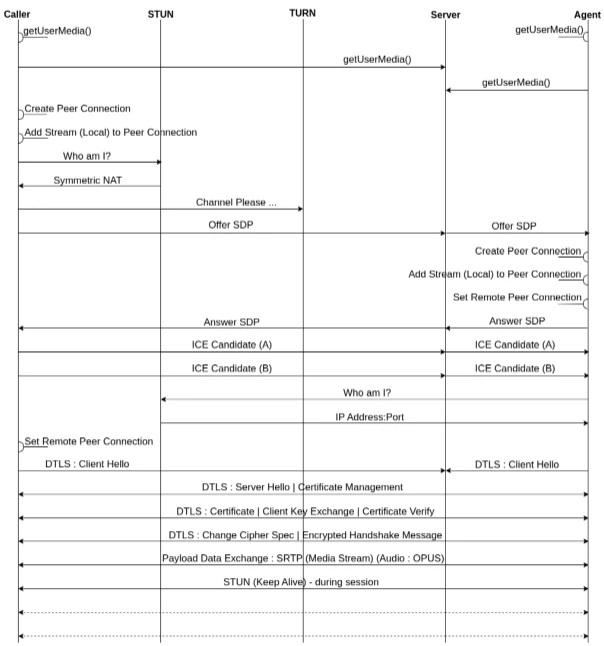
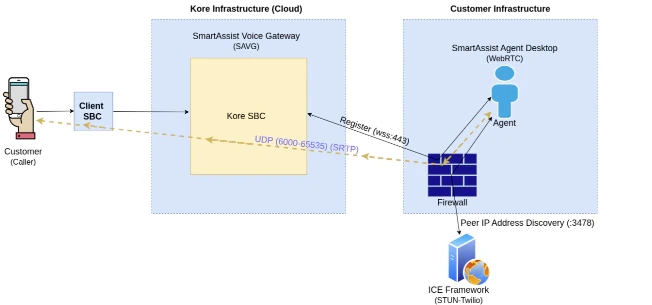
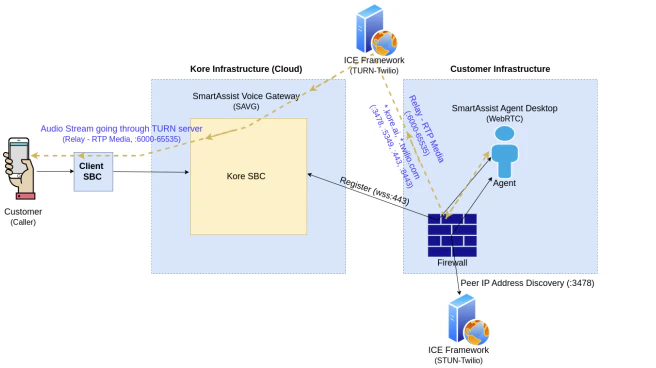
Our Cloud WebRTC (Agent Desktop) requires specific port and service configurations that must be considered before configuring a firewall in different network scenarios. The following diagrams show how to configure the ports and services for each scenario. When reviewing the diagrams to identify the one that best matches the WebRTC (Agent Desktop) setup, consider the following questions:- Are Kore.ai Cloud Voice Edges used?
-
Are agents:
- Inside the same network or firewall as the Edges?
- Outside or in a separate network or firewall from the Edges?
- In both locations (some inside and some outside)?
- Is the firewall configured as Endpoint Dependent (Symmetric) or Endpoint Independent (Asymmetric)?
Call Flow
Agent Desktop Architecture (Client Inside Firewall-Asymmetric NAT)
Agent Desktop Architecture (Client Inside Firewall-Symmetric NAT)
Firewall Requirements
User Diagnostics
If connectivity issues, screen freezing, or lag occur in Agent Desktop, perform the following troubleshooting steps:- First, verify the network connection. This applies whether working in the office or remotely.
- Ensure the network strength meets our defined parameters. See Minimum System Requirements and Supported Browsers for reference.
- After completing these steps, run User Diagnostics.