

Key Benefits
Access Evaluation Metrics
Navigate to Quality AI > Configure > Evaluation Forms > Evaluation Metrics.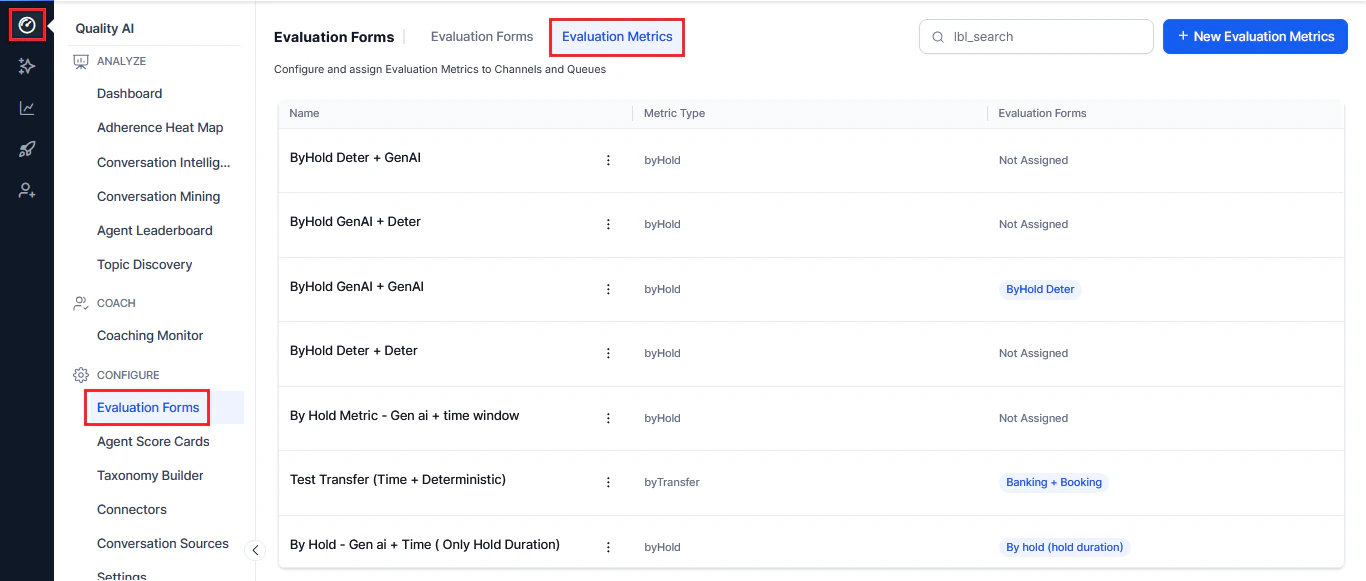
Create New Evaluation Metric
- Select the Evaluation Metrics tab.
- Select + New Evaluation Metrics.
- Choose an Evaluation Metrics Measurement Type.
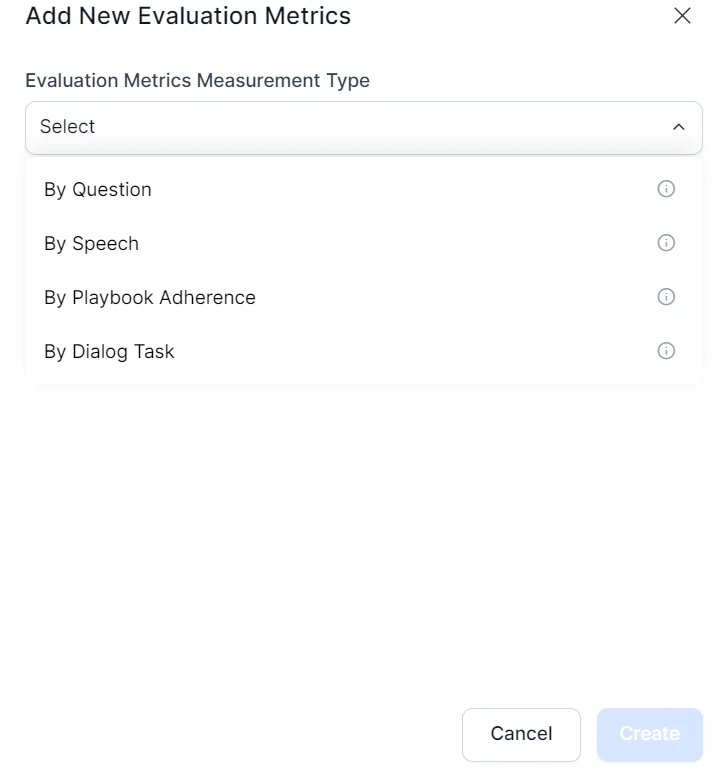
Measurement Types
By Question
Evaluates adherence to specific questions asked or answered during interactions. Key features:- Static Adherence: Applies to all conversations
- Dynamic Adherence: Conditional evaluation triggered by specific events
- GenAI Detection: Contextual understanding with no training samples required
- Deterministic Detection: Semantic matching using predefined patterns
- Flexible thresholds: Set different similarity scores per use case
By Speech
Analyzes speech characteristics during voice interactions. Key features- Crosstalk: Detects overlapping speech with configurable thresholds
- Dead Air: Monitors silence periods (configurable duration)
- Speaking Rate: Tracks Words Per Minute (WPM)
By Value
Verifies customer-specific information shared by an agent with trusted data sources. Key features:- API integration: Real-time verification with CRM and external systems
- Business rules engine: Five rule types (first/last value, negotiated, strict matching, custom)
- Compliance tracking: Detects deviations from expected values
- Audit trails: Logs validation results for supervisory review
By Dialog Task
Assesses completion and quality of specific tasks or workflows within a conversation. Key features:- Dialog agent selection: Choose which dialog agent to evaluate
- Evaluation scope: Entire conversation or time-bound segment
- Time parameters: Configurable in seconds (voice) or message count (chat)
By Playbook Adherence
Measures how well interactions follow predefined playbooks or procedures. Key features:- Entire Playbook: Assesses adherence across all playbook components
- Specific Steps: Targets evaluation at specific stages or steps
- Percentage thresholds: Define minimum adherence levels required
By AI Agent
Uses AI agents for sophisticated, multistep evaluations with autonomous decision-making. Key features:- Complex analysis: Multi-step reasoning across conversation elements
- Domain expertise: Supports specialized evaluation contexts (compliance, technical support)
- Contextual understanding: Nuanced evaluation requiring full conversation context
- Advanced decision-making: Goes beyond pattern matching for judgment calls
By Manual Evaluation
Manual Evaluation metrics enable QA teams to assess agent performance through human-led reviews, especially in scenarios where automated detection is less reliable. QA managers configure these metrics in the form, assigning a weight only in points. Key features:- Human-Driven Assessment: QA auditors evaluate metrics manually, without Auto QA involvement.
- Points-Based Only: Available only within points-based evaluation forms to ensure accurate scoring allocation.
- No AI Dependency: Independent of GenAI, deterministic detection, triggers, and adherence thresholds.
- Clear Visual Identification: Displays distinctly across Audit screens, Conversation Mining, Heatmaps, and Reports with the suffix (Manual Evaluation Metric).
By Hold
Evaluates how well agents manage customer hold scenarios during voice interactions, ensuring proper communication, timing, and resumption behavior. Key Features:- Static Adherence: Applies consistently to all conversations with hold events
- Event-driven Evaluation: Triggers automatically when hold events occur via telephony integration
- Multi-instance Detection: Evaluates multiple hold events within a single interaction
- GenAI Detection: Contextual, flexible evaluation using LLM-based understanding
- Deterministic Detection: Embedding-based semantic matching using predefined utterances
- Configurable Sub-criteria: Assess hold notification, duration compliance, and call resumption
- Flexible Thresholds: Defines similarity scores, hold duration limits, and evaluation windows
- Weighted Scoring: Assigns percentage-based contributions to each sub-criterion
By Transfer Etiquette
Evaluates how well agents communicate with customers before initiating internal transfers during voice interactions, ensuring consistent transfer etiquette and maintaining service quality throughout the handoff. Key Features:- Customer Notification: Verifies that agents notify customers before initiating a transfer.
- Reason Explanation: Checks whether agents explain why the transfer is necessary.
- Destination Information: Evaluates how agents communicate the transfer destination to customers.
- Transfer Detection: Automatically detects transfer events and evaluates multiple transfers within a conversation.
- GenAI Detection: Uses contextual LLM-based analysis to evaluate transfer etiquette.
- Deterministic Detection: Uses embedding-based semantic matching with predefined utterances.
- Configurable Detection Window: Evaluates the last utterance or agent utterances within a configurable time window before the transfer.
Edit or Delete Evaluation Metrics
- Search the required metric to update.
- Select the ellipsis (⋮) menu.
- Choose Edit to modify or Delete to remove the metrics.
- Select Update to save changes.