

- Enable or disable conversation sources.
- Configure and manage voice and chat queues.
- View queue details, including queue name, queue ID, system-generated ID, and assigned agents.
- Add or edit queues.
- Assign agents to Agent AI and Quality AI Express queues through the UI.
- View queue details, including queue name, queue ID, system-generated queue ID, and assigned agents.
- Configure whether Agent AI processes conversations when the AgentAI widget is turned off.
Access Conversation Sources
Navigate to Quality AI > Configure > Conversation Sources.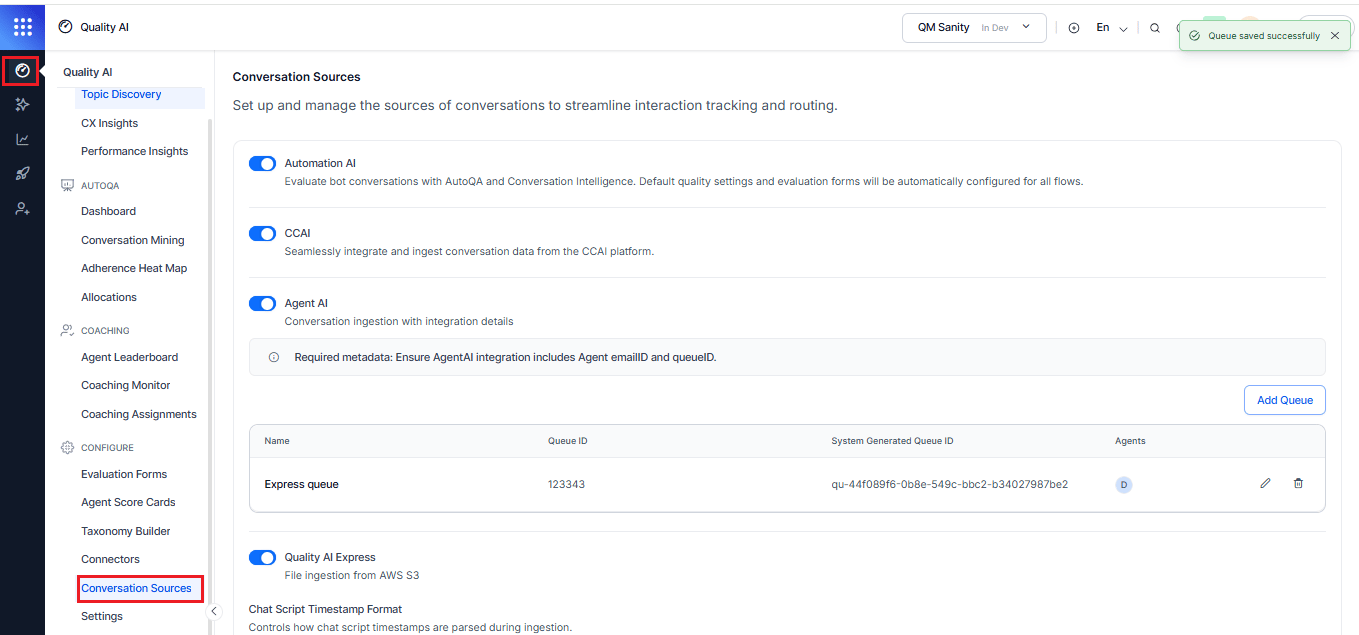
Supported Conversation Sources
Quality AI supports three conversation sources, each designed for specific deployment scenarios and organizational needs.Automation AI
Automation AI provides AI Agent conversations from Automation AI Experience Flows for evaluation and analytics in Quality AI.
When Enabled
- Makes Automation AI Experience Flows available for AI Agent evaluation form assignments.
- Enables ingestion and processing of Automation AI conversations for supported Quality AI capabilities.
Contact Center AI (CCAI)
Contact Center AI (CCAI) ingests real-time conversation data from the CCAI platform for evaluation and analytics.When Disabled
Stop processing incoming interactions from CCAI on third-party desktops.Limitation
- Configure queues and assign agents through existing CCAI workflows and APIs.
- Queue management through the Conversation Sources UI isn’t supported.
Agent AI
Agent AI processes human-agent conversations enhanced with AI assistance, including conversations recorded through Agent AI on third-party desktops.Configure Agent AI
- Turn on Agent AI.
-
Verify the required integration metadata:
emailIDandqueueID. - Optionally turn on Process Conversations When AgentAI Widget is Off to process Agent AI conversations even when the AgentAI widget is turned off.
- Review the configured queues displayed under Agent AI.
- Use Add Queue to create a new queue or select the edit action for an existing queue.
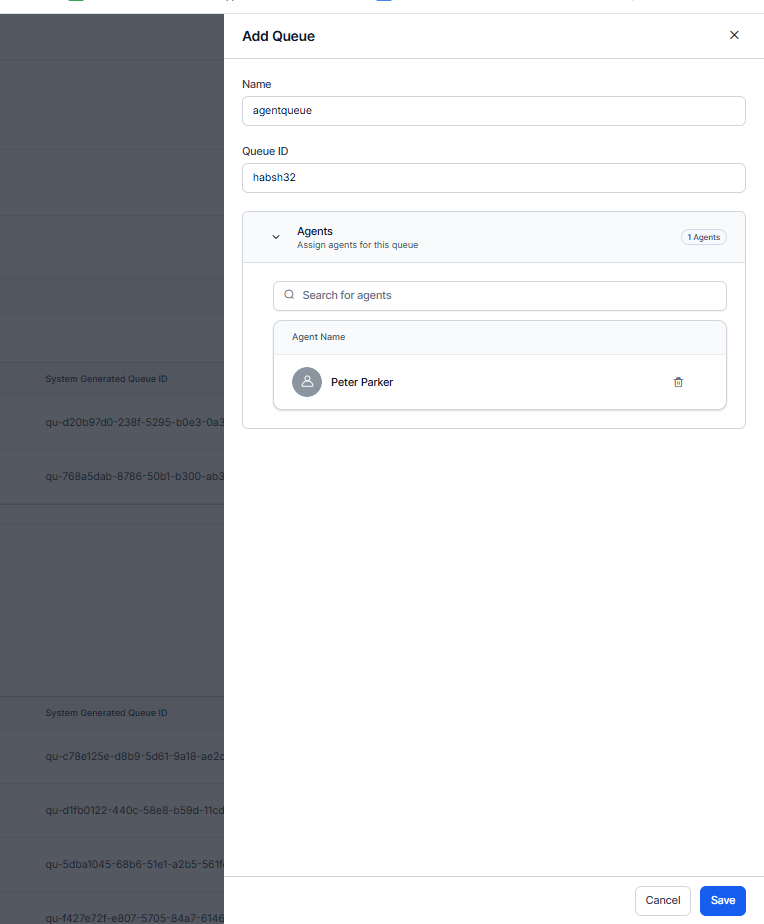
Add a Queue
- Select Add Queue.
- Enter a Name for the queue.
- Enter the Queue ID.
- Review the System Generated Queue ID. The system generates this value automatically.
- Expand Agents and search for agents.
- Select the agents to assign to the queue.
- Select Save.
Edit a Queue
- In the Agent AI queue list, locate the queue you want to modify.
- Select the Edit icon.
- Update the queue name or queue ID, as applicable.
- Add agents using the agent search field or remove assigned agents.
- Select Save to save the queue configuration.
Delete a Queue
- In the Agent AI queue list, locate the queue you want to remove.
- Select the Delete icon.
- Complete the confirmation step, if prompted.
Process Conversations When Agent AI Widget is Off
By default, Quality AI processes only Agent AI conversations where the Agent AI widget is turned on. To process Agent AI conversations even when the AgentAI widget is turned off:- Turn on Agent AI.
- Turn on Process Conversations When AgentAI Widget Is Off.
- Quality AI processes eligible Agent AI conversations regardless of whether the AgentAI widget is turned on or off.
The Agent AI integration must include the agent
emailID and the queueID. Quality AI displays this requirement under the Agent AI source.What Quality AI Captures
When you turn on this setting, Quality AI receives events from Agent AI for conversations where the widget is turned off. Quality AI captures and stores the events and metadata, including all custom data fields such as queue ID, agent ID, and custom fields, for processing. The setting applies to both real-time and scheduled processing configurations.Identify Widget-Off Conversations
Quality AI processes widget-off conversations with the other Agent AI conversations. Use these locations to identify them:Queue Lists
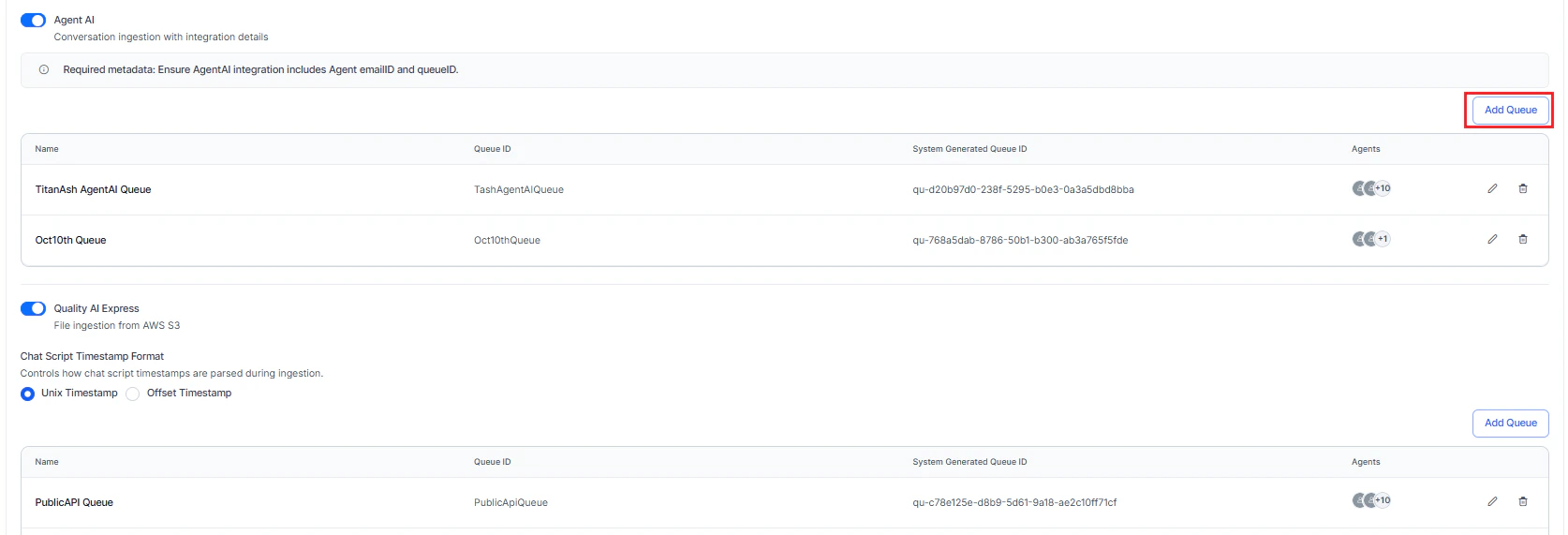
Agent AI and Quality AI Express each list their queues in a separate table with independent pagination. Paging through the queues for one source doesn’t change the page for the other source.When Disabled
Stop processing incoming interactions from Agent AI on third-party desktops.Conversation Event Webhook Requirements
For third-party desktop conversations recorded through Agent AI, the Agent AI Webhook API must include the following mandatory participant custom fields.
These fields are mandatory. Quality AI uses them to identify the agent and queue, associate the interaction with the configured evaluation form, and process third-party desktop conversations.
For more information, refer to the Agent AI - Webhook API.
Quality AI Express
Quality AI Express imports conversations from external sources through AWS S3 Connectors for evaluation and analysis. It supports service records, chat logs, emails, audio recordings, and related metadata files.Integration
Use AWS S3 Connectors as the primary mechanism for importing conversations into Quality AI.Configuration Requirements
Before You Begin
Before configuring Conversation Sources:- Assign the appropriate user permissions.
- Verify that the required metadata structures exist.
- Confirm that the integration endpoints are available.
Before Activating Quality AI Express
Complete the following steps before activating Quality AI Express:- Remove all active Playbook metrics from evaluated form queues.
- Remove all active Dialog Task metrics from evaluated form queues.
Conversation Sources Interface
The Conversation Sources page displays all enabled conversation sources and their associated queues.When Enabled
- Display Connectors in the Quality AI navigation panel after enabling Quality AI Express.
- Refresh or re-sync queues to view agent assignments made through public APIs.
Interface Elements
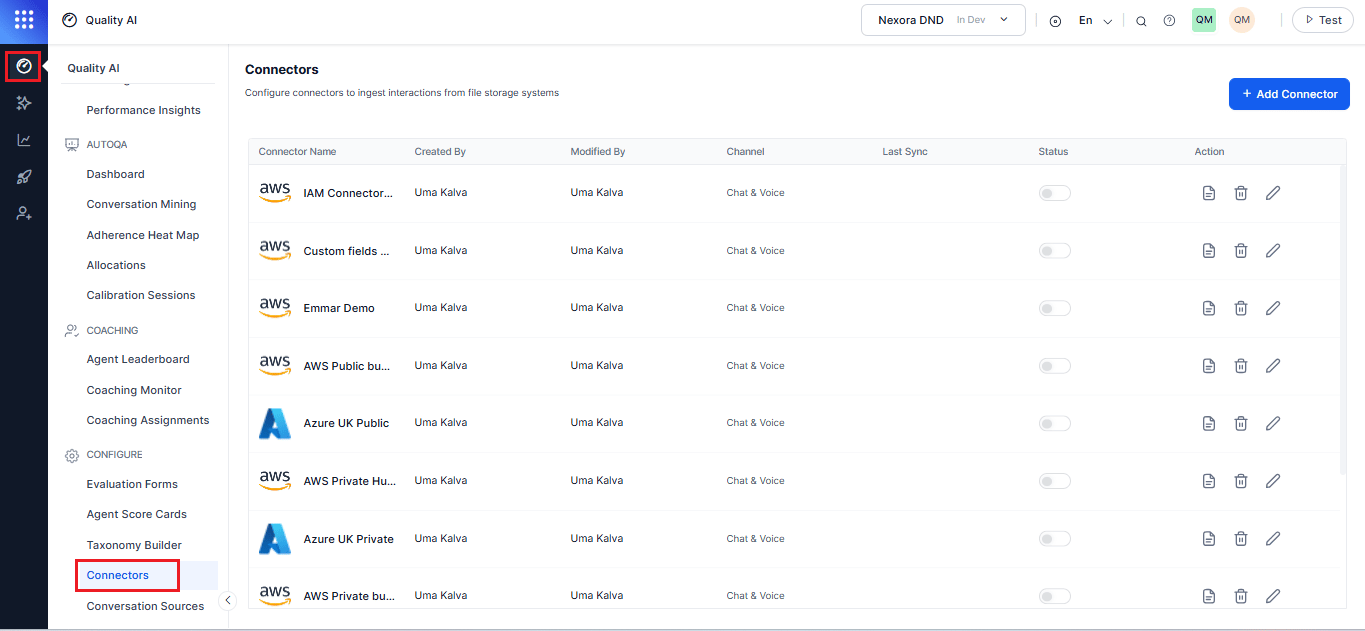
Queue Management
Configure queues for Agent AI and Quality AI Express to route conversations correctly.Add a Queue
- Navigate to Quality AI > Configure > Conversation Sources.
- Enable Agent AI, Quality AI Express source, or both.
- Select Add Queue.
-
Enter the following details:
-
Select Save to start or update conversation ingestion for the queue.
Conversation Agent–Queue Mapping
This describes the agent-to-queue mapping for both Quality AI Express queues and Agent AI queues. Using the UI, agents can map directly to Express queues, and the system successfully saves the configuration. To enable interaction evaluation and Kore score validation, you can attach each mapped queue to the relevant evaluation form. This setup associates imported interactions with the appropriate evaluation form for scoring and reporting. The system displays interactions only when all the following conditions apply:- The queue maps to an evaluation form.
- The agent maps to the queue using the UI.
- The supervisor or agent viewing the data belongs to the same queue.
Applies To
- Agent AI
- Quality AI Express
Limitations
- Agent-to-queue mapping through the UI applies only to Agent AI and Quality AI Express.
- Contact Center AI (CCAI) queue configuration, routing, and agent assignment continue to follow existing CCAI workflows.
- Assign agents created through platform-level user administration or public APIs.
Requirement
For third-party desktop conversations recorded through Agent AI, the Agent AI Webhook API must provide the configuredqueueId, queueName, and agentEmail. Queue mapping and evaluation depend on these values.
Chat Script Timestamp Format
Chat Script Timestamp Format controls how Quality AI Express parses timestamps in chat conversation files during ingestion. Each chat script contains multiple timestamps per message. Correct configuration ensures accurate message sequencing, duration calculations, and time-based analytics. Enables you to configure the timestamp format at the Quality AI Express app level, and it applies to all ingested chat files. The system persists the selected format across sessions and displays it consistently in the Conversation Sources tab.Why timestamp format matters
- Orders messages chronologically
- Calculates conversation duration and response times
- Identifies hold periods and transfer events
- Generates time-based analytics and reports
Supported Timestamp Formats
Unix Timestamp
Represents the number of seconds since the Unix epoch. Quality AI supports Unix timestamps with start and end time validation. This format limits flexibility for third-party desktop integrations.- Format: Integer or decimal number
- Examples:
1735574400or1735574400.523
Offset Timestamp
Represents the elapsed time from the start or end of a conversation. Quality AI supports message-level offset timestamps without validating the conversation start or end time. This format applies only to chat conversation ingestion and doesn’t affect voice conversation ingestion.- Format: Integer or decimal number
- Examples:
0(start),45(45 seconds in),120.5(2 min 0.5 sec in)
Conversation Source Behavior
Access Control
Disabling Quality AI Express hides the following CCAI metrics:
- Compare functionality
- Contact Center Efficiency
- Agent Efficacy (including CSAT)
- Agent Performance Monitor (Occupancy, Playbook Adherence)
- Customer Experience (Average Wait Time, NPS Score)
- Interaction Details (Dispositions)