Configuration
To add the Cisco Jabber channel, follow the below steps:- Select the assistant that you want to add the Jabber channel to.
- Go to Channels & Flows > Channels > Digital > All.
- Click the Jabber icon. The Jabber Channel page is displayed.
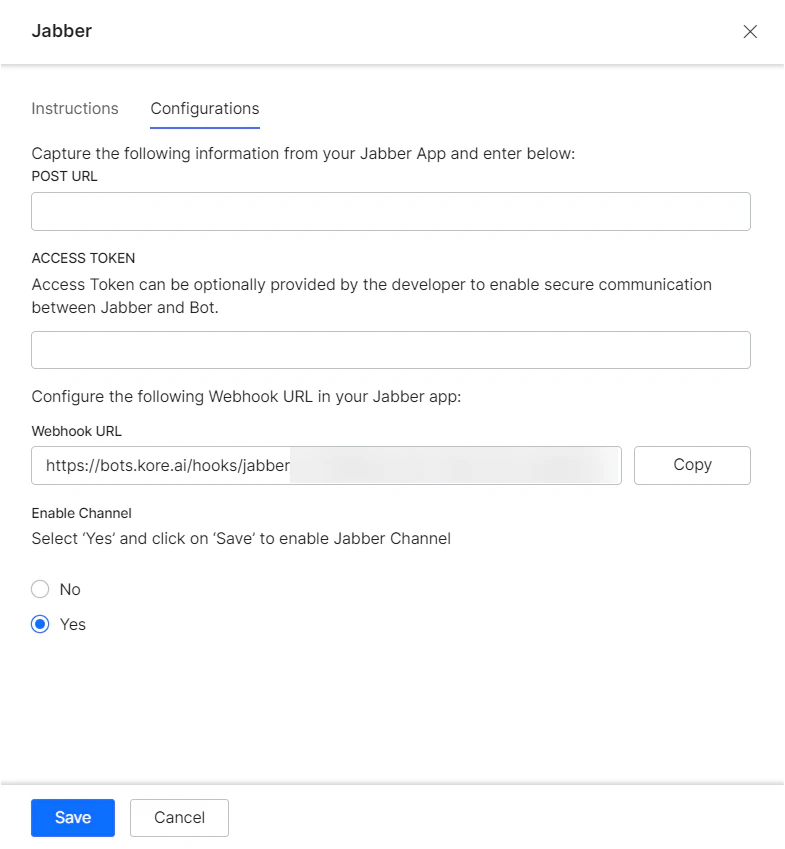
- To enable a webhook integration on your Jabber application, log into your Jabber app. Copy the Webhook URL from the Configurations tab on the Jabber channel page and enter the Webhook URL field in the Jabber app for integration.
- Go to the Configurations tab on the Jabber channel page to complete the channel setup.
- Capture the POST URL details from your Jabber app and enter them in the POST URL field.
- You can also optionally generate and capture the Access Token details from your Jabber integration and enter in the Access Token field to enable secure communication between Jabber and the AI Agent.
- Select Yes and click Save to enable Jabber Channel.