

Default Conversation Types
Standard Responses
The Platform displays pre-defined text responses to users based on events, conditions, triggers, or user input. For example, when a user says Hi!, the AI Agent randomly selects from responses like Hi!, Hello, Hi there!, or Hey. You can modify these defaults and add channel-specific overrides. For example, in an SMS channel, you may want shorter responses to reduce data usage.Access Standard Responses
Go to Conversation Intelligence > Conversation Management > Standard Responses. Standard responses are organized into the following categories:Add or Edit a Response
- Select a category tab (for example, Greeting) and hover over the target situation.
- Click Add Response.
-
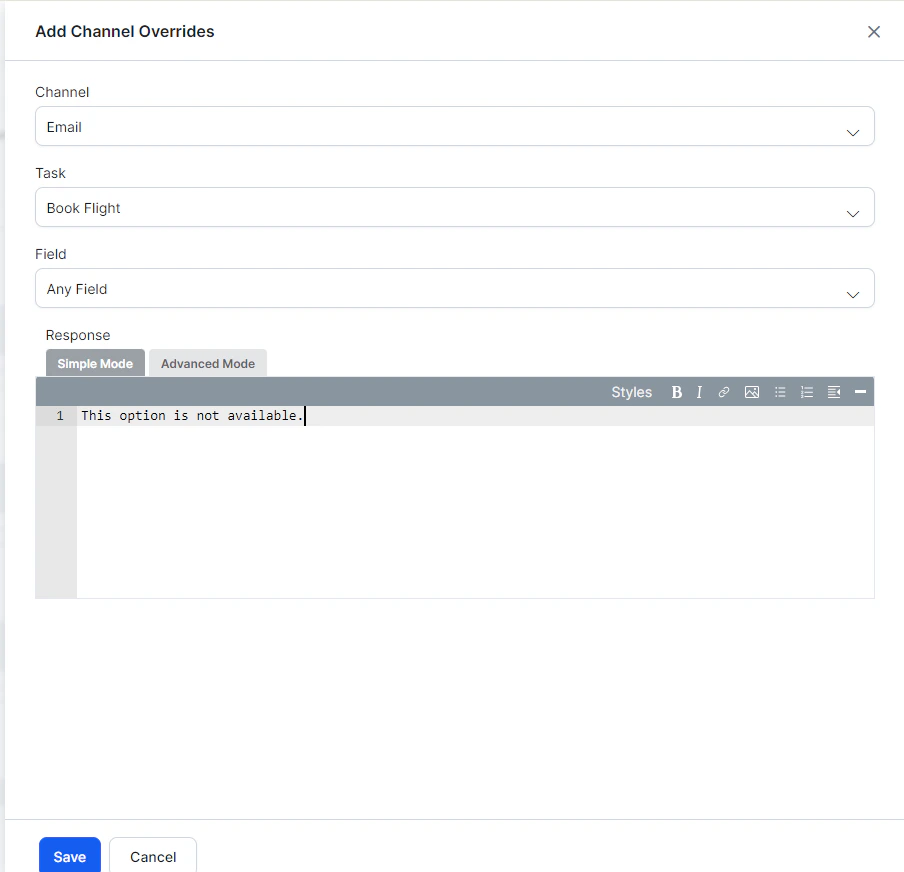
In the Add Channel Overrides dialog:
- Select a channel from the dropdown (or Any Channel to apply to all).
- For channel-specific responses, select a task and optionally a field.
-
In the Response editor:
- Simple Mode — Enter plain text with optional formatting (bold, italics, links, lists).
- Advanced Mode — Enter JavaScript for channel-specific message formats. Use
response.messageto return the default message string andresponse.choicesto return the options array.
- Click Done to save.