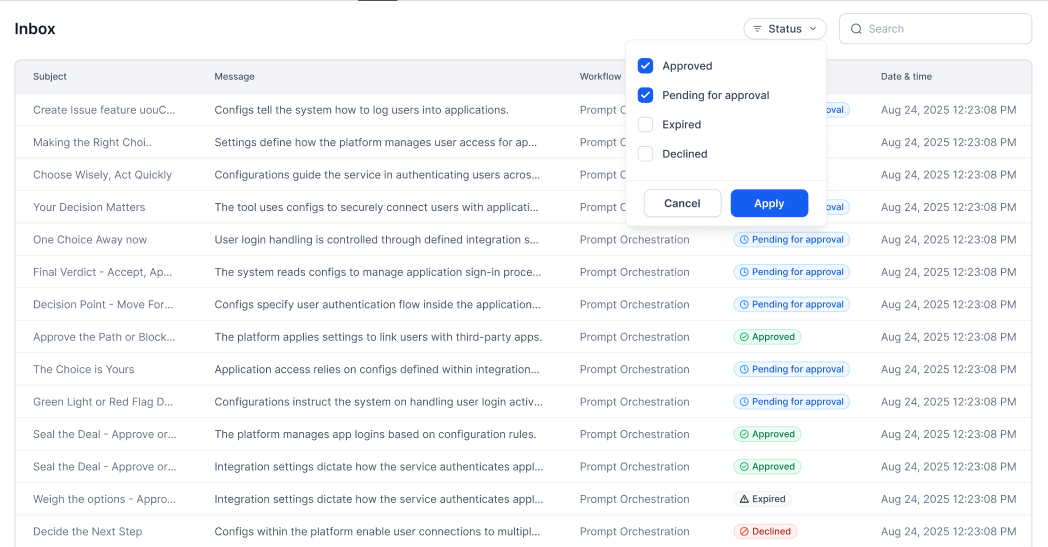
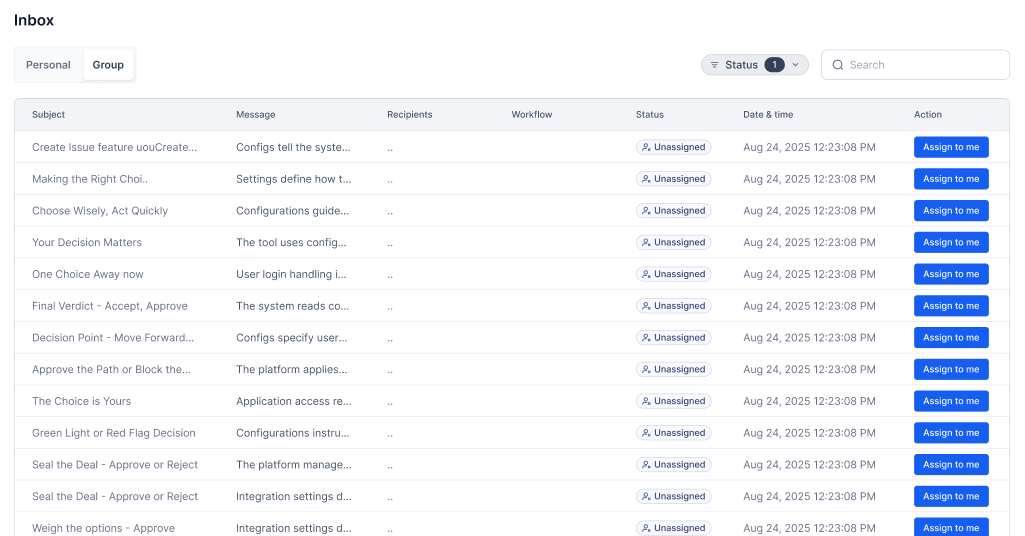
The Inbox provides a centralized queue for human tasks:
Review AI-generated outputs
Approve workflow decisions
Provide missing information
Handle exceptions and escalations
How It Works
┌─────────────────────────────────────────────────────────────────┐
│ Workflow Execution │
└─────────────────────────────────┬───────────────────────────────┘
│
▼
┌─────────────────────────────────────────────────────────────────┐
│ Human Node │
│ (Requires human action) │
└─────────────────────────────────┬───────────────────────────────┘
│
▼
┌─────────────────────────────────────────────────────────────────┐
│ Inbox │
│ │
│ ┌─────────────────────────────────────────────────────────┐ │
│ │ Task: Review Invoice Extraction │ │
│ │ Workflow: Invoice Processor │ │
│ │ Priority: High │ │
│ │ Due: 2024-01-15 5:00 PM │ │
│ │ │ │
│ │ Invoice #: INV-12345 [Edit] │ │
│ │ Amount: $1,250.00 [Edit] │ │
│ │ Vendor: Acme Corp [Edit] │ │
│ │ │ │
│ │ [Approve] [Reject] [Request Changes] │ │
│ └─────────────────────────────────────────────────────────┘ │
│ │
└─────────────────────────────────────────────────────────────────┘
│
▼
┌─────────────────────────────────────────────────────────────────┐
│ Workflow Continues │
└─────────────────────────────────────────────────────────────────┘
For details, see Human node .
Inbox Interface
Task List
View and manage pending tasks:
Column Description Task Task name and description Workflow Source workflow Priority High, Medium, Low Due Deadline for completion Assigned Current assignee Status Pending, In Progress, Completed
Filters
Filter tasks by:
Workflow name
Priority level
Due date range
Assignee
Status
Tags/labels
Search
Search tasks by:
Task content
Workflow ID
Custom fields
Notes
Task Types
Review Task
Review and optionally edit AI-generated content:
Task : Review Document Summary
Type : review
Fields :
- name : original_document
type : document
readonly : true
- name : ai_summary
type : text
editable : true
label : "AI Generated Summary"
- name : confidence_score
type : number
readonly : true
Actions :
- approve
- edit_and_approve
- reject
See all 17 lines
Approval Task
Binary decision with optional comments:
Task : Approve Expense Report
Type : approval
Fields :
- name : expense_details
type : structured_data
readonly : true
- name : total_amount
type : currency
readonly : true
- name : comments
type : text
optional : true
Actions :
- approve
- reject
Required :
- comment_on_reject : true
See all 17 lines
Collect information from humans:
Task : Provide Missing Information
Type : input
Instructions : |
The AI couldn't extract the following fields.
Please provide the missing information.
Fields :
- name : vendor_address
type : address
required : true
- name : payment_terms
type : dropdown
options :
- Net 30
- Net 60
- Net 90
required : true
See all 16 lines
Classification Task
Categorize or label content:
Task : Classify Support Ticket
Type : classification
Fields :
- name : ticket_content
type : text
readonly : true
- name : category
type : single_select
options :
- Technical Support
- Billing
- Sales
- General Inquiry
required : true
- name : priority
type : single_select
options :
- High
- Medium
- Low
required : true
See all 21 lines
Assignment
Assignment Rules
Configure how tasks are assigned:
Assignment Rules :
# Assign to specific role
- condition : task_type == "approval"
assign_to :
role : approver
# Assign based on workflow data
- condition : amount > 10000
assign_to :
role : senior_approver
# Round-robin assignment
- condition : default
assign_to :
role : reviewer
strategy : round_robin
See all 16 lines
Manual Assignment
Reassign tasks:
Open task details
Click Reassign
Select new assignee
Add optional note
Confirm reassignment
Self-Assignment
Allow users to claim tasks:
Self-Assignment :
enabled : true
max_concurrent : 5
claim_action : "Take Task"
SLAs and Escalation
SLA Configuration
Set time-based expectations:
SLA :
warning :
threshold : 4h
action : notify_assignee
critical :
threshold : 8h
action : notify_supervisor
breach :
threshold : 24h
action : escalate
See all 10 lines
Escalation Rules
Automatic escalation when deadlines approach:
Escalation :
- level : 1
trigger : sla_warning
action :
notify :
- assignee
highlight : true
- level : 2
trigger : sla_critical
action :
notify :
- assignee
- supervisor
reassign_to : supervisor
- level : 3
trigger : sla_breach
action :
notify :
- assignee
- supervisor
- manager
reassign_to : manager
priority : high
See all 25 lines
Notifications
Notification Channels
Channel Events Email New task, approaching deadline, escalation In-app All task events Slack Configurable events Webhook All events for integration
Configuration
Notifications :
new_task :
channels : [ email , in_app , slack ]
template : new_task_notification
deadline_warning :
channels : [ email , in_app ]
template : deadline_warning
escalation :
channels : [ email , in_app , slack ]
template : escalation_notice
See all 10 lines
Bulk Actions
Batch Processing
Process multiple tasks at once:
Action Description Bulk approve Approve multiple tasks Bulk assign Assign tasks to user Bulk prioritize Update priority Bulk tag Add labels
Batch Configuration
Bulk Actions :
allowed :
- approve_all
- assign
- update_priority
require_confirmation : true
max_batch_size : 50
Analytics
Inbox Metrics
Metric Description Queue depth Tasks waiting Avg completion time Time to complete SLA compliance % within SLA Throughput Tasks completed/day
Metric Description Tasks completed Per user Avg time Per task type Accuracy If tracked SLA rate On-time completion
Best Practices
Task Design
Keep tasks focused and clear
Provide sufficient context
Include original data for reference
Set realistic deadlines
Assignment
Balance workload across team
Match skills to task types
Use escalation for blockers
Monitor queue health
User Training
Train users on task types
Provide guidelines for decisions
Share examples of good completions
Collect feedback for improvements