> ## Documentation Index
> Fetch the complete documentation index at: https://koreai.mintlify.site/llms.txt
> Use this file to discover all available pages before exploring further.
# Using the BotKit SDK
[Back to BotKit SDK Overview](/ai-for-service/sdk/botkit-sdk)
The BotKit SDK is a set of Node.js libraries that let you intercept and customize messages and webhook events in Platform dialog tasks. It's the integration layer between your server and the Platform.
**Common reasons to use BotKit:**
* A user asks a question the bot isn't designed to answer.
* A user explicitly requests a human agent.
* Your dialog flow transfers to a live agent based on a condition (user type, tone analysis, etc.).
***
## How It Works
### Messaging
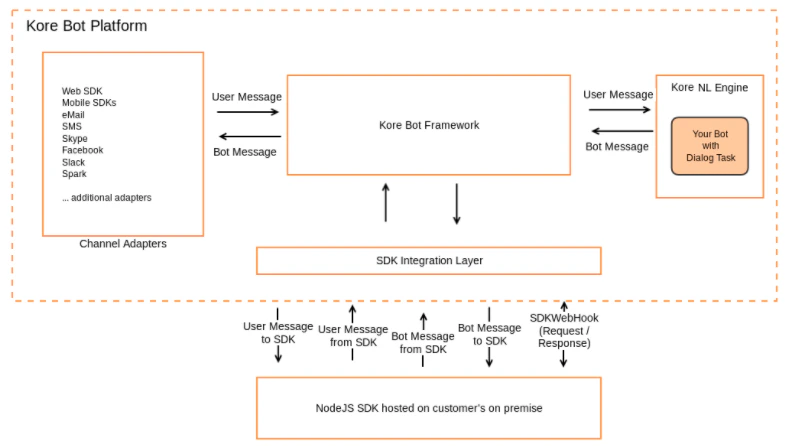
Every message — both user input and bot responses — is sent to the BotKit SDK as a message event. BotKit sits in the message path and can modify or reroute messages before they reach the user or the Platform.
 ### Feedback Surveys
When a feedback survey is active on a channel (NPS, CSAT, Thumbs-up/down), all survey messages between the user and bot are also sent to BotKit as message events.
### Webhooks
Add a Webhook node in a dialog task flow when you need server-side validation, business logic execution, or a backend call. When the NL Engine reaches a Webhook node, it triggers an `on_webhook` event in BotKit.
### Feedback Surveys
When a feedback survey is active on a channel (NPS, CSAT, Thumbs-up/down), all survey messages between the user and bot are also sent to BotKit as message events.
### Webhooks
Add a Webhook node in a dialog task flow when you need server-side validation, business logic execution, or a backend call. When the NL Engine reaches a Webhook node, it triggers an `on_webhook` event in BotKit.
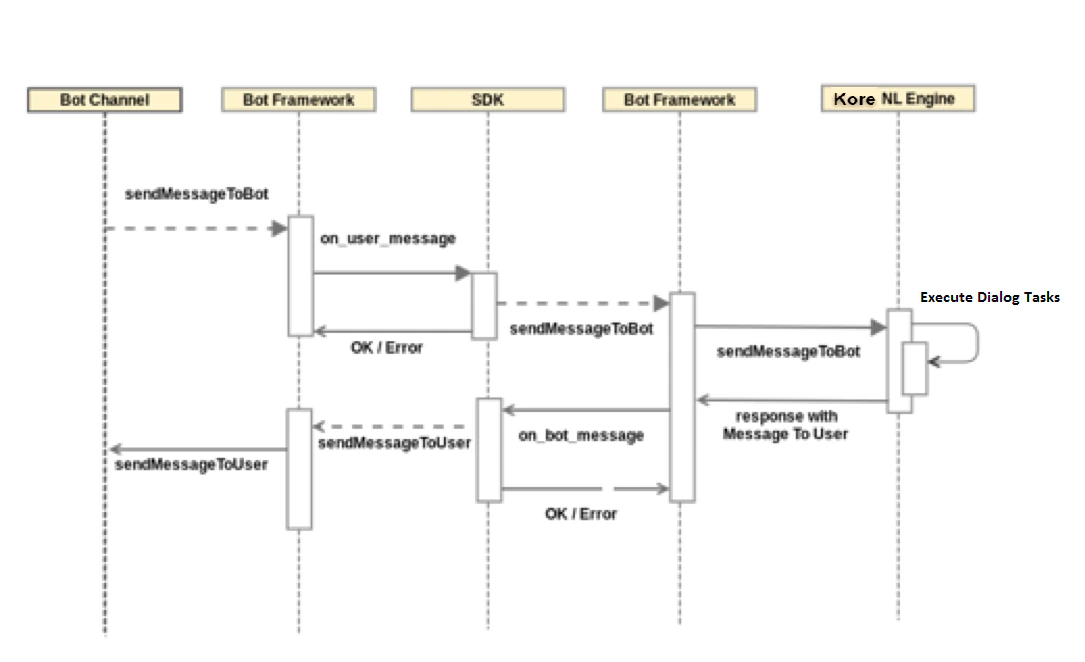 BotKit responds either:
* **Synchronously** — `callback(null, payload)` — when the logic completes quickly.
* **Asynchronously** — `callback(null, new sdk.AsyncResponse())` returns HTTP 202, then calls `sdk.respondToHook(payload)` when ready.
BotKit responds either:
* **Synchronously** — `callback(null, payload)` — when the logic completes quickly.
* **Asynchronously** — `callback(null, new sdk.AsyncResponse())` returns HTTP 202, then calls `sdk.respondToHook(payload)` when ready.
 ### Agent Transfer
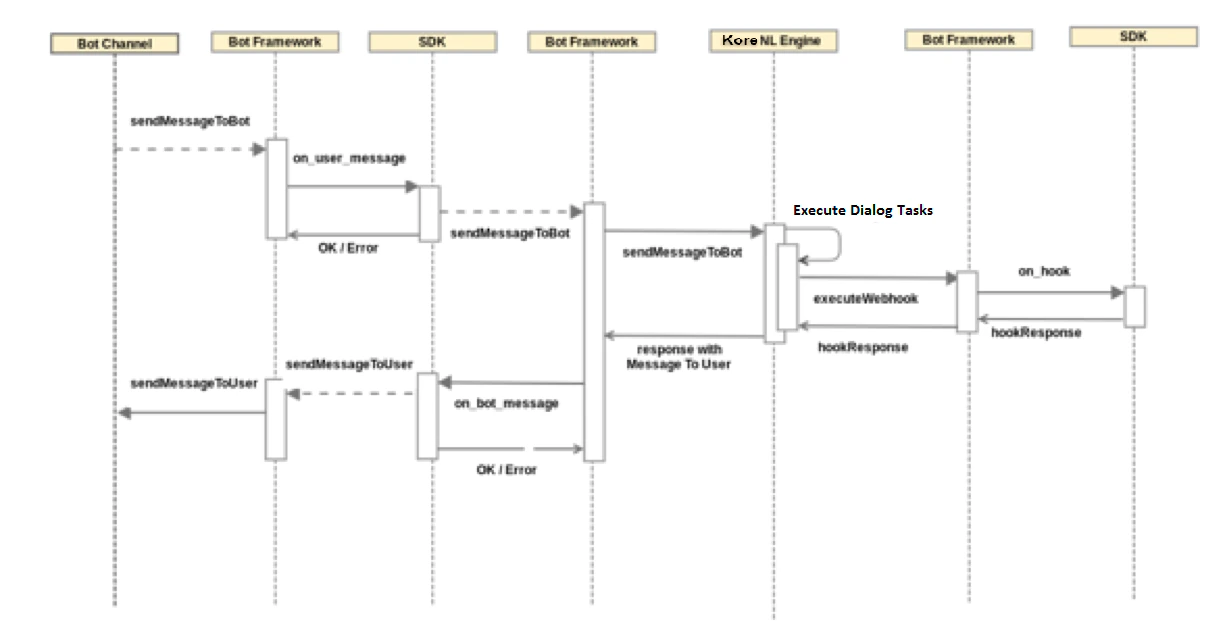
When an Agent Transfer condition is met, the Platform connects to your BotKit and initializes the live chat. BotKit manages the handoff, bridging the user and agent until the agent closes the session.
### Agent Transfer
When an Agent Transfer condition is met, the Platform connects to your BotKit and initializes the live chat. BotKit manages the handoff, bridging the user and agent until the agent closes the session.
 ***
## Setting Up Agent Transfer
1. Go to **Build > Integrations > BotKit** in the Platform.
RS256 and RS512 JWT signing algorithms aren't supported for BotKit.
2. Define the **Callback URL** and generate **Client ID** and **Client Secret**. Enable **OnAgentTransferNode**.
3. Define transition conditions in your dialog flow to trigger the transfer.
4. Add an Agent Transfer node in the dialog.
For a step-by-step walkthrough, see [BotKit SDK Tutorial — Agent Transfer](/ai-for-service/sdk/tutorials/agent-transfer#botkit-sdk-tutorial-agent-transfer).
***
***
## Setting Up Agent Transfer
1. Go to **Build > Integrations > BotKit** in the Platform.
RS256 and RS512 JWT signing algorithms aren't supported for BotKit.
2. Define the **Callback URL** and generate **Client ID** and **Client Secret**. Enable **OnAgentTransferNode**.
3. Define transition conditions in your dialog flow to trigger the transfer.
4. Add an Agent Transfer node in the dialog.
For a step-by-step walkthrough, see [BotKit SDK Tutorial — Agent Transfer](/ai-for-service/sdk/tutorials/agent-transfer#botkit-sdk-tutorial-agent-transfer).
***