

v11.8.1 December 19, 2024
Patch Release This update include enhancement and bug fixes. The key enhancement included in this release is summarized below.Campaigns
Configure SIP Transfer Voice Numbers for SMS Campaigns This update allows supervisors to set up Twilio voice numbers in the generic SMS channel, enabling a single number to be used for both voice and SMS flows. Key Updates:- Twilio numbers purchased for voice can be configured in the generic SMS channel.
- The number can be attached to both a voice flow and an SMS flow.
- Voice flow is triggered when a customer calls the number.
- SMS flow is triggered when a customer texts the number.
- Currently, it only supports Twilio numbers in the generic SMS channel.
Flows
Configuring Bot Delay-Transfer to External Agent A new option is added to transfer calls to external agents if the bot fails to respond in time. When enabled, the following options are available:- BotNoInputTimeout: Timeout in seconds (default is 2 sec).
- BotNoInputSpeech/URL: Allows text or audio URL input (default is text).
- BotNoInputRetries: Number of retries (default is 2).
- BotNoInputGiveUpTimeout: Timeout in seconds (default if not provided).
- End the Call (default): Option to add a custom message.
- Transfer the Call: Option to add a custom message for external agent transfer.
v11.8.0 December 11, 2024
Minor ReleaseAgent Console
Keypad for IVR Navigation During Conference Calls Agents can now access a keypad during active conferences with DTMF (Dual-Tone Multi-Frequency) input in the conference call interface. The keypad allows agents to navigate through IVR menus and make IVR number calls without disrupting the main conference call. Depleting Timer Post Caller Disconnection A depleting timer is introduced on the call disconnected screen, prompting agents to either Call Back or End the call within a specified timeframe. This feature prevents agents from occupying slots indefinitely by enforcing timely action and enhancing productivity and slot availability. Administrators can enable this functionality through Agent Settings. By default, the timer is disabled for existing users. Enhanced Call Connection Calls now connect within 3 seconds when agents click the Accept button on their console. The default message,Thank you for waiting…, will only play after an agent successfully connects to the call.
Configuration
Custom Email Domain Configuration The enhanced email configuration options allow platform users to set up and manage Kore and custom domain email addresses. The options significantly expand email capabilities, allowing businesses to maintain brand consistency in their communications while leveraging the full features of Contact Center AI. Key Updates:- Kore Domain Email Management:
- Configure multiple Kore domain email addresses.
- Easy addition of new addresses via the “Add Email Address” button.
- Attach experience flows to specific email addresses.
- Custom Domain Setup:
- “Add Domain” button for custom email domain configuration.
- Domain ownership verification through email login test.
- Tabular display of custom domains with associated email addresses.
- Improved User Interface: Clear organization of Kore and custom domain settings.
- Blocklist Management: Administrators can specify blocklisted email addresses.
- Verification Process: The system checks incoming email addresses against the blocklist.
- Automated Response: Disables pre-configured automations for blocklisted addresses and prevents automated agent transfers for blocklisted interactions.
- Normal Processing: Non-blocklisted emails proceed through the usual automation and transfer processes.
Analytics
Enhanced Call Recording Download On the Dashboard > Interactions tab, supervisors now have two options to download call recordings:- Download as a single file,
- Download as separate files.
- Export PCAP
- Export TEXT
- Transcript Tab: When call recording is disabled in Agent Settings, no audio is available.
- Transcript Tab: When call recording is disabled, and media generation is in progress.
- Interactions Page: When call recording is disabled and users attempt to download the recording from the Actions menu, the “Media generation is in progress” message will also appear.
- Call Start and Call End timestamps.
- All other identifier information.
- Precise Timestamp
- Event Type
- Involved Agents/Supervisors
- Detailed Event Description
Voice Gateway (v0.9.3-rc4)
Wait Time for IP Whitelisting While Configuring SIP Transfer Users must wait for at least 10 minutes after saving their IPs to be whitelisted while configuring SIP Transfer. Session and Node Level Call Control Parameters Developers can now apply Call Control Parameters at the Session or Node level, offering more flexibility in managing call behavior.- Session-Level Parameters: Add the prefix “
session.” to apply parameters throughout the session (for example, “session.ttsprovider”). - Node-Level Parameters: Add the prefix “
node.” to apply parameters only at a specific node (for example, “node.ttsprovider”). - Default Behavior: Parameters without a prefix are considered session-level by default.
- Node-level parameters take precedence over session-level parameters. If no node-level parameters are defined, session-level properties will be applied.
- Matching Numbers: If the referred number matches a configured experience flow, Contact Center AI will trigger the corresponding flow.
- Non-Matching Numbers: Calls will be returned to the source (default behavior).
- User transferred to Agent (When the Automation transfers the voice call to Agent)
- User transferred to Automation (When the Agent transfers the voice call back to Automation)
- 4-5 (Excellent): Green
- 3-4 (Moderate): Orange
- 2-3 (Poor): Orange
- 1-2 (Very Poor): Red
v11.7.1 November 18, 2024
Patch Release This update includes bug fixes.v11.7.0 November 03, 2024
Patch Release This update includes enhancements and bug fixes. Key enhancements included in this release are summarized below.Agent Console
Preserve Agent’s Last Status To improve agent experience and maintain consistent availability, the agent’s last manually set status is now preserved across sessions. A chosen status (Available, Away, or Busy) is automatically restored when the agent:- Return from breaks,
- Complete outbound calls, or
- Switch from system-assigned states. .
- Agent Productivity and Data Accuracy: Agents can tag interactions as they happen, reducing the risk of oversight.
- Enhanced Filtering: Dispositions are integrated in real-time with dashboard filters, allowing users to track conversations with instant dashboard updates.
- See assigned agents immediately in the queue and agent tabs.
- Monitor conversations before the agent’s first response.
- View synchronized assignment updates across all tabs.
- Better workload monitoring.
- Improved resource allocation.
- Real-time conversation tracking.
Campaigns
SMS Campaigns - Advanced Message Option SMS Campaigns now support the Advanced Message format in addition to the Simple message format. With the Advanced message format, businesses can establish two-way communication with their end customers. Within the Advanced message format, you can associate an SMS Flow that can take the end customers through an automation journey, run dialog tasks, and connect to live agents if required.Voice Gateway
External Agent Transcription Control using SIP INVITE The newagentUtils.setExternalAgentTranscribe utility method helps manage transcription settings for external agents integrated via SIP INVITE. It allows transcription enablement or disablement during active calls on the Agent Assist platform.
Utility details:
- Function:
agentUtils.setExternalAgentTranscribe(param) - Supported in:
- Experience Flow script nodes
- Bot Builder Dialog Flows
- Voice Gateway integrations
- Enable/disable transcription during live calls.
- Adjust settings based on agent requirements.
- Configure language and provider preferences.
- Control transcription in temporary scenarios.
- Isolated conversation records.
- Separate call controls.
- Independent agent sessions.
Analytics
Queue Tracking Improvement Queue metrics now focus on live customer interactions, showing only active cases in the dashboards. Voicemails and callbacks are excluded from counts until an agent accepts them. Also, “Waiting” and “In Queue” queue labels are standardized across views to reflect this change for clearer monitoring. Revised Average Speed to Answer Calculation The Average Speed to Answer (ASA) calculation is refined to focus on initial customer wait times:- Only counts first queue entry.
- Excludes voicemails, callbacks, and outbound calls.
- Measures time until first agent response.
v11.6.1 October 21, 2024
Patch Release This update includes enhancements and bug fixes. Key enhancements included in this release are summarized below.Voice Gateway
Automatic IP Address Resolution for Fully Qualified Domain Names (FQDNs) Voice Gateway now automatically resolves IP addresses for specific Fully Qualified Domain Names (FQDNs), simplifying network configuration and secure domain access management. Key benefits:- Ease of use: Add FQDNs directly without manually entering multiple IP addresses for whitelisting.
- Efficiency: Reduces the need for ongoing manual updates as IP addresses change or expand for the associated domain.
v11.6.0 September 28, 2024
Minor Release This update includes enhancements and bug fixes. Key enhancements included in this release are summarized below.Agent Console
Enhanced Live Interaction Pane This update improves clarity and efficiency by visually distinguishing different types of incoming conversations and system messages, allowing agents to identify the nature of the request quickly.- New conversations, agent transfers, and supervisor transfers are differentiated on the conversation tray.
- System messages sent to the user are visually differentiated using a different color from those sent to an agent.
- Customer’s Name
- Time of submission
- View Form link
Analytics
Display Active Callback Requests on the Interactions Tab The Interactions tab now displays active call-back requests and ongoing interactions, ensuring supervisors can track and monitor these requests in real time. Supervisor Actions:- Assigning Call-Backs to Agents: Supervisors can manually assign call-back requests to available agents, streamlining the process and reducing wait times.
- Queue Management: Supervisors can change the queue for a call-back request, optimizing resource allocation and prioritizing customer interactions.
v11.5.1 September 14, 2024
Patch Release This update includes enhancements and bug fixes. Key enhancements included in this release are summarized below.Agent Console
Call Forwarding Source Selection The Agent Console now offers Call Forwarding Source Selection, allowing agents to choose the call source when forwarding calls. This feature integrates call history into the dialer tab, improving compatibility with outgoing targets and streamlining the call management workflow.v11.5.0 September 01, 2024
Patch Release This update includes enhancements and bug fixes. Key enhancements included in this release are summarized below.Agent Console
Outbound Calling - Revised Dialpad Behavior Agents now have more flexibility and validation options when dialing outbound calls. It streamlines the outbound calling process, giving agents more control and reducing potential mistakes when dialing international numbers. Key updates:- Automatic country code recognition:
- Displays country flag when number includes country code.
- Enhanced number entry options:
- Direct dialing without country code.
- Option to change country code to
unknown. - Automatic country selection for pasted numbers with codes.
- Improved validation:
- Error messages for invalid number formats.
- The call button is disabled for non-compliant numbers.
- Flexible country code handling:
- It supports dialing with or without country codes.
- Allows manual country code changes.
Configuration
New Permission for Sentiment Visibility Control The new permission to manage the visibility of captured customer sentiment in the Agent Console. It allows administrators to fine-tune sentiment visibility, balancing between providing agents with valuable customer insights and maintaining data privacy standards. Key updates:- Permission Details:
- Name: Visibility of Captured Sentiment
- Subtext: Manage the visibility of customer’s sentiment in the agent console
- Access Level: Yes/No
- Default Settings:
- Administrator, Supervisor, Agent: Set to “Yes”
- Custom Role: Default “Yes”
- Functionality:
- When enabled, it displays real-time sentiment changes in the header pane.
- Ensures agents have current information on customer sentiment.
- Expanded Participation:
- Up to 5 contact center participants (1 agent + 4 supervisors).
- Improved Network Resilience:
- In case of network disruption, only the affected participants are disconnected.
- Rejoin option for disconnected users.
- Comprehensive Recording:
- The recording status is updated in the database for compliance.
- Advanced Conference Management:
- Transfer and exit options for all participants.
- 5-second window to rejoin or close conversation after exit.
- Enhanced Accountability:
- CSAT linked to the last handling agent.
- The primary agent is responsible for After-Call Work (ACW).
- Improved Visibility:
- Joined participants are highlighted in the chat transcript.
- Clear conference indicators on the Monitor tab and Agent Console.
Analytics
“Yesterday” Filter Added to Reports The “Yesterday” date filter is now available in all reports that previously didn’t have this option. Users can quickly view and analyze data from the previous day without manually setting the date range. When the “Yesterday” filter is selected in any report, it automatically includes all data from the previous day, from 12:00.00 AM to 11:59:59.999 PM. “Week to Date” and “Month to Date” Filters Added to Reports This update has introduced two new date filters for reports. The filters provide more flexible and standardized options for viewing recent data, facilitating easier trend analysis and performance tracking.- “Week to Date” Filter (All Reports):
- Covers from most recent Sunday 12:00 AM to Yesterday 11:59:59.999 PM
- Available in all reports.
- No data is returned if it runs on a Sunday.
- “Month to Date” Filter (Specific Reports):
- Added to 11 key reports, including Agent Activity, Queue Metrics, and IVR Containment.
- Covers from the first day of the current month 12:00 AM to Yesterday 11:59:59.999 PM.
- No data will be returned if run on the first day of the month.
- Interactions Dashboard:
- The new “Joined Users” field is in the Insights to Logs > Details tab.
- Displays a comma-separated list of users who joined the conversation.
- Interactions Details Report:
- The “Joined Users” column has been added to the CSV version.
- Shows a pipe-separated list of joined users.
- Call Details API v2:
- A new mandatory “JoinedUsers” array is added.
- Agent Activity Summary Report:
- Now includes interaction duration for all involved agents and supervisors.
- The “Interacting” field counts time for primary agents, consultants, and joined users.
API
Enhanced Conversation Transfer Functionality This update enhances the conversation transfer functionality through API, allowing for more flexible and efficient chat transfers. Key updates:- Flexible Transfer Options:
- Transfer to specific agents using agent ID (aId).
- Transfer to waiting queues using queue ID (queueID).
- API Alignment with Agent Console:
- API now mirrors the transfer capabilities of the agent console.
- Improved Response Handling:
- Clear success or error messages for transfer requests.
- More versatile conversation routing.
- Consistent transfer capabilities across API and Agent Console.
- Enhanced chat management efficiency.
- Improved clarity in transfer status communication.
v11.4.1 August 11, 2024
Patch Release This update includes only bug fixes.v11.4 July 27, 2024
Patch Release This update includes feature enhancements and bug fixes. Key features and enhancements included in this release are summarized below.Agent Console
Improved Arrival Summary Placement When an agent accepts a conversation, the system now automatically generates an arrival summary and inserts it at the bottom of the Bot-User transcript. It helps agents quickly grasp the context of each interaction, thus improving their ability to assist users effectively. A loading indicator is displayed for summaries that take time to generate. Additionally, a refresh button is available to retrieve any missing bot/user conversation data, ensuring agents have complete information. After an agent transfer, Agent 2 will see the entire summary of the prior conversation, displayed immediately after the last message from Agent 1.Configuration
Load-Balanced Agent Routing Contact Center AI now offers Load-Balanced Agent Routing, an administrator-enabled functionality that improves task distribution among agents. It enhances operational efficiency by ensuring optimal utilization of available agents while preserving task quality and agent expertise. Key aspects:- Fair workload distribution: Tasks are matched based on skills, language proficiency, and last assignment time.
- Prioritization of less busy agents: Agents who haven’t received recent tasks are given priority for new assignments.
- Skill-based allocation: Load balancing occurs within the pool of qualified agents, maintaining service quality.
- Reduced wait times for tasks.
- Improved overall system performance.
- Balanced workload across qualified agents.
- Maintained service quality through skill-based assignments.
- Inbound flow attachment section: Labels appear next to phone numbers
- Phone number configuration page: New “Label” column in the table
- Improved organization: Easier to manage multiple phone numbers.
- Enhanced clarity: Easier identification of number purposes.
- Better readability: Improved readability in configuration tables.
Voice Gateway
ID R&D integration with Voice Gateway Voice Gateway can now be integrated with ID R&D.Campaigns
SMS Campaigns The Campaigns module now supports SMS campaigns, enabling businesses to engage audiences through text messages. SMS allows businesses to leverage impactful, concise communication, enhancing marketing, informational, and transactional messaging strategies. Key capabilities:- Campaign Management: Create, edit, clone, and delete campaigns. Also, run, pause, stop, and re-run campaigns.
- Templates: Pre-define message structure and content to ensure consistency and efficiency in messaging.
- Dashboard: Track campaign progress and monitor essential metrics.
- Direct audience engagement via mobile phones.
- Versatile use for promotions, alerts, reminders, and more.
- Streamlined campaign creation and management.
- Improved efficiency through standardized templates.
- Real-time performance tracking.
- Call Information Preview: Agents see recipient details before calling, including name, account history, and other relevant data.
- Agent-Controlled Calls: Agents decide when to initiate each call. It allows preparation for more personalized interactions.
- Efficient Campaign Management: Assigns call records to available agents, helps optimize agent utilization, and adheres to dialing rules and compliance standards.
Analytics
Add Alternate Text for JavaScript Messages By default, a “JavaScript Message” label in displayed in the chat/interactions history for messages written using JavaScript. Now, an Alternate Text can be added to these messages to explain their purpose more clearly. This Alternate Text will be shown in place of the JavaScript label in the interaction history across the application. The “Alternate text” for a JavaScript message can be added using the functiontags.addAlternateText(“value”).
Improved Search Functionality with Filter Integration
The search functionality has been enhanced to work seamlessly with applied filters.
Key improvements:
- Integrated search and filter: Search now considers active filter criteria. Results are limited to conversations matching both search and filter.
- Increased result relevance: Conversations matching search but not filter are excluded. Ensures consistent results with current filter settings. The improvements result in a streamlined user experience, faster access to desired conversations, and reduced time spent on manual filtering of search results.
v11.3.1 July 13, 2024
Patch Release Key features and enhancements included in this release are summarized below.Agent Console
Enhanced Outbound Calling Agents can now make outbound calls from any status except “System Away” (Chat and Voice) and “System Busy” (Voice). This feature allows agents to contact customers at scheduled times or during emergencies without changing to “Available” status, preventing incoming calls. Key Points:- Outbound calls are possible while handling digital interactions.
- No secondary outbound calls until the current voice call ends.
- Agent status automatically changes to “System Busy” when initiating an outbound call.
Administration
Two-Factor Authentication (2FA) Support Contact Center AI now offers Two-Factor Authentication (2FA) for enhanced login security. When enabled in the Admin Console, 2FA becomes mandatory for all users of the account/workspace. If not enabled, the login process remains unchanged.v11.3.0 June 29, 2024
Patch Release Key features and enhancements included in this release are summarized below.Agent Console
Enhanced Outbound Dialer The outbound dialer has been enhanced with the following functionalities:- Search Bar: The search bar on the dialer interface allows agents to enter keywords or partial numbers to find configured contacts quickly.
- International Subscriber Dialing (ISD) Code Update: The dialer automatically adjusts the outbound phone number’s ISD code based on the last country code used. This streamlines the process for agents making calls to different regions.
- Phone Number Formatting: The system displays the phone number in a standardized format when an agent enters it for dialing, regardless of whether the original number contains hyphens or brackets if the format is valid.
- Validation and Error Handling: An error message is displayed if an invalid number is entered (for example, incorrect length or characters). The call button is disabled until a valid number is entered, preventing accidental calls to inaccurate numbers.
- Agents can Accept (✅) or Reject (❌) each interaction on the conversation tray.
- Accept: Displays the conversation panel for that interaction.
- Reject: Removes the interaction from the agent’s queue and returns it to the queue for reassignment.
- The Agents sub-tab now includes counts for rejected and unanswered interactions.
- Clicking an agent displays the count of Completed, Transferred, Rejected, and Unanswered interactions.
- Clicking an agent displays the count of Answered, Transferred, Rejected, and Unanswered interactions.
Configuration
Phone Number Labels for Outbound Dialer Administrators can now label outbound phone numbers (for example, Technical Support, Helpdesk). These labels appear next to phone numbers on the outbound dialer. Agents can search numbers by label, with results updating dynamically. The system logs all label-related activities, including creation, modification, and deletion.Administration
PII Redaction: Consistency Between Instance and Automation Bots To ensure consistency, the instance bot also redacts data that the Automation bot redacts and vice versa. This applies to all channels. This change affects new transcripts created from this release onwards.Analytics and Reporting
Queue Metrics Interval Report This report provides queue performance metrics at sub-daily intervals (15 minutes to 4 hours). It includes service level data, highlighting both met and unmet targets. Secure Form View Extended to 30 Days Administrators and Supervisors with access to Dashboard > Interactions can now view the data captured via the Secure Forms for up to 30 days from the conversation date. Auto Refresh of Monitor Tab Filters Automatic refresh for filters applied in the Monitor tabs at fixed intervals is implemented to ensure real-time data accuracy.- Filtered data on Monitor tabs is updated at the specified interval, reflecting real-time changes.
- New interactions aren’t immediately added to filtered results but appear after the 5-second update interval.
Voice Gateway
Changes to Bot Delay Handling These updates refine how delays are managed during bot interactions, enhancing the user experience by providing smoother transitions. If a delay persists between two message nodes:- In the case of a URL, the music stops immediately when the bot responds.
- In the case of a text message, the prompt plays completely, even after the bot responds.
- Waiting music starts playing when there is a delay from the API node.
- When the API node responds, the music stops gracefully, and the next message node begins playback without interruption.
API
Task Name (tN) Field Added in the Response for Automation Bots The response of the Conversation History API is updated to show the “tN” field for all intents executed in Automation bots. This field accurately shows the task name associated with the executed intent. For example, “tN” = “Pay Bill”, “tN” = “Show Balance”.Campaigns
Cloning Campaigns Without Schedule Configurations When a campaign is cloned, the new campaign won’t include the schedule configurations of the parent campaign. Voice Campaigns: User Settings for Auto Dialers Administrators can enable voice support for inbound calls and outbound campaigns.- Inbound: In the case of an Agentless Dialer, the agent can handle transferred calls.
- Outbound Campaigns: Agents can handle calls from Auto Dialers.
v11.2.1 June 15, 2024
Patch Release This update includes feature enhancements and bug fixes. Key features and enhancements included in this release are summarized below.Configuration
Revised Routing Logic When No Agents Available When no agents are logged in, conversations will now remain in the queue until the maximum wait time specified for that queue is reached. After the queue timeout occurs, the “no agents available” flow will be automatically triggered. This enhanced routing logic is enabled by default at the account level for all new accounts and applies across all channels. It ensures that when agents are unavailable, conversations are handled smoothly by the fallback flow after the configured wait time, improving the customer experience. Existing accounts will continue to use their current routing logic. To take advantage of this improved routing, please contact Support to modify your configuration.Voice Gateway
Support for Additional Azure Voices Contact Center AI now supports additional Azure voices, providing a wider range of options for voice-based interactions. The following voices have been added:- en-US: Ava
- en-UK: Sonia
- de-DE: Louisa
- en-AU: Freya
- es-ES: Elvira
- es-CO: Salome
- fr-FR: Denise
- it-IT: Isabella
- ko-KO: SoonBok
- Mandarin (China): XiaoXiao
- Cantonese (China): XiaoMin
- af-ZA, am-ET, ar-EG, ar-SA, az-AZ, bg-BG, bn-BD, bn-IN, bs-BA, ca-ES, cs-CZ, cy-GB, da-DK, de-AT, de-CH, de-DE, el-GR, en-AU, en-CA, en-GB, en-IE, en-IN, en-US, es-ES, es-MX, et-EE, eu-ES, fa-IR, fi-FI, fil-PH, fr-BE, fr-CA, fr-CH, fr-FR, ga-IE, gl-ES, he-IL, hi-IN, hr-HR, hu-HU, hy-AM, id-ID, is-IS, it-IT, ja-JP, jv-ID, ka-GE, kk-KZ, km-KH, kn-IN, ko-KR, lo-LA, lt-LT, lv-LV, mk-MK, ml-IN, mn-MN, ms-MY, mt-MT, my-MM, nb-NO, ne-NP, nl-BE, nl-NL, pl-PL, ps-AF, pt-BR, pt-PT, ro-RO, ru-RU, si-LK, sk-SK, sl-SI, so-SO, sq-AL, sr-RS, su-ID, sv-SE, sw-KE, ta-IN, te-IN, th-TH, tr-TR, uk-UA, ur-PK, uz-UZ, vi-VN, zh-CN, zh-HK, zh-TW, zu-ZA.
v11.2.0 June 01, 2024
Patch Release This update includes feature enhancements and bug fixes. Key features and enhancements included in this release are summarized below.Agent Console
HTML Elements Supported on the Agent Compose Bar Agents can now add hyperlinks to their typed text in the compose bar by highlighting the text and adding a hyperlink. Using this feature, agents can do the following:- Select a portion of their text and add a hyperlink to it.
- Remove the hyperlink if they change their mind.
- Add hyperlinks for HTTP and HTTPS URLs.
- Add hyperlink actions for email (
mailto:john.doe@example.com). Clicking the link opens the associated mail app. - Customize the display text of the hyperlink.
- Display the full URL when an agent hovers over the hyperlink.
Voice Gateway
User Diagnostics User diagnostics systematically assesses and analyzes network connectivity and device permissions to identify issues, optimize service delivery, and enhance user satisfaction. Using real-time monitoring, this tool helps resolve problems efficiently, improving agent performance and ensuring a seamless customer experience. The User Diagnostics (♡) icon is at the top right corner of the Agent Console. Agent Diagnostics: Clicking the User Diagnostics (♡) icon displays the Agent Diagnostics page. Users can run diagnostics related to their:- Audio Device,
- Video Device,
- Connectivity.
Campaigns
Schedule Proactive Web Campaigns The ability to schedule campaigns is extended to Proactive Web Campaigns. Dynamic Retrieval and Reflection of CSV Column Values Campaign managers can read, fetch, and display column/field values from a CSV file whenever required. This can be done within the message node in the start flow or by sending the necessary values to the Agent Console during an agent transfer, ensuring these values are reflected in the voice campaign call.Configuration
Start Flows Table: Enhanced Visibility for Channels and Flow Types A Channels column is added to the Start Flows table. This column displays a list of all channels attached to each flow. Each row shows the flow type (call or chat) for each flow.Analytics
Bulk Download of ASR Transcripts Supervisors can select conversations and choose to Export Conversation Data or Export Transcripts.- If Export Conversation Data is selected, the metadata of all selected conversations is exported.
- If Export Transcripts is selected, the exported transcript files retain the same naming convention currently used for all transcript exports. These files are compressed into a zip file named “transcripts-YYYY-MM-DD-HH24-mm-SS.zip.
- Up to 25 conversations can be selected for exporting transcripts.
v11.1.1 May 11, 2024
Patch Release This update includes feature enhancements and bug fixes. Key features and enhancements included in this release are summarized below.Voice Gateway
Play HT Streaming Support Streaming for Play HT Text-to-Speech (TTS) is now supported. With streaming support, the voice gateway doesn’t wait for the entire prompt audio to be generated before playback begins. This means reduced latency and a smoother user experience when playing prompts.API
Delete Call Recording API Applications with the relevant access can delete call recordings to manage storage and comply with privacy regulations. A new scope called Delete Recordings is added under API Scopes. You can assign this scope to delete call recordings using a session ID.v11.1.0 April 27, 2024
Minor Release Key features and enhancements included in this release are summarized below.Agent Console
Outbound Emails Outbound email functionality is a key feature within Contact Center AI designed to streamline communication between agents and customers through email channels. Agents can now send outbound emails from the agent console. The outbound emails are independent of the ongoing conversations. A new permission for Outbound Email is added in the Agent & Supervisor Experience section with the following details: Name: Outbound Email Subtext: Make outbound emails if enabled for the account Access Level: Yes/No- App Owner-Yes
- App Developer-Yes
- Supervisor-Yes
- App Tester-No
- Agent-No
- Custom Role-No (Default)
Campaigns
Schedule Voice Campaigns Scheduling allows precise control over when your messages will be delivered. You can now seamlessly plan campaigns to coincide with peak engagement times, ensuring maximum impact.Agents & Supervisors
System Busy and System Away Status Enabled by Default System Away and System Busy statuses are enabled by default for new accounts. For existing accounts, contact Support. Enable/Disable Resolution Disposition Sets The Resolution Disposition Set comes prebuilt. App Owners can now enable/disable and edit the resolution disposition set.Analytics and Reporting
Selected Hours Report The Selected Hours Report shows daily totals of every agent’s productive hours. Productive hours are determined by built-in and custom statuses selected by users.v11.0.0 March 30, 2024
Major Release Key features and enhancements included in this release are summarized below.Contact Center AI
Contact Center AI (previously SmartAssist) is now a part of AI for Service. You can now leverage Automation AI Use Cases and Search AI Answers to automate regular customer queries and seamlessly transfer them to a human agent as needed. The new Campaigns module helps streamline outbound voice and web campaigns. It provides templates and analytics to easily create targeted campaigns, reach audiences efficiently, track performance, and achieve goals more effectively. The key features and experience changes are summarized below.-
Experience Flows:
- Improved Experience Flows: To reduce confusion, the OnConnect/Welcome Events have now been merged into the new Experience Flows. With XO v11, the logic typically written in these events can now be easily managed via experience flows.
- Updated Flow Builder: The Flow Builder interface has been revamped to provide a smoother, more intuitive user experience. The interface is similar to the Dialog Builder, making the transition seamless and effortless.
- Enhanced Automation: Conversational Input and Run Automation Nodes Merged, Deflect to Chat Deprecated; the automation process is simplified by merging Conversational Input and Run Automation Nodes into a single entity: Automation. This consolidation streamlines bot invocation and aligns with usage patterns observed from existing customers and demo scenarios. Deflect to Chat is no longer supported. This change is driven by the limited usage observed among customers, but we remain committed to addressing relevant needs and exploring adding support based on internal use cases.
- Centralized Publish Module: To ensure consistency, simplify workflow management, and centralize management tasks, we’ve introduced a centralized Publish Module. All flows can be published from this module.
-
Channels:
- Omni-channel Setup: With Contact Center AI, you can seamlessly integrate various channels, including voice, chat, email, social media, and custom SDKs, to provide a unified experience for your customers and ensure effortless omnichannel communication.
- Voice Gateway: Expand your reach by enabling voice interactions through the Kore.ai Voice Gateway. It helps configure how Contact Center AI handles automation for inbound voice calls. Customers can engage with your contact center using natural language voice commands.
- Selective Routing: One significant enhancement is the ability to selectively choose whether to direct customers to automation or human assistance. This feature empowers you to optimize customer journeys considering complexity, urgency, or preference.
- Support for Digital Channels: Our platform is extended to support digital channels such as social media platforms, enterprise messaging apps, and custom SDKs. This allows you to engage with customers wherever they’re, enhancing accessibility and convenience.
- Integration with 3rd Party IVR Systems: Contact Center AI seamlessly integrates with third-party IVR systems, enabling you to leverage existing investments and infrastructure while benefiting from our advanced capabilities.
-
Role and User Management:
- App Level User Definitions: Users can be defined at the app level and assigned necessary roles, providing granular control over access and permissions.
- Contact Center Attributes: Additional contact center attributes can now be added under the Contact Center section, enhancing customization and tailoring the application to your specific requirements.
- Administrator / Admin Role Deprecated: The Administrator/Admin role is deprecated. Existing accounts will seamlessly transition to a new custom role with equivalent permissions on Contact Center AI, ensuring continuity and preserving access levels.
- Updated Bot Architecture: Instance and Automation bots are merged into a single bot. New accounts will require managing only one bot. However, existing accounts that will be migrated will continue to have separate instance and automation bots.
-
New Campaigns Module: The new Campaigns module simplifies and enhances outbound efforts across voice and web channels. It offers tools for creating targeted voice campaigns and proactive web campaigns, supported by easy-to-use templates and comprehensive analytics. This allows businesses to efficiently reach their audience, monitor campaign performance, and achieve their objectives with greater precision and effectiveness.
-
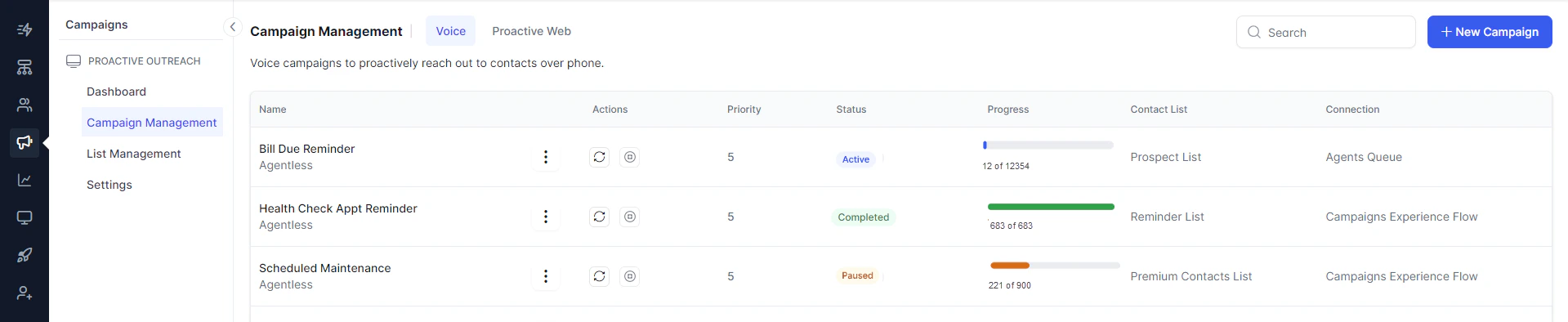
Voice Campaigns :Use the power of voice technology to connect with your audience through personalized messages or interactive experiences. Setting up a new voice campaign is easy—begin with a targeted contact list to ensure your message resonates with the right audience.\
-
Proactive Web Campaigns: Elevate your online presence with proactive web campaigns to promote your products, services, or brand. Utilizing digital channels, these campaigns are crafted to increase visibility, generate leads, and build brand awareness, ensuring measurable success.\



-
List Management: List management involves organizing and maintaining targeted Contact Lists for efficient outreach while adhering to Do Not Contact (DNC) regulations.
Managing Contact Lists:\


-
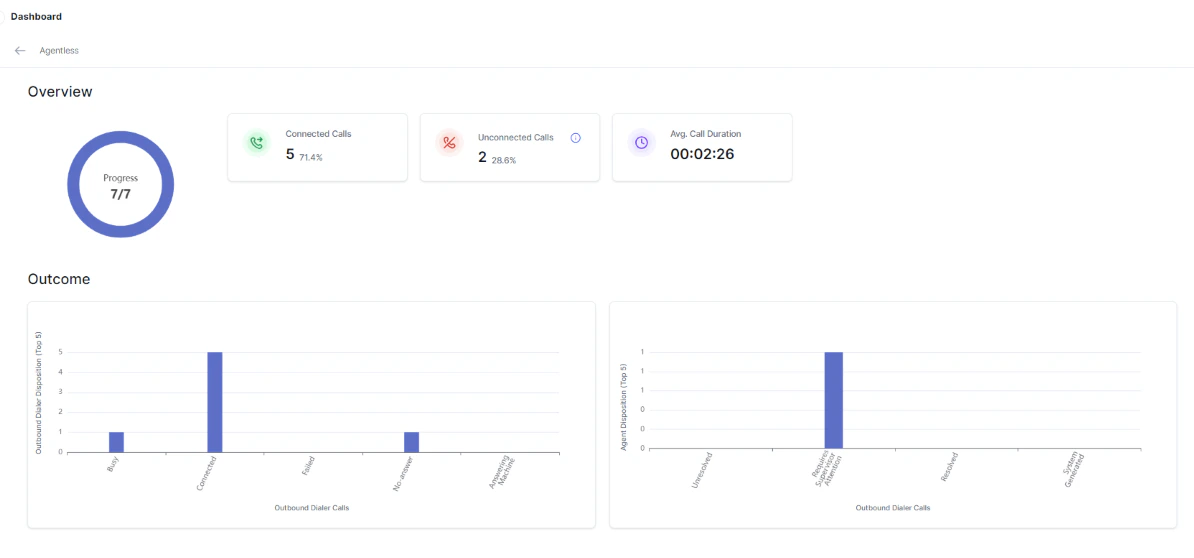
Dashboard: The campaign dashboard allows campaign managers to obtain an overview of all their campaigns, including their status—whether they’re active, inactive, or completed. This centralized snapshot facilitates effortless monitoring and management.\

-
Settings: The settings allow campaign managers to decide the maximum number of concurrent calls that can be dialed.\

-
Voice Campaigns :Use the power of voice technology to connect with your audience through personalized messages or interactive experiences. Setting up a new voice campaign is easy—begin with a targeted contact list to ensure your message resonates with the right audience.\