

v11.8.1 December 19, 2024
Patch Release This update includes bug fixes.v11.8.0 December 11, 2024
Minor Release This update include enhancement and bug fixes. The key enhancement included in this release is summarized below.DialogGPT, an Agentic Orchestration for Intelligent Conversations
DialogGPT is an intelligent, agentic orchestration engine that powers natural conversations at scale, providing autonomous orchestration across multiple topics through Dialog Tasks. This innovative solution perfectly balances defined business rules and the conversational fluidity your customers expect from virtual assistants. Using a powerful combination of embeddings and generative models, it contextually understands user input and identifies optimal paths for request fulfillment. Setup is quick and effortless, as DialogGPT eliminates the need for training data by intelligently utilizing task names and descriptions for recognition. The DialogGPT is supported for English conversations only. Key Capabilities- Conversation Orchestration: DialogGPT intelligently manages conversations, understands user intent, handles requests, seeks clarification when needed, and automatically deals with common conversational flows like pausing, repeating information, or restarting.
- Smart Understanding: By considering the full context - current conversation, prior interactions, and user details - the system better understands user needs, reducing errors. It simplifies intent training and management by consolidating all intent types within a unified vector index.
- Intelligent Dialog Navigation: DialogGPT can start by understanding a request and then asking targeted follow-up questions to determine the user’s needs, guiding the conversation intelligently.
- Flexible Responses: The system generates natural, contextual responses dynamically based on conversation history, user information, and business rules, ensuring appropriate answers for each situation.
- Cross-Assistant Communication: DialogGPT seamlessly routes conversations to the correct assistant based on the user’s stated needs for organizations with multiple virtual assistants.
- Model Flexibility: Organizations can use their preferred AI models, whether commercial, custom, or Kore.ai’s fine-tuned specialized models, for enhanced performance. They also have full control over the prompts’ design to interact with AI models.
- Performance Monitoring: Comprehensive testing tools and analytics are provided to track the system’s performance in understanding users, successfully handling requests, and identifying areas for improvement.
- Improved Customer Experience: Customers enjoy more natural conversations with virtual assistants who understand the context and can simultaneously handle multiple requests.
- Greater Accuracy: The system better understands what customers request, even when requests are complex or industry-specific. Combining broad understanding with detailed knowledge of your business can extract the right information and make smarter decisions about how to help.
- Lower Costs: It reduces manual effort in building and maintaining virtual agents; it automatically resolves more requests, minimizing transfers to human representatives and lowering operational expenses.
- Phase 1 (included in this release): Focuses on core capabilities like the main DialogGPT flow, RAG pipeline, conversation orchestrator, and handling of common conversation intents.
- Phase 2 (future release): Introduces advanced features such as Multi-App Routing support, granular intent identification, custom entity extraction, and new XO GPT models.
- Phase 3 (future release): Includes extended capabilities like multilingual support and implementation of guardrails.
Dialog Builder
Property Panel Enhancements for List of Items Configuration The property panel has been updated with a redesigned interface for configuring “List of Items” properties, including both enumerated and lookup types. Key Improvements- Intuitive Layout: The new design organizes properties logically, making it easier to locate and modify settings. The streamlined interface reduces clutter and enhances usability.
- Enhanced Sliders: The configuring “List of Items” sliders have been revamped to provide a more user-friendly experience. Users can now adjust settings more efficiently within the improved interface.
- Text Styling: Bold and italic formatting options
- Headings: Six levels of headings (H1 to H6) for clear content structure
- Lists: Numbered and bulleted lists with referencing controls
- Media: Insertion of links and images (with URL and alt text)
Knowledge AI
Get FAQs API Enhancement The Get FAQs API has been enhanced to support two sets of parameters, providing more flexible retrieval options while ensuring backward compatibility:- Existing Parameters (backward compatible): ktId and parentId (node ID)
- New Parameters (alternative option): botId, language, mode (configured/published), and nodeName.
v11.7.1 November 18, 2024
Patch Release This update includes bug fixes.v11.7.0 November 03, 2024
Minor Release This update include enhancement and bug fixes. The key enhancement included in this release is summarized below.Conversation Testing
Support for Preprocessor Script The new Preprocessor Script for Conversation Testing lets platform users control preconditions during conversation testing. Users can run custom scripts before the recording, validation, and execution phases. Key features:- Script Editor: Create, edit, and manage preprocessor scripts with built-in syntax highlighting and error checking.
- Testing Controls: Execute scripts before initiating test recording and validation, with the ability to modify and re-validate on the fly.
- Data Management: Control session context by modifying data, simulating external systems, and tracking changes through secure execution.
Dialog Builder
Auto Save Option in JavaScript Editor The JavaScript editor in Dialog Builder now allows users to enable auto save to automatically save changes while writing the code. Users can enable auto-save with a single click, and the changes will automatically be saved after one second of inactivity. They can view the last saved timestamp and use this feature across all Dialog Builder script editors.v11.6.1 October 21, 2024
Patch Release This update include enhancement and bug fixes. The key enhancement included in this release is summarized below.Knowledge AI
FAQ Conditional Responses The FAQ feature has been enhanced to provide more contextually relevant answers. Platform users can now define conditions for each FAQ response, allowing for dynamic answer selection based on specific criteria. Key updates:- Context-based answer selection: Define rules to determine which response is delivered based on the query’s context.
- Integration with existing methods: The new rule-based system works seamlessly with the current channel-based and random selection methods.
- Improved accuracy and relevance of FAQ responses.
- Enhanced personalization of user interactions.
- Greater flexibility in managing complex FAQ scenarios.
- Better user experience through context-aware answers.
- The enhancement is fully compatible with existing FAQs and answers to ensure a smooth user transition.
v11.6.0 September 28, 2024
Minor Release This update includes enhancements and bug fixes.Dialog Builder
PII Redaction in API Responses (Service Node) The platform now supports the redaction of sensitive/PII information in responses from external services. Users can select specific parts of API responses for PII scanning and apply suitable redaction patterns. Key updates:- A new “PII Redaction for API responses” setting in Service Node Component Properties.
- Customizable redaction for specific keys in API responses.
- Multiple redaction methods, including original value, de-identification, random value, static text, or masking.
- Supports various API response structures, including key-value pairs, arrays, and nested objects.
- Enhanced logging with options for original or redacted data display.
- Improved compliance with data privacy regulations
- Reduced risk of accidental sensitive data exposure
- Flexible configuration to balance usability and privacy.
v11.5.1 September 14, 2024
Patch Release This update include minor enhancement and bug fixes. The key enhancement included in this release is summarized below.Dialog Builder
Error Handling for Service Nodes Service Node’s error handling capability is enhanced to provide greater control over non-timeout error scenarios. It allows platform users to customize dialog execution when API calls fail for reasons other than timeouts. Key updates:- A new option to continue dialog execution after a service call failure.
- Ability to transition to a specific node upon encountering an error.
- Detailed error information is available in the service node response object.
v11.5.0 September 01, 2024
Patch Release This update includes enhancements and bug fixes. Key enhancements included in this release are summarized below.Dialog Builder
Introducing Search AI Node The platform has introduced a new Search AI node in the dialog builder. The node empowers platform users to integrate advanced search capabilities directly into dialog flows, improving the accuracy and relevance of AI responses in complex, multi-topic environments. Key features:- Customizable Search Configuration:
- Query selection: Last user input or custom.
- Search Filters: Define meta filters to scope searches.
- Flexible Results Configuration:
- Return Qualified Chunks: Access chunks via context variable.
- Generate Answer: Present standard response or store in context object.
- Enhanced Control:
- Custom tags: Allow categorization and organization of search queries.
- Timeout configuration: Set limits on search duration to prevent delays.
- Error handling options: Define how the bot responds to search failures or timeouts.
- Targeted searches: Allows scoping searches to specific topics or contexts.
- Improved accuracy: Reduces irrelevant responses and intent confusion.
- Customization: Enables defining meta filters and search rules.
- Seamless integration: Incorporates advanced search directly into conversation flows.
- Instant Cursor Chat: To initiate a cursor chat, use “Cmd+/” on Mac or “Ctrl+/” on Windows, or right-click on the dialog builder and select “Cursor Chat.”
-
Dialog Access Claim:
- A new notification system is in place for users when the current editor exits the dialog. This allows other users to claim edit access seamlessly.
- The first user to click on the edit access notification will immediately be granted editing rights, enabling them to continue working on the dialog in edit mode.
- Collaborative viewing: The first user to open the app is automatically granted editing rights, while subsequent users join as viewers. This ensures clear control over who can make changes, reducing the potential for conflicts or errors.
Dialogs
Manage Components Search Enhancement The improved search functionality in the Manage Components page allows platform users to find components more easily, regardless of whether they remember a component’s technical name or display name. Key updates:- A new “Display Name” field is added for all nodes.
- Search now supports both Name and Display Name for all nodes.
- Dynamic filtering as user types.
- Case-insensitive search.
- Matches from the beginning of field names.
- Real-time results update.
Digital Forms
Field Validations using Post Processor Script The platform now supports custom field validations in Digital Forms using a post-processor script. It allows platform users to create complex, custom validation rules using JavaScript, improving data collection accuracy and user experience. Key updates:- Custom Validation:
- JavaScript-based post-processor script.
- Supports dynamic variables, multi-field validations, and regex.
- Design Time:
- An expandable text box for script input.
- Retry limit (20) with an error message on exceeding.
- Run Time:
- Script processed on form submission.
- Error handling with task failure events and debug logs.
- Validation Types:
- Field-level: Highlights field with the error message below
- Form-level: Displays error message above submit button
- Existing forms treat the post-processor as an empty script.
v11.4.1 August 11, 2024
Patch Release This update includes bug fixes and minor enhancements.Entity Node
Transient Entity Feature for Enhanced Data Privacy The platform has introduced a “Transient Entity” feature for the Entity node. It allows platform users to ensure that sensitive user inputs don’t persist after a conversation session ends. Key updates:- The new “Transient Entity” toggle in Entity Node > Component Settings. It’s visible when Sensitive Entity is enabled.
- It’s a component-level property, ensuring consistent application across all instances and flows using the Entity node.
- Applies to all channels, including IVR.
- Masks data during conversation based on existing Sensitive Entity settings.
- Removes specified data from conversation history once the session ends.
- Displays a placeholder “[data_purged]” in conversation history where data has been removed.
- Enhanced Data Privacy: Sensitive information doesn’t persist after conversations end.
- Audit-Friendly: Improves audit trails with a clear indication of purged data.
- Task Execution Logs (script execution): Entity values in the Context Object are redacted and not purged.
- In Analytics > Conversation History: When a Transient Entity is printed in the message/confirmation node, the data is redacted but not purged.
- Service Node: The usage of the transient entity in the service node request is in plain text in the response.
- Debug Logs (Analytics): When a transient entity is printed as part of debugger statements, the data is in redacted form in the Debug Logs (Analytics) and isn’t purged.
Dialog Builder
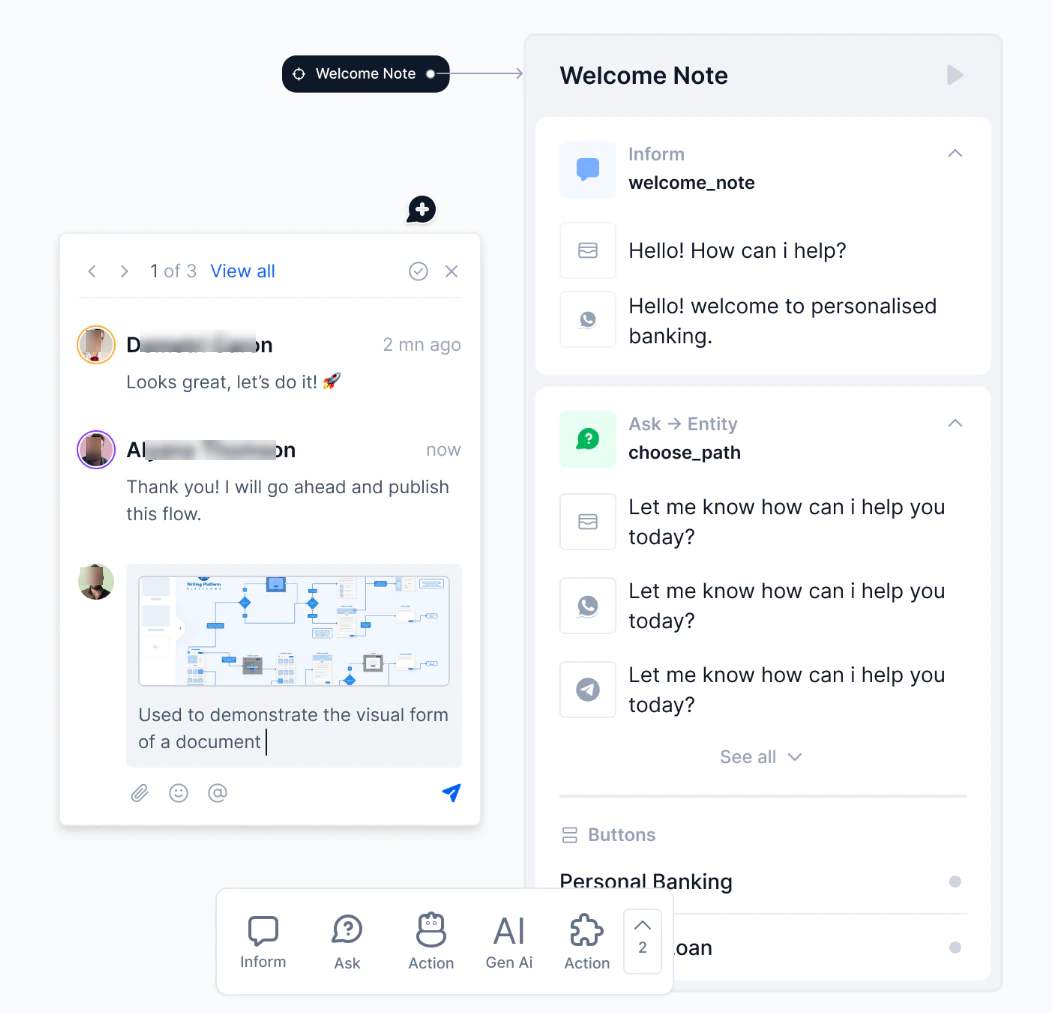
Real-time Collaboration in Dialog Builder The platform now enables real-time collaboration in the dialog builder. It allows team members to work together seamlessly, enhancing efficiency and productivity in dialog development. Key updates:- Live presence awareness: See who’s currently working on the canvas. Cursor displays and avatar icons show active team members. Each member gets a unique color for easy identification.
- Color-coded cursor: This helps team members easily identify their actions. They can see each other’s cursor locations in real-time.
- Instant cursor chat: It enables instant communication through comments tied to cursor positions, allowing users to communicate ideas and feedback in real time.
- Simultaneous editing and viewing: It allows team members to work together seamlessly.
- Improved team efficiency.
- Decreased risk of conflicting changes.
- Faster decision-making and problem-solving.
- Immediate feedback and idea sharing.
- Streamlined dialog development process.
- Clean, intuitive layout: Logical organization of properties and minimized clutter for easier navigation.
- Compact and responsive design: Streamlined interface for quicker access to properties. Adapts to various screen sizes and orientations.
- Consistent updating: Applied to all nodes for uniform experience.
- Improved property accessibility.
- Enhanced user efficiency in modifying element properties.
- Easier navigation and reduced cognitive load for users.
- Consistent experience across different devices.
Digital Forms
Field Validations using Regex The platform now supports Regex-based field validations in Digital Forms, enhancing data collection capabilities. Key updates:- Regex Option: Added alongside the existing predefined conditions in Field Validation.
- Flexible Validation: Fields are validated based on the provided regex patterns.
- Error Handling: Displays a custom error for a regex pattern mismatch.
- Provides greater control over input formats.
- Enables precise data validation for complex scenarios.
Agent Transfer
Enhanced Agent Chat History Link The platform has improved the functionality of chat history links provided to agents during conversation transfers. The access limit for these links has been increased from 5 to 10 times, allowing supervisors to better audit them. Additionally, the links now display the specific conversation that prompted the transfer, providing more relevant context to agents. Backward compatibility:- The existing agent transfer chat history links remain unchanged. These changes apply only to the links generated after this release.
v11.4 July 27, 2024
Patch Release This update includes feature enhancements and bug fixes. Key features and enhancements included in this release are summarized below.Virtual Assistant
Timeout Settings Moved to Instance Properties for Service Node The timeout settings for the Service Node have been moved from Component Properties to Instance Properties. Key benefits:- Increased flexibility: Customize timeout settings for each dialog individually without affecting other tasks using the same Service Node.
- Improved error handling: The “Jump to Specific Node” option now works more reliably within the current dialog.
- Existing service nodes retain their current timeout behavior while the timeout settings are moved to the Instance Properties.
- Chat-like interface for intuitive log viewing.
- Detailed logs displayed on group expansion.
- Truncated display for lengthy responses with the “Show more” option.
- Improved readability: Easily follow the conversation flow.
- Enhanced context: Quickly understand the sequence of events in a conversation.
- Efficient navigation: Collapsible groups and smooth scrolling for a better overview.
- Flexible viewing: Filter option for targeted log analysis.
- Optimized performance: Lazy loading for efficient log rendering.
Rephrased User Query Details in the Context Object
The platform now includes the Rephrased User Query in the context object, making it available for downstream tasks. This enhancement improves intent detection, entity extraction, and search accuracy by providing enriched user input by incorporating contextual signals. Platform users can now leverage rephrased queries for dialog execution and API calls to Search AI. Key updates:-
New “UserQuery” context object:
- New “Conversation History” setting: Indicates the conversation history length - the number of previous messages sent as context to LLM: Generative AI > Dynamic Conversation > Rephrase User Query > Advanced Settings > Conversation History Length.
v11.3.1 July 13, 2024
Patch Release This update includes bug fixes.v11.3.0 June 29, 2024
Patch Release Key features and enhancements included in this release are summarized below.Virtual Assistant
Dynamic Values for Timeout Duration in Voice Call Properties This update enables dynamic timeout settings for voice calls via environment variables. Users can now manage timeouts across multiple components without manual adjustments. This approach enhances consistency, reduces errors, and simplifies voice call property management. The users now have two options for setting timeout durations:- Preset: Select a maximum wait time between 1 and 60 seconds to receive input.
- Environment Variable: Select any environment variable from a drop-down list or use a search bar to find a specific variable.
NLU
Ability to Import ML Utterances from One Language to Another (without Translation) The platform now supports copying utterances between languages within the same app. This feature simplifies importing and synchronizing utterance data across multiple languages. The ability to automatically translate the copied utterances in the target language will be available soon. Improvements to Zip Code Entities The Zip Code entity has been enhanced to identify wild cards like “ “ and “-”. For example, “1 2 3 45” is identified as “12345”.Digital Forms
Option to Clear Default Date During Design Time Date fields on digital forms now have a clear (‘x’) icon, which allows users to easily remove the default date value.Agent Transfer
Attachment Sharing Between Users and Live Agents Users can now send files to agents during conversations. This improves communication and helps solve issues faster. This feature is currently available only for ServiceNow agent integration.Capability to Handle Agent Fallback Errors
The platform has introduced a new “Agent Transfer fallback response” to improve user experience during agent transfers. Instead of leaving the conversation idle, the platform can now inform users with an appropriate response that can be configured in the app definition. This feature allows for clearer communication and better handling of technical issues during agent transfers.v11.2.1 June 15, 2024
Patch Release This update includes bug fixes.v11.2 June 01, 2024
Patch Release Key features and enhancements included in this release are summarized below.Digital Forms
Preprocessor Script Support for Digital Forms The Digital Forms module now provides the ability to dynamically configure the form definition and behavior. The newly introduced Preprocessor configuration allows updating the form definition dynamically using JavaScript. The platform executes this preprocessor during the runtime and delivers the form definition to the channel. The preprocessor can use the environment, content, and context variables. The following are some of the key use cases:- Dynamically changing the form field titles and descriptions.
- Dynamically populating the values of fields.
- Changing the language of the messages to support multilingual conversations.
SDK Configuration
Customize Virtual Assistant’s Theme & Design The platform now supports customizing the Virtual Assistant’s look and feel with the new Theme and Design feature. This includes changes to welcome text, buttons, colors, chat windows, and sound themes to match their needs. A real-time preview pane shows changes instantly and makes it easy to make any adjustments before deploying the updated design. Enhanced Panels & Widgets The platform now supports the Panels and Widgets feature according to the selected Theme and Design of the Web SDK.v11.1.1 May 11, 2024
Patch Release This update includes bug fixes.v11.1.0 April 27, 2024
Minor Release Key features and enhancements included in this release are summarized below.Dialog Builder
Enhancement to the Comments Functionality The Comments feature now includes comment and thread actions, user mentions and notifications, timestamps, and filtering options. These enhancements make Comments a powerful tool for collaboration.Digital Forms
- Enable the “Off-the-Record Information” Flag for Digital Forms: On a digital form, when the field’s “Off the record” flag is enabled, the field data is cleared at the end of the user session and not stored in databases or logs.
- Digital Forms Date Picker Supports Japanese: The digital form’s Date Picker now supports the Japanese language if the bot language is Japanese.
Export/Import
Enable App Import Functionality using Zip File Upload Platform users can now import apps by uploading a ZIP file containing the app’s data. This eliminates the need to extract and manually import JSON files. The ZIP file import works for both new and existing apps. The corresponding APIs have also been updated to support this change: Import New VA and Import Existing VA.v11.0.0 March 30, 2024
Major Release Key features and enhancements included in this release are summarized below.Advanced AI Capabilities
The platform has introduced several Advanced AI Capabilities that simplify building agentic experiences. Users can create more natural and personalized virtual assistant conversations while streamlining their development workflow. DialogGPT, an Agentic Orchestration for Intelligent Conversations DialogGPT is an intelligent, agentic orchestration engine that powers natural conversations at scale, providing autonomous orchestration across multiple topics through Dialog Tasks. This innovative solution perfectly balances defined business rules and the conversational fluidity your customers expect from virtual assistants. Using a powerful combination of embeddings and generative models, it contextually understands user input and identifies optimal paths for request fulfillment. Setup is quick and effortless, as DialogGPT eliminates the need for training data by intelligently utilizing task names and descriptions for recognition. Key Capabilities- Autonomous Decision Making: Independently analyzes inputs and determines execution paths.
- Zero-Shot Intent Detection: Utilizes RAG and LLMs to accurately identify intents without requiring training data.
- Ambiguity Resolution: Efficiently resolves unclear intents through real-time clarification.
- Multi-Intent Processing: Recognizes and manages multiple intents within a single query.
- Conversational Nuance Management: Handles pauses, repetitions, and restarts naturally.
- Dynamic Response Generation: Creates contextually appropriate responses based on user data and history.
- Model Flexibility: Supports various model options, including commercial, custom, or Kore.ai’s XO GPT models.
- Granular Intent Resolution: Refines broad queries into specific, actionable intents using domain knowledge.
- Multi App Routing Capability: Powers the Parent app capabilities with intelligent and dynamic routing to the appropriate agent.
- Greater Accuracy: The system better understands what customers request, even when requests are complex or industry-specific. Combining a broad understanding with detailed knowledge of your business can help extract the correct information and make smarter decisions about how to help.
- Lower Costs: It removes the need to manually train the agent with diverse utterances, reducing the overall effort in building and maintaining virtual agents; it automatically resolves more requests, minimizing transfers to human representatives and lowering operational expenses.
- Improved Customer Experience: assistants provide more natural conversations by understanding context and handling multiple requests simultaneously.
- Tool-Based Orchestration:
- Exit Scenarios as Default Tools: Automate exit scenarios without setup using the Exit Orchestration Tool.
- Custom Tools: Integrate tools for specific business needs.
- Simplified Entity Handling: V2 removes explicit entity collection, reducing configuration complexity.
- Expanded Tool Calling: Handles entity collection and exit scenarios via tool calling.
- V2 Prompts and Templates:
- Flexible Version Selection: Choose V1 (Legacy) or V2 (Enhanced) prompts based on your requirements.
- Customizable Templates: For faster implementation, use pre-built JavaScript-based V2 prompt templates as custom prompts with both system and custom models.
- Tool calling integration with business applications and external data.
- Direct connection between tools and actions (scripts, service, or Search AI).
- Prompts include tool definitions and context for decision-making.
- Choice between “Orchestrated Autonomy” (powered by DialogGPT) or “Full Autonomy” (Powered by the Agent Platform) based on automation capabilities.
- Agentic Apps fully supports any digital and voice channels enabled via the Platform.
- Link Multiple Apps via Automation Node: The Automation Node in Experience Flows has been enhanced to support linking multiple apps and using DialogGPT for intent identification.
- Indexing Linked App Content: Dialog and FAQ chunks from linked apps are indexed in the parent app after linking. Search AI knowledge is supported only by default in the parent app.
- Embedding-Based Matching: User input and content from linked apps (dialogs, FAQs, search documents) are converted into embeddings with metadata. The platform then retrieves the top-matching chunks based on semantic similarity.
- LLM-Powered Intent Resolution: An LLM resolves the shortlisted chunks and determines the winning intent. It could be an Intent, Multiple Intents, Answers, FAQs, Conversation Intents, Ambiguous Intents, or Small Talk.
- Automated Event Handling: Default platform-provided event handlers are triggered based on the fulfillment type, ensuring smooth user interactions and dialog execution.
- Clarifying Questions for Ambiguous Intents: When ambiguous intents are detected, clarifying questions are triggered for disambiguation
- Simplified Training: There is no need for training utterances or invocation phrases for bot qualification. However, providing complete dialog descriptions is required for more accurate intent identification.
LLM and Generative AI Framework
Guardrails Large language models (LLMs) are powerful AI systems that can be leveraged to offer human-like conversational experiences. The Platform offers a wide range of features to leverage the power of LLMs. LLMs are usually pre-trained with a vast corpus of public data sources, and the content isn’t fully reviewed and curated for correctness and acceptability for enterprise needs. This results in generating harmful, biased, or inappropriate content at times. The Platform’s Guardrail framework mitigates these risks by validating LLM requests and responses to enforce safety and appropriateness standards. Guardrails enable responsible and ethical AI practices by allowing developers to easily enable/disable rules and configure settings for different features using LLMs. Additionally, platform users can design and implement fallback behaviors for a feature, such as triggering specific events, if a guardrail detects content that violates set standards. Monitoring It offers comprehensive insights into utilizing Large Language Models (LLMs) and Generative AI features. The framework collects, analyzes, and presents comprehensive data on user interactions, request-response dynamics, and payload details. It enables platform users to track and compare usage across various LLM features and refine prompts and settings to boost performance and user experience.All-new Dialog Builder
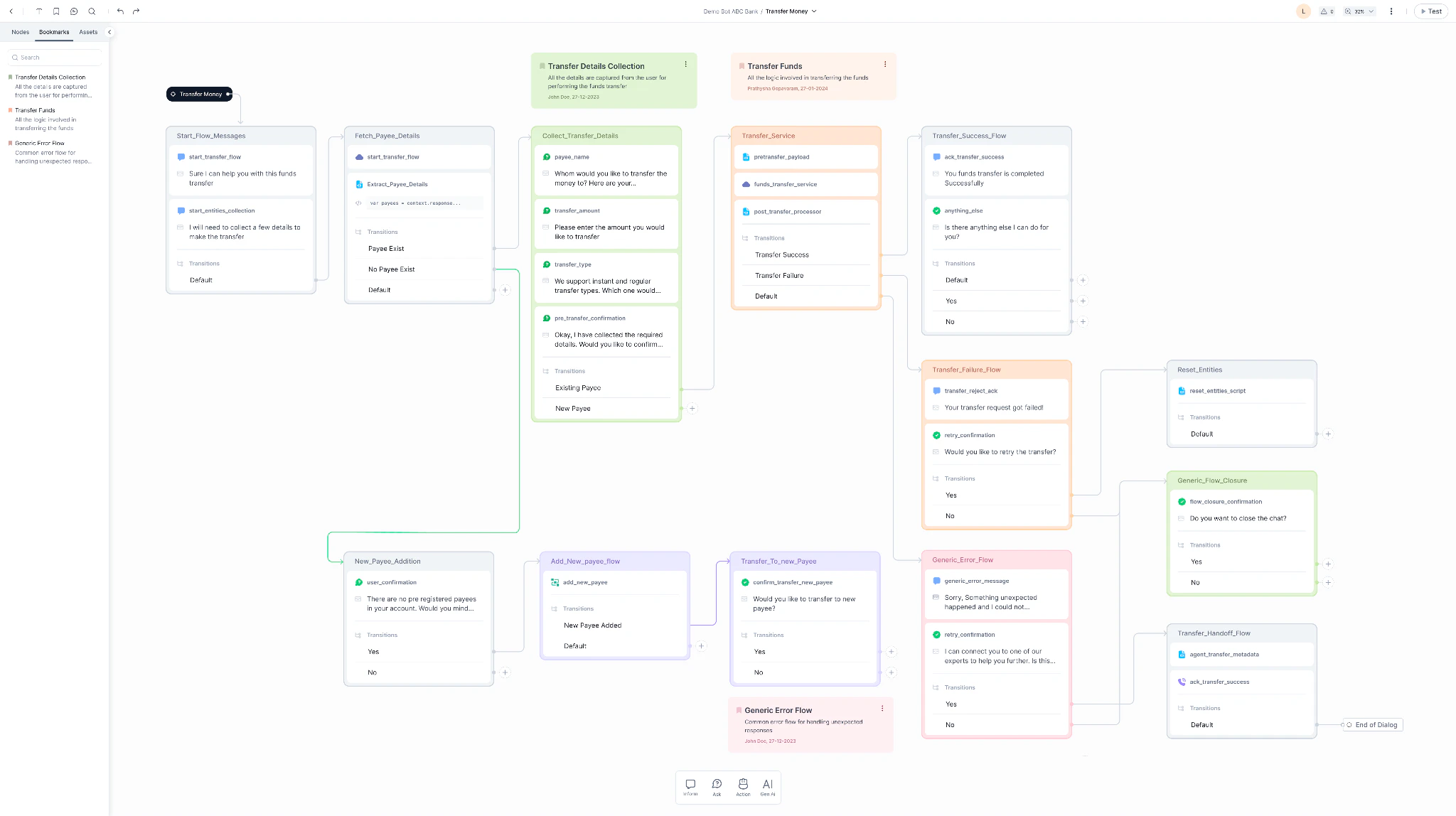
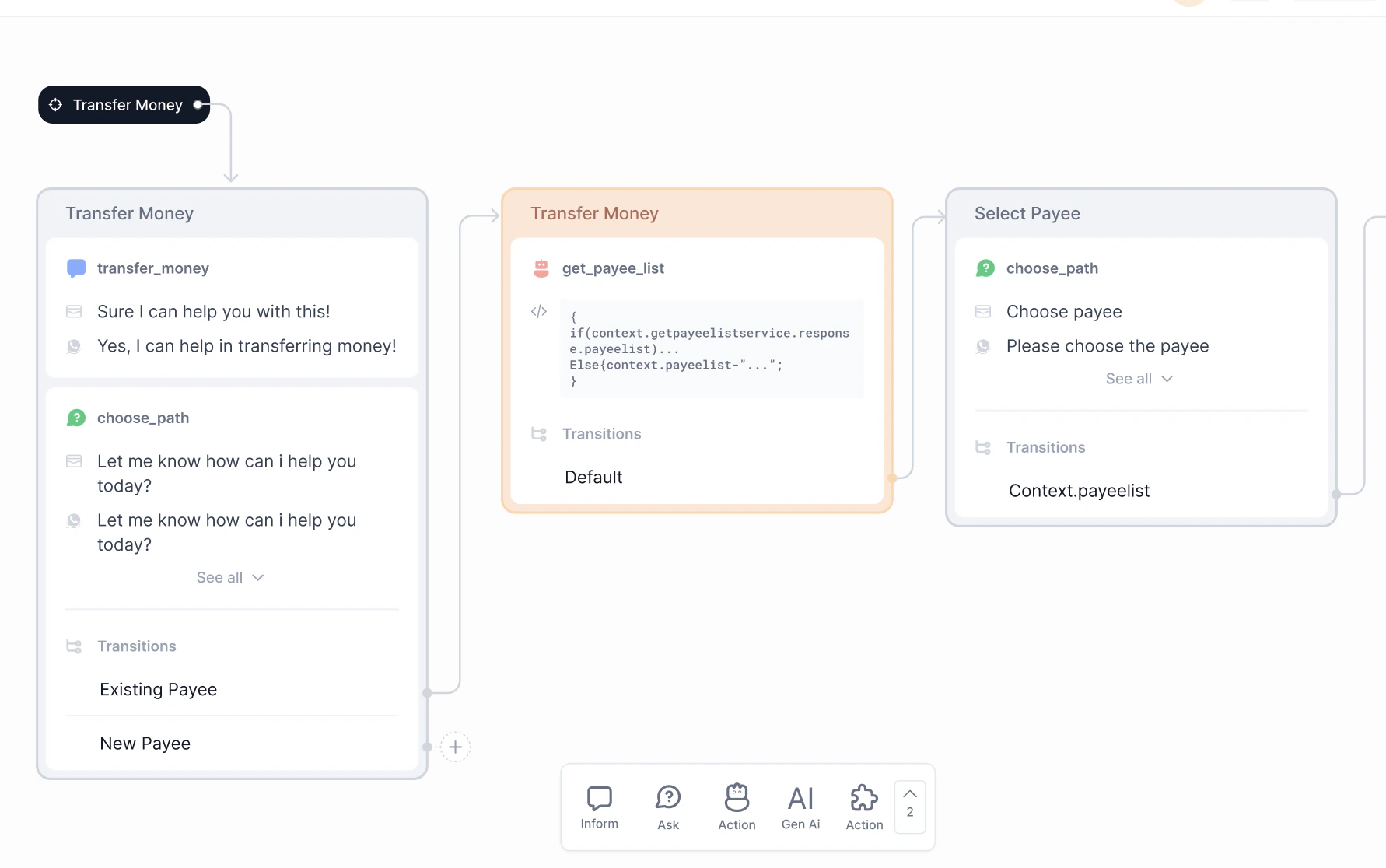
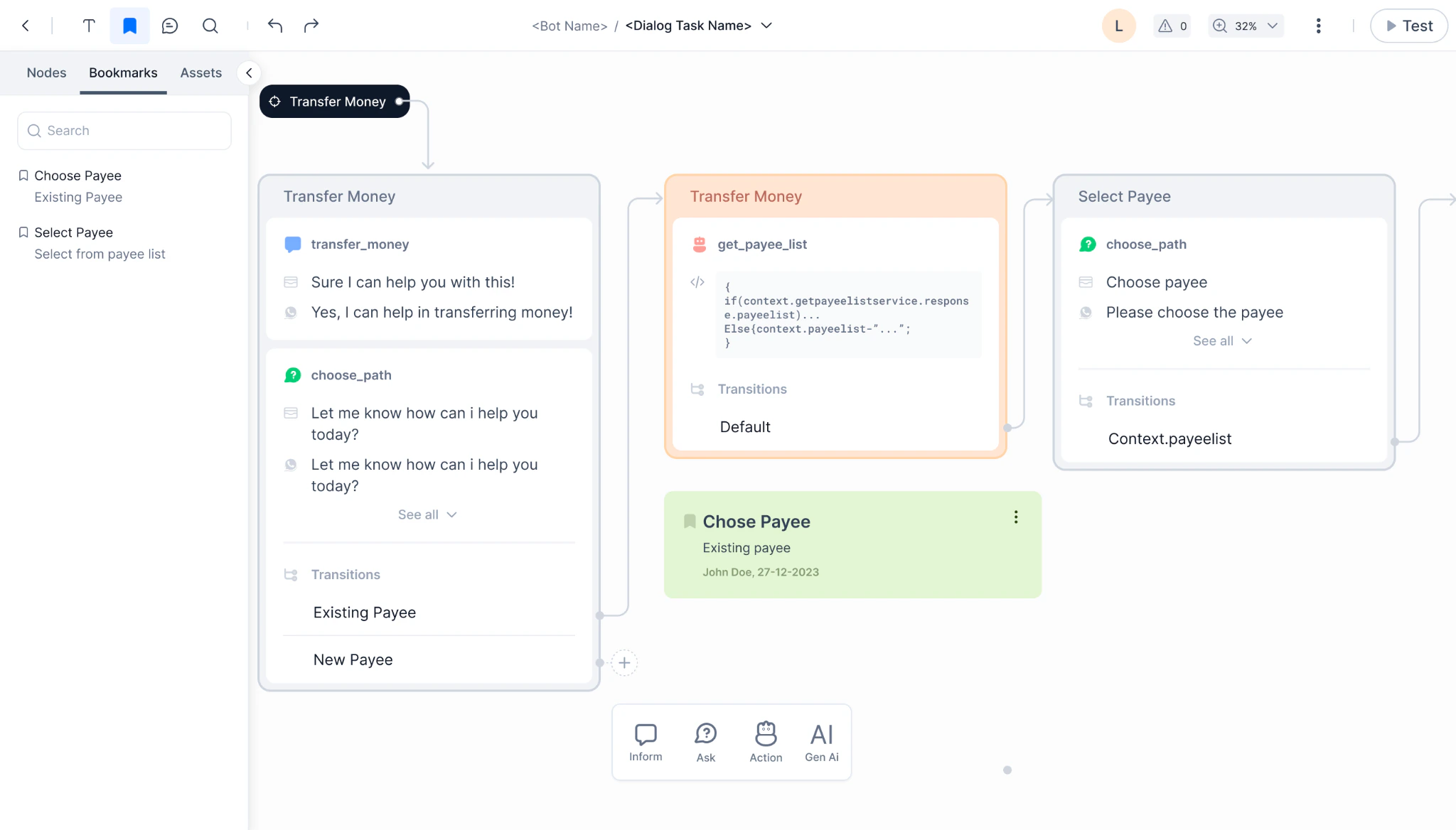
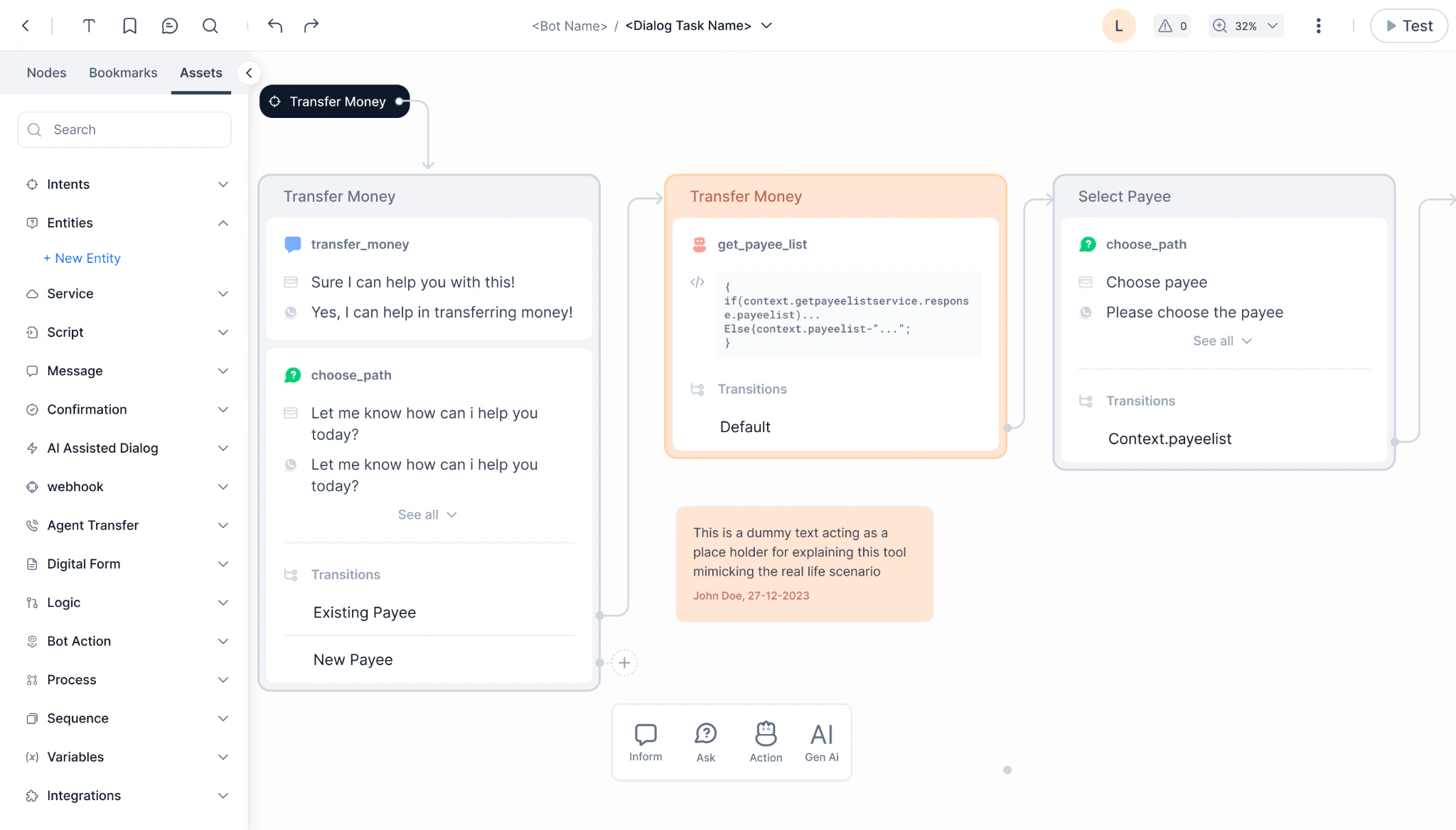
The all-new dialog builder is super intuitive, user-friendly, and visually appealing. Intuitive Graphical User Interface The all-new intuitive graphical user interface allows users to design conversational flows by dragging and dropping components onto a canvas. This simplifies the process of constructing dialogs, allowing users to visually structure and customize interactions between the AI system and users. It empowers developers and non-technical users alike to design and create conversational flows effortlessly.- Free-flow Designing empowers users to easily design the flow without worrying too much about the logic at the beginning. The ability to easily connect nodes without having to fully define the transition rule. The transition rule can start with a simple description and can be enforced at the later stages while testing/publishing.
- Infinite Canvas allows designers to logically arrange the flow (based on purpose, objective, etc.) as needed, making it easy for them to review and audit the flows.
- Customizable Connectors featuring options for color, width, and style to enhance clarity, readability, and emphasis.
- Seamless drag and drop of nodes for a smooth experience.\

Additional features in XO v11
Addition of Flows Flows act as entry points for conversations received through channel adapters. For each channel, a unique Welcome Flow is linked to define the user experience. Out of the box, there are predefined Welcome Chat Flow and Welcome Voice Flow options. Flows contain nodes like message nodes to greet users, script nodes to run JavaScript, IVR nodes for voice experience, and more. For bots being upgraded to v11, existing On-connect and Welcome events (like Welcome Event, Facebook Welcome Event, etc.) will be retained. These will be present in the Start Flows (Welcome Chat Flow) as an option called “Use existing event configurations”. Users can either honor the existing events or choose to execute the Welcome Chat/Voice Flow by turning off those events. Dialog Builder Upgrade The Dialog Builder used to create Dialog Tasks will be upgraded to the latest version V3. Existing published Dialog Tasks will remain viewable in their original V2 or V1 versions. However, if users want to edit any of those existing Dialog Tasks, they must upgrade them to the new V3 Dialog Builder version before making changes. Addition of Search AI The Basic and Advanced RAG features of Search AI come bundled with the Automation AI module for standard accounts. For enterprise customers, a separate Enterprise Search AI plan purchase is required to access the Search AI product, which isn’t included by default. A new “Fallback configuration” is available in App Settings -> App Profile:- Set Automation AI as the first option, with Search AI as the fallback.
- Set Search AI as the first option, with Automation AI as the fallback.
- Default playbooks
- Default agent coaching
- Agent Assist channel
- Master Admin remains the same
- Bot Owner becomes App Owner (role type “App”)
- Bot Developer becomes App Developer (role type “App”)
- Bot Tester becomes App Tester (role type “App”)
- New roles added: Agent (role type “App”), Supervisor (role type “App”)
- Custom roles remain unchanged
- The “Bot” role type is renamed to “App”
- All permissions across products are consolidated into one list
- Existing role permissions remain, with additional permissions for other products in the same app
- Users can enable these new cross-product permissions for roles
- New option for admins to allow App Owners to create new account-level roles from the XO v11 app
- Standard accounts retain their existing v10 trial period, provisions (2000 sessions, 2000 voice minutes, 10,000 Search requests), and pay per app.
- Enterprise accounts continue accessing their pre-purchased products and custom limits.
- The current in-development version is published to check for errors.
- If errors are found, the upgrade is stopped, and the user is notified.
- Assuming no errors, the new v11 features are added to the bot.
- Finally, the upgraded bot, now a v11 app with the new capabilities, is published again.