> ## Documentation Index
> Fetch the complete documentation index at: https://koreai.mintlify.site/llms.txt
> Use this file to discover all available pages before exploring further.
# By Question Metric
The By Question metric evaluates how well agents respond to specific questions during customer interactions. Supervisors can apply this metric to all conversations (Static) or trigger it only when specific conditions occur (Dynamic). This metric helps teams measure response quality, enforce compliance, and provide targeted coaching.
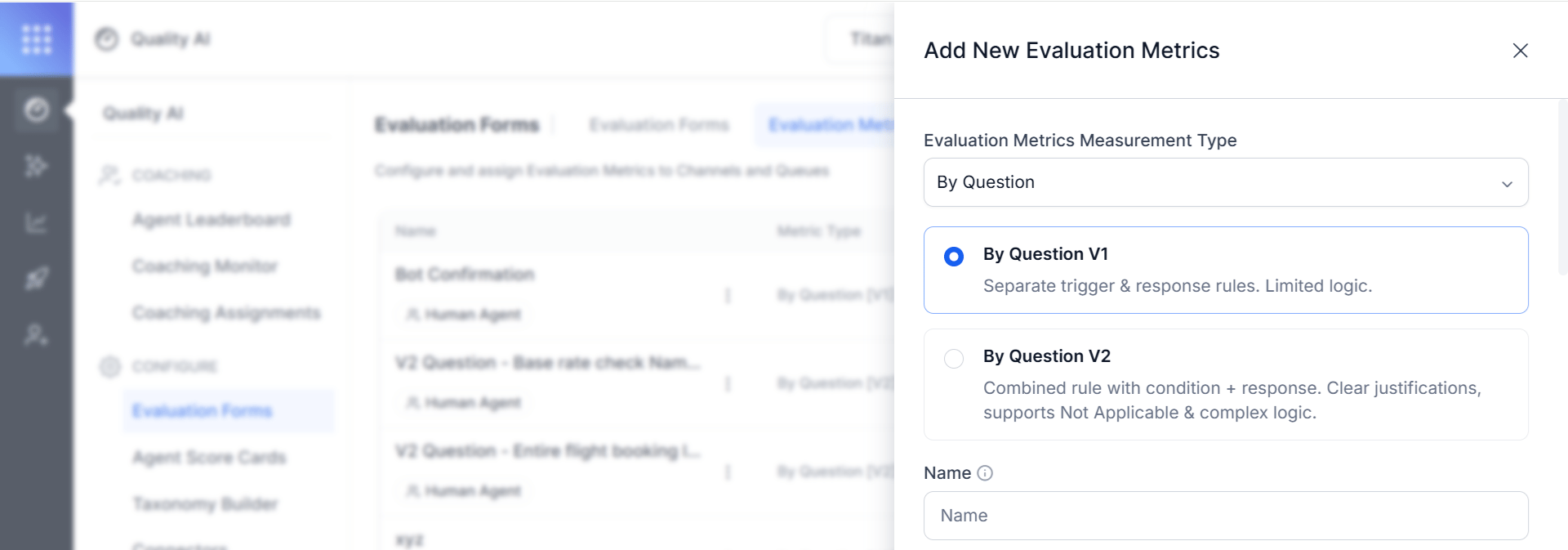
By Question is available in two versions, **By Question V1** and **By Question V2**. You choose the version when you create the metric. V2 is an addition, not a replacement: existing V1 metrics continue to work unchanged, and you can still create new V1 metrics.
 ***
## Key Benefits
* Standardized quality assessment framework.
* Customizable evaluation criteria based on business needs.
* Multi-language support for global operations.
* Automated evaluation suggestions through AI.
## When to Use This Metric
| Use Case | Description |
| ------------------------------- | --------------------------------------------------------------------------------------------------------------------- |
| **Quality Assurance** | Evaluate whether agents follow required scripts, procedures, or expected responses. |
| **Training Assessment** | Measure how well agents apply training guidelines during customer conversations. |
| **Compliance Monitoring** | Measure how well agents deliver critical information such as disclaimers, privacy policies, or regulatory statements. |
| **Performance Standardization** | Apply consistent evaluation criteria across agents and interactions. |
***
## Choose a Version: V1 or V2
When you add a By Question metric, select the version that matches the complexity of the rule you need to evaluate.
* **By Question V1** — Separate trigger and response rules. Limited logic.
* **By Question V2** — Combined rule with condition and response. Clear justifications, supports Not Applicable and complex logic.
| Capability | By Question V2 | By Question V1 |
| --------------------- | ------------------------------------------------------------------------------------------------------ | ------------------------------------------------------------------------------------------ |
| Rule model | A single unified rule describes the condition and the expected agent behavior together. | Configure Trigger and answer as two separate rules. |
| Evaluation flow | The LLM evaluates in two steps — first whether the condition applies, then whether the agent complied. | Evaluate Trigger and answer independently; the application combines the results afterward. |
| Not Applicable | A first-class output with its own AI-generated justification. | Inferred by the application from the trigger result; no AI-generated explanation. |
| Multi-condition logic | A single metric can express multi-condition logic. | Each condition needs its own separately configured metric. |
| Justifications | Separate, coherent justifications for the condition and the adherence verdict. | Two disconnected reasoning fragments. |
| Evaluation Window | Turn-based window: entire, first X, or last X turns. | Not supported. |
***
## How the Metric Works
The metric operates through a question-driven evaluation process with two main adherence approaches. Both approaches are available in V1 and V2.
Static Adherence: Evaluates every response across all conversations; used for universal rules (for example, greetings). No triggers needed.
Dynamic Adherence: Evaluates responses only when specific triggers or conditions occur; used for conditional rules that apply in certain situations.
***
## Configure a By Question Metric
These steps are common to both versions. The version-specific configuration follows in the sections below.
1. Navigate to **Quality AI** > **Configure** > **Evaluation Forms** > **Evaluation Metrics**.
2. Select **+ New Evaluation Metric**.
3. From the **Evaluation Metrics Measurement Type** dropdown, select **By Question**.
***
## Key Benefits
* Standardized quality assessment framework.
* Customizable evaluation criteria based on business needs.
* Multi-language support for global operations.
* Automated evaluation suggestions through AI.
## When to Use This Metric
| Use Case | Description |
| ------------------------------- | --------------------------------------------------------------------------------------------------------------------- |
| **Quality Assurance** | Evaluate whether agents follow required scripts, procedures, or expected responses. |
| **Training Assessment** | Measure how well agents apply training guidelines during customer conversations. |
| **Compliance Monitoring** | Measure how well agents deliver critical information such as disclaimers, privacy policies, or regulatory statements. |
| **Performance Standardization** | Apply consistent evaluation criteria across agents and interactions. |
***
## Choose a Version: V1 or V2
When you add a By Question metric, select the version that matches the complexity of the rule you need to evaluate.
* **By Question V1** — Separate trigger and response rules. Limited logic.
* **By Question V2** — Combined rule with condition and response. Clear justifications, supports Not Applicable and complex logic.
| Capability | By Question V2 | By Question V1 |
| --------------------- | ------------------------------------------------------------------------------------------------------ | ------------------------------------------------------------------------------------------ |
| Rule model | A single unified rule describes the condition and the expected agent behavior together. | Configure Trigger and answer as two separate rules. |
| Evaluation flow | The LLM evaluates in two steps — first whether the condition applies, then whether the agent complied. | Evaluate Trigger and answer independently; the application combines the results afterward. |
| Not Applicable | A first-class output with its own AI-generated justification. | Inferred by the application from the trigger result; no AI-generated explanation. |
| Multi-condition logic | A single metric can express multi-condition logic. | Each condition needs its own separately configured metric. |
| Justifications | Separate, coherent justifications for the condition and the adherence verdict. | Two disconnected reasoning fragments. |
| Evaluation Window | Turn-based window: entire, first X, or last X turns. | Not supported. |
***
## How the Metric Works
The metric operates through a question-driven evaluation process with two main adherence approaches. Both approaches are available in V1 and V2.
Static Adherence: Evaluates every response across all conversations; used for universal rules (for example, greetings). No triggers needed.
Dynamic Adherence: Evaluates responses only when specific triggers or conditions occur; used for conditional rules that apply in certain situations.
***
## Configure a By Question Metric
These steps are common to both versions. The version-specific configuration follows in the sections below.
1. Navigate to **Quality AI** > **Configure** > **Evaluation Forms** > **Evaluation Metrics**.
2. Select **+ New Evaluation Metric**.
3. From the **Evaluation Metrics Measurement Type** dropdown, select **By Question**.
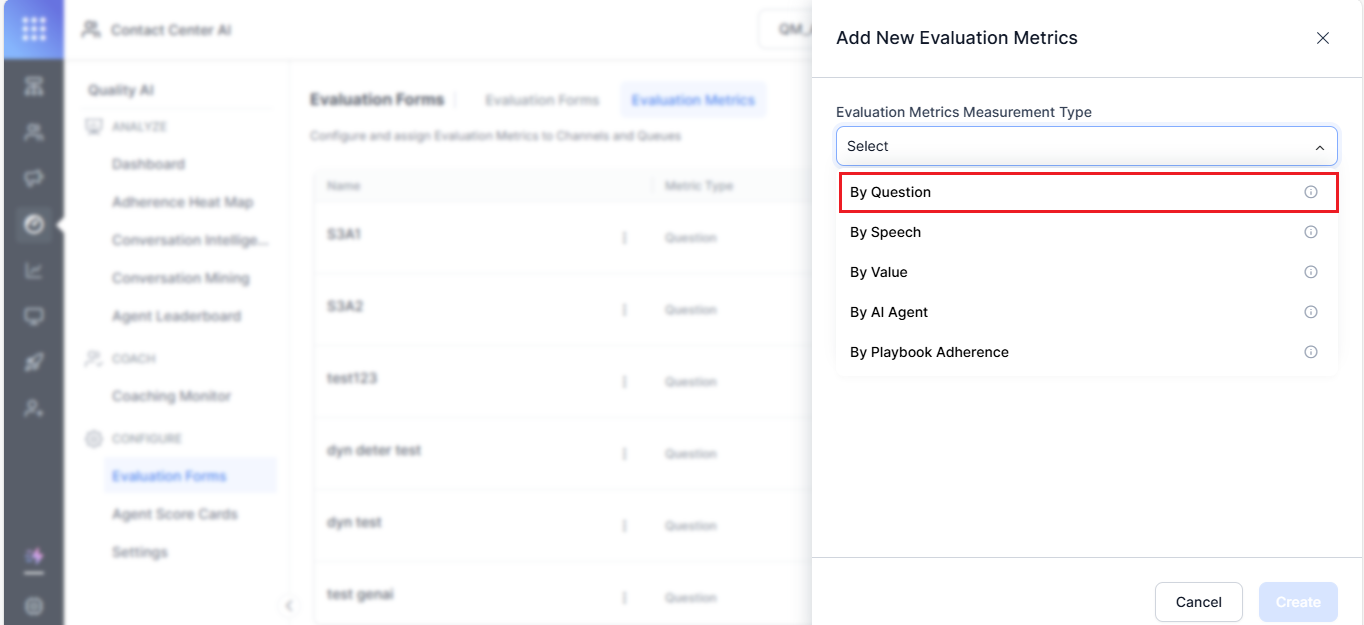 4. Select the version — **By Question V1** or **By Question V2**.
5. Enter a descriptive **Name** (for example, `Agent's Warm Greeting`).
6. Select a **Language** used for evaluation.
7. Enter an evaluation **Question**, which is a reference prompt for supervisors during audits and reviews.
4. Select the version — **By Question V1** or **By Question V2**.
5. Enter a descriptive **Name** (for example, `Agent's Warm Greeting`).
6. Select a **Language** used for evaluation.
7. Enter an evaluation **Question**, which is a reference prompt for supervisors during audits and reviews.
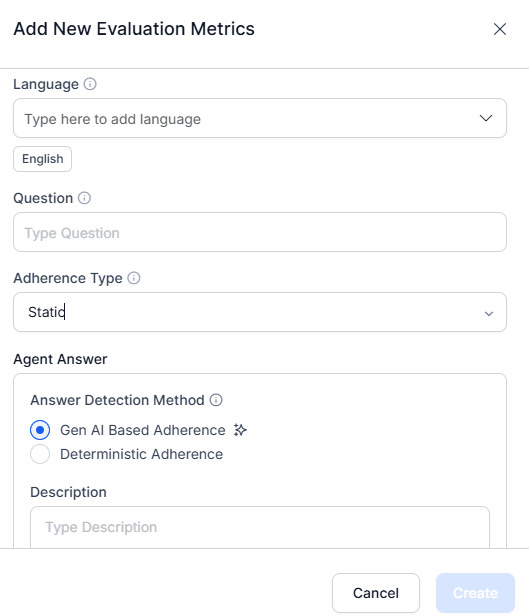 8. Select the **Adherence Type** (Static or Dynamic).
For **Static**, configure at least one agent answer utterance. For **Dynamic**, configure at least one trigger and one agent answer utterance.
***
## By Question V1 Configuration
V1 configures the trigger and the agent answer as two separate rules. Use V1 for straightforward checks that do not require Not Applicable justifications or multi-condition logic.
### Adherence Type Configuration
V1 supports two evaluation modes.
**Static Adherence**: Applies to all calls without any condition or trigger. Use for mandatory, universal compliance items like greeting scripts or regulatory disclaimers.
* Define acceptable utterances for the queue.
* Set a similarity threshold to evaluate whether the agent's response matches the predefined utterance.
* Configure at least one agent utterance template.
**Dynamic Adherence**: Evaluates adherence only after detecting a configured trigger. Use for context-sensitive checks.
* Define at least one trigger (customer or agent utterance) and one acceptable agent response.
* Set the similarity threshold based on criticality:
* **Lower threshold (\~60%, yellow)** — for casual interactions or greetings.
* **Higher threshold (\~100%, green)** — for critical topics such as legal disclaimers or privacy policies.
### Trigger Configuration
Choose the utterance source that initiates the trigger:
| Trigger Type | Description |
| ---------------------- | ------------------------------------------------------------------------------------------ |
| **Customer Utterance** | Triggered by something the customer says (for example, `I need a refund`) |
| **Agent Utterance** | Triggered by something the agent says (for example, `Can I transfer this call to support`) |
You can add multiple trigger utterances and define AND/OR conditions to control when the trigger activates.
### Trigger Detection Method
| Method | Description |
| ----------------- | ------------------------------------------------------------------------------------- |
| **GenAI-Based** | Uses LLMs to detect intent contextually. No sample utterances or thresholds required. |
| **Deterministic** | Relies on predefined sample utterances and semantic similarity matching. |
### Agent Answer Configuration
#### GenAI-Based Adherence
Uses LLMs to detect meaning, context, and intent. Evaluates whether the agent's answer fulfills the intent, even if phrased differently.
1. Select **GenAI-Based Adherence** as the answer detection method.
2. Enter a **Description** explaining the metric's intent.
Before using GenAI-based adherence, ensure supported models and the GenAI features (GenAI-based agent answer adherence and customer trigger detection) are enabled. No sample utterances or thresholds are required — LLMs evaluate adherence using zero-shot prompts.
#### Deterministic Adherence
Evaluates responses based on semantic similarity to predefined reference utterances.
1. Select **Deterministic Adherence**.
2. Define an **Answer** — acceptable utterances per queue. Use Generative AI to suggest similar variations.
3. Set the **Similarity** threshold:
* Lower threshold (\~60%) for soft skills like greetings and etiquette.
* Higher threshold (\~100%) for compliance-critical statements (Policy, Privacy, Disclaimers).
### Count Type Configuration
Choose how the metric evaluates adherence across the conversation:
**Entire Conversation**: Evaluates adherence throughout the entire interaction at any point.
**Time Bound**: Focuses on specific timeframes — the first or last X seconds or messages.
1. Select **Parameter** — First Part or Last Part of the conversation.
2. Set the evaluation window:
* **Voice** — enter number of seconds.
* **Chat** — enter number of messages.
3. Select **Create** to save and activate the metric.
***
## By Question V2 Configuration
V2 replaces the split trigger/answer architecture with a single unified rule definition. Instead of two disconnected rules, V2 describes the trigger condition and the expected agent behavior in one natural-language description. Use V2 when you need Not Applicable justifications or multi-condition logic.
### Unified Rule Definition
Define the condition and the expected agent behavior together in a single natural-language description rather than as separate trigger and answer rules. The auditor reads this description to return one of three verdicts for the conversation.
| Verdict | Meaning |
| ------- | -------------------------------------------------------------------------------- |
| YES | The agent satisfied the requirement. |
| NO | The agent violated the requirement. |
| NA | The requirement does not apply, or the conversation can't be evaluated reliably. |
### Write the Metric Description (Best Practices)
Write the description as a set of labeled sections. The auditor reads these sections in a fixed order, so a clear, well-structured description produces consistent verdicts. Follow the structure, connectors, and style rules below.
#### Description Structure
A description uses up to four sections. Always write them in this order. Only `EXPECTED BEHAVIOR` is mandatory; `CONDITION`, `PROHIBITED`, and `EXCEPTION` are optional.
```text theme={null}
CONDITION: # optional
EXPECTED BEHAVIOR:
PROHIBITED: # optional
EXCEPTION: # optional
```
| Section | Required | What it defines and how to write it |
| --------------------- | --------- | ------------------------------------------------------------------------------------------------------------------------ |
| **CONDITION** | Optional | When the metric applies. Reference any participant; join items with AND or OR. Defaults to `Always.` when omitted. |
| **EXPECTED BEHAVIOR** | Mandatory | The observable actions the evaluated speaker must perform. Refer only to that speaker; join items with AND, OR, or THEN. |
| **PROHIBITED** | Optional | An action that fails the metric immediately, even when the expected behavior occurs. Listed items act as OR. |
| **EXCEPTION** | Optional | A situation that makes reliable evaluation impossible; checked first and returns NA. Listed items act as OR. |
#### Simple and Extended Form
Use the simple form when a section holds a single statement (see Patterns A and B). Use the extended form when a section holds multiple components joined by connectors:
```text theme={null}
CONDITION:
- Customer expresses frustration.
AND
- Customer mentions a billing issue.
EXPECTED BEHAVIOR:
- Agent acknowledges the frustration.
AND
- Agent provides a next step.
EXCEPTION:
- Customer disconnects before the agent responds.
```
#### Logical Connectors
Join multiple items with one of the following connectors. Use a single connector type per list.
| Connector | Meaning |
| --------- | ------------------------------------------------------------ |
| **AND** | The agent must satisfy every listed item. |
| **OR** | The agent must satisfy at least one listed item. |
| **THEN** | The agent must perform the listed items in the stated order. |
Don't mix AND and OR in the same list. Mixed connectors make the logic ambiguous. If you need branching logic, create separate metrics instead.
#### How the Auditor Evaluates the Description
The auditor applies the sections in a fixed order and returns the first verdict that matches:
1. If any **EXCEPTION** matches, the verdict is **NA**.
2. If any **PROHIBITED** action occurs, the verdict is **NO**.
3. If the **CONDITION** is not met, the verdict is **NA**.
4. If the **EXPECTED BEHAVIOR** is fully satisfied, the verdict is **YES**.
5. Otherwise, the verdict is **NO**.
Because the auditor reads condition and behavior together, it produces one coherent explanation — and a clear reason when the metric doesn't apply.
#### Style Rules
* Write in the present tense and active voice.
* Describe observable actions, not subjective qualities.
* Refer to each speaker clearly so responsibilities are unambiguous.
* Write section headers and connectors in uppercase.
* End every statement with a period.
* Keep each bullet to **20 words or fewer**, and the full description to about **12 lines**.
#### Do and Don't
**Avoid subjective language.** Describe what the agent does, not how they seem.
```text theme={null}
Avoid: EXPECTED BEHAVIOR: Agent is professional.
Use: EXPECTED BEHAVIOR: Agent uses courteous language.
```
**Don't mix connectors in one list.** Mixed AND and OR make precedence ambiguous.
```text theme={null}
Avoid: EXPECTED BEHAVIOR:
- Agent offers refund.
AND
- Agent escalates.
OR
- Agent offers replacement.
```
**Don't use conditional branching.** Create separate metrics instead of "if/otherwise" logic.
```text theme={null}
Avoid: EXPECTED BEHAVIOR:
If customer agrees, agent refunds; otherwise escalates.
```
Also, avoid internal tool references, message identifiers, and turn identifiers in the description.
#### Standard Patterns
Start from one of these patterns and adapt it to your requirements.
**Pattern A — Trigger and response**
```text theme={null}
CONDITION: Customer requests assistance.
EXPECTED BEHAVIOR: Agent provides assistance.
EXCEPTION: Customer disconnects before response.
```
**Pattern B — Unconditional requirement**
```text theme={null}
CONDITION: Always.
EXPECTED BEHAVIOR: Agent greets the customer.
EXCEPTION: No agent messages exist.
```
**Pattern C — Sequential workflow**
```text theme={null}
CONDITION: Customer requests account information.
EXPECTED BEHAVIOR:
- Agent verifies identity.
THEN
- Agent provides information.
EXCEPTION:
- Customer refuses verification.
```
**Pattern D — Alternative acceptable responses**
```text theme={null}
CONDITION: Customer requests compensation.
EXPECTED BEHAVIOR:
- Agent offers refund.
OR
- Agent offers replacement.
OR
- Agent escalates the issue.
EXCEPTION: Customer disconnects before response.
```
**Pattern E — Positive requirement with guardrails**
```text theme={null}
CONDITION: Always.
EXPECTED BEHAVIOR:
- Agent communicates courteously.
PROHIBITED:
- Agent guarantees approval.
- Agent shares customer data.
EXCEPTION: None.
```
#### Description Template
Use this template as your starting point:
```text theme={null}
CONDITION:
EXPECTED BEHAVIOR:
PROHIBITED:
-
EXCEPTION:
```
### Not Applicable Handling
Not Applicable is a first-class output in V2. When an exception matches or the condition isn't met, the auditor returns Not Applicable directly, along with its own justification explaining why the metric did not apply. The application no longer infers Not Applicable from a trigger result.
### Evaluation Window Constraints
V2 evaluates the rule against a turn-based window. Choose where in the conversation the metric applies:
* **Entire conversation** — evaluate at any point.
* **First X turns** — evaluate only the opening turns.
* **Last X turns** — evaluate only the closing turns.
A turn is one customer block and one agent block.
### Audit Screen (V2)
For V2 metrics, the Audit Screen shows two separate justification fields, giving evaluators a clear, auditable explanation for every outcome:
* **Condition determination** — why the condition did or did not apply.
* **Adherence verdict** — whether the agent complied when the condition applied.
***
## Enable GenAI-Based Features (Prerequisites)
To activate GenAI-based features:
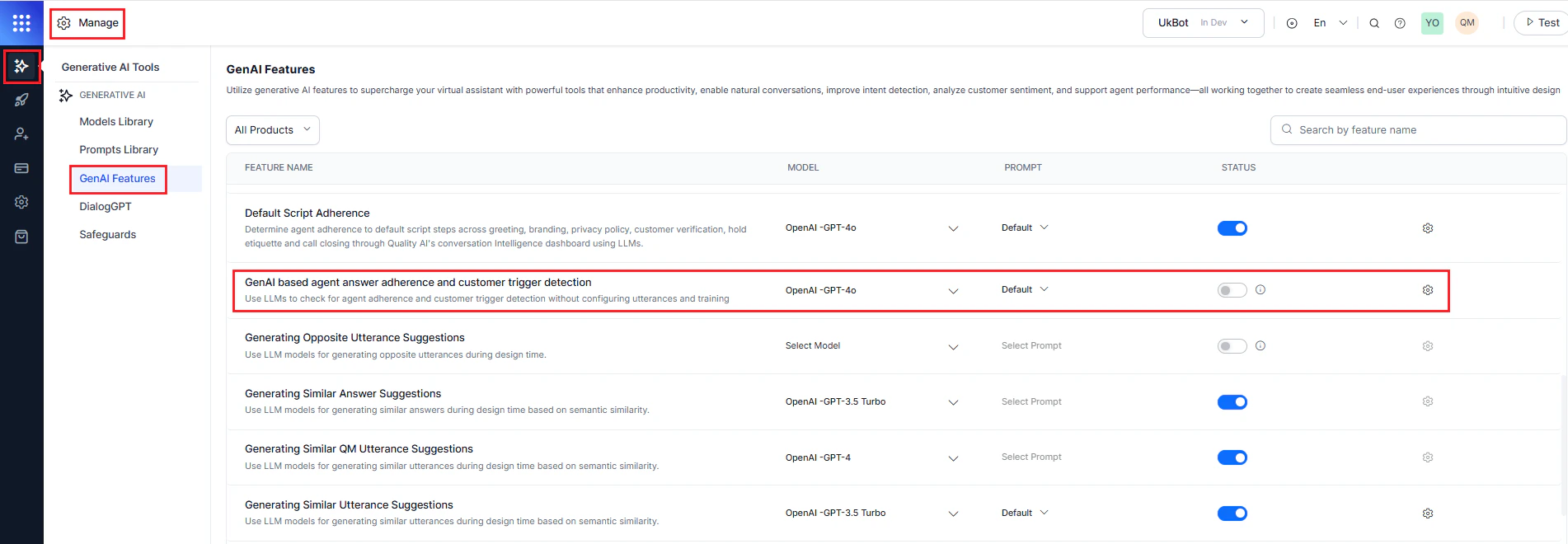
1. Navigate to **Manage** > **Generative AI** > **GenAI Features**.
2. Enable and publish the following features:
* **GenAI-based agent answer adherence**
* **GenAI-based customer trigger detection**
8. Select the **Adherence Type** (Static or Dynamic).
For **Static**, configure at least one agent answer utterance. For **Dynamic**, configure at least one trigger and one agent answer utterance.
***
## By Question V1 Configuration
V1 configures the trigger and the agent answer as two separate rules. Use V1 for straightforward checks that do not require Not Applicable justifications or multi-condition logic.
### Adherence Type Configuration
V1 supports two evaluation modes.
**Static Adherence**: Applies to all calls without any condition or trigger. Use for mandatory, universal compliance items like greeting scripts or regulatory disclaimers.
* Define acceptable utterances for the queue.
* Set a similarity threshold to evaluate whether the agent's response matches the predefined utterance.
* Configure at least one agent utterance template.
**Dynamic Adherence**: Evaluates adherence only after detecting a configured trigger. Use for context-sensitive checks.
* Define at least one trigger (customer or agent utterance) and one acceptable agent response.
* Set the similarity threshold based on criticality:
* **Lower threshold (\~60%, yellow)** — for casual interactions or greetings.
* **Higher threshold (\~100%, green)** — for critical topics such as legal disclaimers or privacy policies.
### Trigger Configuration
Choose the utterance source that initiates the trigger:
| Trigger Type | Description |
| ---------------------- | ------------------------------------------------------------------------------------------ |
| **Customer Utterance** | Triggered by something the customer says (for example, `I need a refund`) |
| **Agent Utterance** | Triggered by something the agent says (for example, `Can I transfer this call to support`) |
You can add multiple trigger utterances and define AND/OR conditions to control when the trigger activates.
### Trigger Detection Method
| Method | Description |
| ----------------- | ------------------------------------------------------------------------------------- |
| **GenAI-Based** | Uses LLMs to detect intent contextually. No sample utterances or thresholds required. |
| **Deterministic** | Relies on predefined sample utterances and semantic similarity matching. |
### Agent Answer Configuration
#### GenAI-Based Adherence
Uses LLMs to detect meaning, context, and intent. Evaluates whether the agent's answer fulfills the intent, even if phrased differently.
1. Select **GenAI-Based Adherence** as the answer detection method.
2. Enter a **Description** explaining the metric's intent.
Before using GenAI-based adherence, ensure supported models and the GenAI features (GenAI-based agent answer adherence and customer trigger detection) are enabled. No sample utterances or thresholds are required — LLMs evaluate adherence using zero-shot prompts.
#### Deterministic Adherence
Evaluates responses based on semantic similarity to predefined reference utterances.
1. Select **Deterministic Adherence**.
2. Define an **Answer** — acceptable utterances per queue. Use Generative AI to suggest similar variations.
3. Set the **Similarity** threshold:
* Lower threshold (\~60%) for soft skills like greetings and etiquette.
* Higher threshold (\~100%) for compliance-critical statements (Policy, Privacy, Disclaimers).
### Count Type Configuration
Choose how the metric evaluates adherence across the conversation:
**Entire Conversation**: Evaluates adherence throughout the entire interaction at any point.
**Time Bound**: Focuses on specific timeframes — the first or last X seconds or messages.
1. Select **Parameter** — First Part or Last Part of the conversation.
2. Set the evaluation window:
* **Voice** — enter number of seconds.
* **Chat** — enter number of messages.
3. Select **Create** to save and activate the metric.
***
## By Question V2 Configuration
V2 replaces the split trigger/answer architecture with a single unified rule definition. Instead of two disconnected rules, V2 describes the trigger condition and the expected agent behavior in one natural-language description. Use V2 when you need Not Applicable justifications or multi-condition logic.
### Unified Rule Definition
Define the condition and the expected agent behavior together in a single natural-language description rather than as separate trigger and answer rules. The auditor reads this description to return one of three verdicts for the conversation.
| Verdict | Meaning |
| ------- | -------------------------------------------------------------------------------- |
| YES | The agent satisfied the requirement. |
| NO | The agent violated the requirement. |
| NA | The requirement does not apply, or the conversation can't be evaluated reliably. |
### Write the Metric Description (Best Practices)
Write the description as a set of labeled sections. The auditor reads these sections in a fixed order, so a clear, well-structured description produces consistent verdicts. Follow the structure, connectors, and style rules below.
#### Description Structure
A description uses up to four sections. Always write them in this order. Only `EXPECTED BEHAVIOR` is mandatory; `CONDITION`, `PROHIBITED`, and `EXCEPTION` are optional.
```text theme={null}
CONDITION: # optional
EXPECTED BEHAVIOR:
PROHIBITED: # optional
EXCEPTION: # optional
```
| Section | Required | What it defines and how to write it |
| --------------------- | --------- | ------------------------------------------------------------------------------------------------------------------------ |
| **CONDITION** | Optional | When the metric applies. Reference any participant; join items with AND or OR. Defaults to `Always.` when omitted. |
| **EXPECTED BEHAVIOR** | Mandatory | The observable actions the evaluated speaker must perform. Refer only to that speaker; join items with AND, OR, or THEN. |
| **PROHIBITED** | Optional | An action that fails the metric immediately, even when the expected behavior occurs. Listed items act as OR. |
| **EXCEPTION** | Optional | A situation that makes reliable evaluation impossible; checked first and returns NA. Listed items act as OR. |
#### Simple and Extended Form
Use the simple form when a section holds a single statement (see Patterns A and B). Use the extended form when a section holds multiple components joined by connectors:
```text theme={null}
CONDITION:
- Customer expresses frustration.
AND
- Customer mentions a billing issue.
EXPECTED BEHAVIOR:
- Agent acknowledges the frustration.
AND
- Agent provides a next step.
EXCEPTION:
- Customer disconnects before the agent responds.
```
#### Logical Connectors
Join multiple items with one of the following connectors. Use a single connector type per list.
| Connector | Meaning |
| --------- | ------------------------------------------------------------ |
| **AND** | The agent must satisfy every listed item. |
| **OR** | The agent must satisfy at least one listed item. |
| **THEN** | The agent must perform the listed items in the stated order. |
Don't mix AND and OR in the same list. Mixed connectors make the logic ambiguous. If you need branching logic, create separate metrics instead.
#### How the Auditor Evaluates the Description
The auditor applies the sections in a fixed order and returns the first verdict that matches:
1. If any **EXCEPTION** matches, the verdict is **NA**.
2. If any **PROHIBITED** action occurs, the verdict is **NO**.
3. If the **CONDITION** is not met, the verdict is **NA**.
4. If the **EXPECTED BEHAVIOR** is fully satisfied, the verdict is **YES**.
5. Otherwise, the verdict is **NO**.
Because the auditor reads condition and behavior together, it produces one coherent explanation — and a clear reason when the metric doesn't apply.
#### Style Rules
* Write in the present tense and active voice.
* Describe observable actions, not subjective qualities.
* Refer to each speaker clearly so responsibilities are unambiguous.
* Write section headers and connectors in uppercase.
* End every statement with a period.
* Keep each bullet to **20 words or fewer**, and the full description to about **12 lines**.
#### Do and Don't
**Avoid subjective language.** Describe what the agent does, not how they seem.
```text theme={null}
Avoid: EXPECTED BEHAVIOR: Agent is professional.
Use: EXPECTED BEHAVIOR: Agent uses courteous language.
```
**Don't mix connectors in one list.** Mixed AND and OR make precedence ambiguous.
```text theme={null}
Avoid: EXPECTED BEHAVIOR:
- Agent offers refund.
AND
- Agent escalates.
OR
- Agent offers replacement.
```
**Don't use conditional branching.** Create separate metrics instead of "if/otherwise" logic.
```text theme={null}
Avoid: EXPECTED BEHAVIOR:
If customer agrees, agent refunds; otherwise escalates.
```
Also, avoid internal tool references, message identifiers, and turn identifiers in the description.
#### Standard Patterns
Start from one of these patterns and adapt it to your requirements.
**Pattern A — Trigger and response**
```text theme={null}
CONDITION: Customer requests assistance.
EXPECTED BEHAVIOR: Agent provides assistance.
EXCEPTION: Customer disconnects before response.
```
**Pattern B — Unconditional requirement**
```text theme={null}
CONDITION: Always.
EXPECTED BEHAVIOR: Agent greets the customer.
EXCEPTION: No agent messages exist.
```
**Pattern C — Sequential workflow**
```text theme={null}
CONDITION: Customer requests account information.
EXPECTED BEHAVIOR:
- Agent verifies identity.
THEN
- Agent provides information.
EXCEPTION:
- Customer refuses verification.
```
**Pattern D — Alternative acceptable responses**
```text theme={null}
CONDITION: Customer requests compensation.
EXPECTED BEHAVIOR:
- Agent offers refund.
OR
- Agent offers replacement.
OR
- Agent escalates the issue.
EXCEPTION: Customer disconnects before response.
```
**Pattern E — Positive requirement with guardrails**
```text theme={null}
CONDITION: Always.
EXPECTED BEHAVIOR:
- Agent communicates courteously.
PROHIBITED:
- Agent guarantees approval.
- Agent shares customer data.
EXCEPTION: None.
```
#### Description Template
Use this template as your starting point:
```text theme={null}
CONDITION:
EXPECTED BEHAVIOR:
PROHIBITED:
-
EXCEPTION:
```
### Not Applicable Handling
Not Applicable is a first-class output in V2. When an exception matches or the condition isn't met, the auditor returns Not Applicable directly, along with its own justification explaining why the metric did not apply. The application no longer infers Not Applicable from a trigger result.
### Evaluation Window Constraints
V2 evaluates the rule against a turn-based window. Choose where in the conversation the metric applies:
* **Entire conversation** — evaluate at any point.
* **First X turns** — evaluate only the opening turns.
* **Last X turns** — evaluate only the closing turns.
A turn is one customer block and one agent block.
### Audit Screen (V2)
For V2 metrics, the Audit Screen shows two separate justification fields, giving evaluators a clear, auditable explanation for every outcome:
* **Condition determination** — why the condition did or did not apply.
* **Adherence verdict** — whether the agent complied when the condition applied.
***
## Enable GenAI-Based Features (Prerequisites)
To activate GenAI-based features:
1. Navigate to **Manage** > **Generative AI** > **GenAI Features**.
2. Enable and publish the following features:
* **GenAI-based agent answer adherence**
* **GenAI-based customer trigger detection**
 ***
## Edit or Delete a By Question Metric
1. Select the metric from the **By Question** category.
***
## Edit or Delete a By Question Metric
1. Select the metric from the **By Question** category.
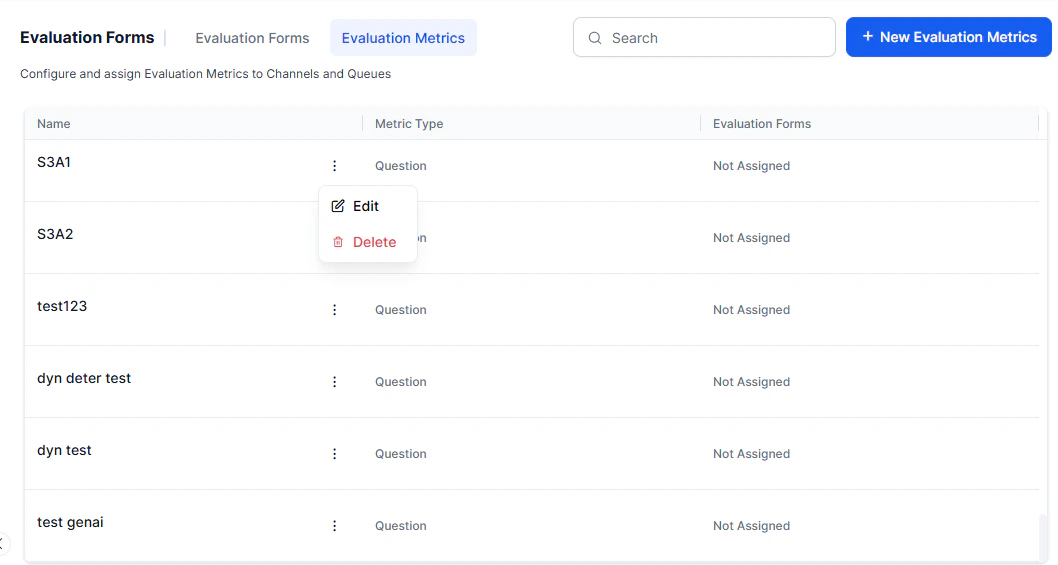 2. Choose an option: **Edit** to modify the required details, or **Delete** to remove.
3. Select **Update** to save changes.
### Language Dependency Warnings
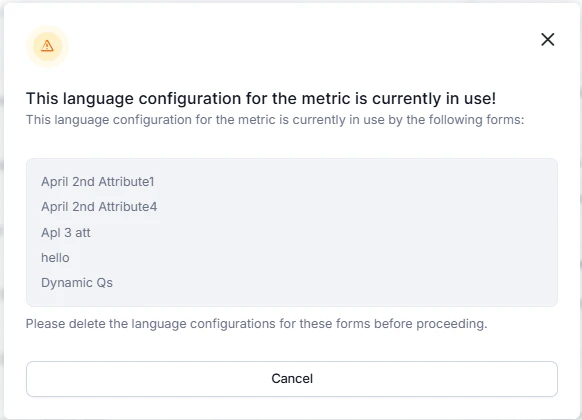
You can't remove a language while any evaluation form or metric uses it. Remove the language from all linked forms and metrics before deleting it.
2. Choose an option: **Edit** to modify the required details, or **Delete** to remove.
3. Select **Update** to save changes.
### Language Dependency Warnings
You can't remove a language while any evaluation form or metric uses it. Remove the language from all linked forms and metrics before deleting it.
 ### Delete Warnings
Before deleting a metric:
1. Remove it from all associated evaluation forms.
2. If any attributes link to the metric, reassign them to a different metric first.
3. Resolve all dependencies before deleting the metric.
If the metric is still in use, the system displays a warning and prevents deletion.
***
### Delete Warnings
Before deleting a metric:
1. Remove it from all associated evaluation forms.
2. If any attributes link to the metric, reassign them to a different metric first.
3. Resolve all dependencies before deleting the metric.
If the metric is still in use, the system displays a warning and prevents deletion.
***