

- Metric-level adherence analysis
- Fatal metric violation tracking
- Contact direction insights
- Queue, language, and agent-based filtering
- Adherence and failure trend analysis
- CSV export and scheduled delivery
Each scorecard determines eligibility for evaluation. Threshold configuration can evaluate an interaction for one scorecard and exclude it from another.
Generate the Report
New report configuration:- Create the Report Follow the standard report creation process described in see Scheduled Reports.
-
Select Evaluation Summary Form Report from the Report Type list.
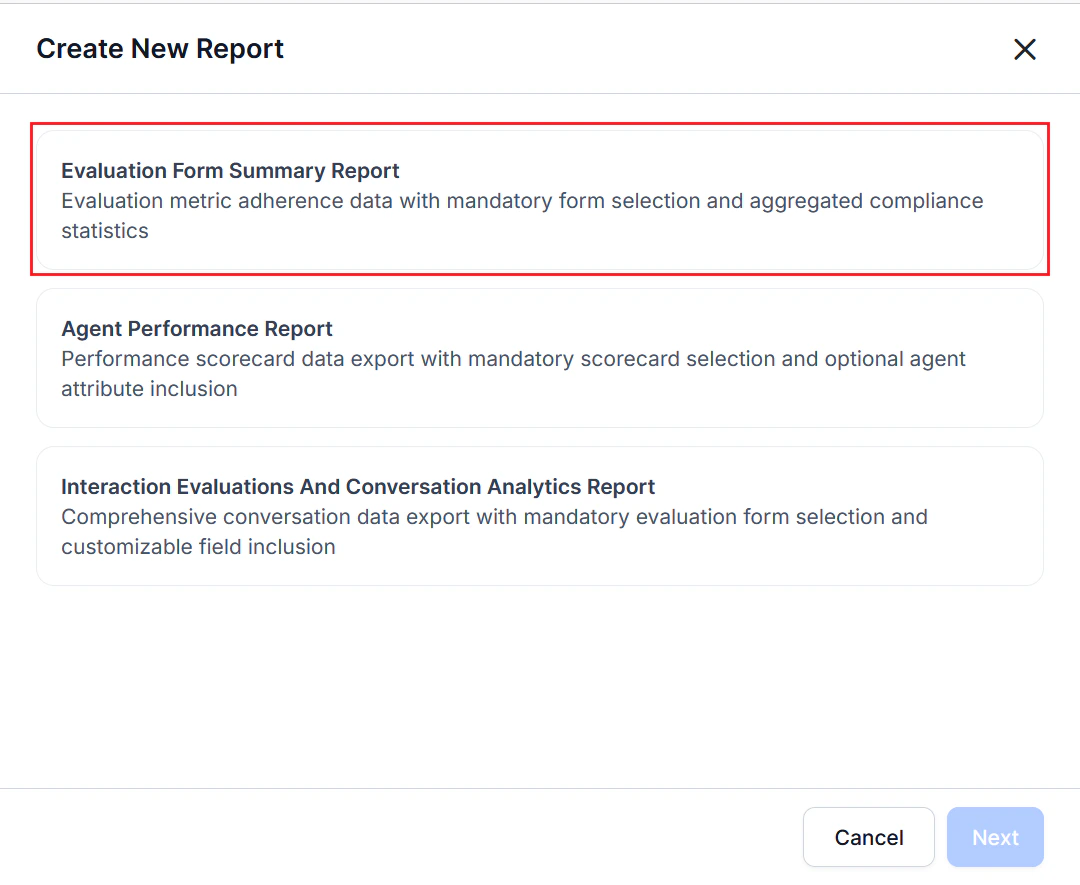
- Select an Evaluation Form. At least one evaluation form is required.
- Select the Date Range and Timezone.
- Complete the Configuration — Filters section.
- Select + Add Filter to add one or more filter rows.
- Select a Filter Type, such as: Channel (Voice or Chat), Contact Direction (Inbound or Outbound), Queue, Language, and Agents.
- Select the appropriate values for each filter selected.
-
Select Optional Fields to include additional supported columns in the generated CSV.
- The available optional fields depend on the selected evaluation form.
- Selected fields are appended as additional columns in the exported CSV.
- Enter one or more email addresses in the Send Email to field to send the automated reports. At least one email address is required.
- Select Next.
- Complete the Schedule section to generate the report using the current configuration.
This report includes only evaluated interactions associated with the selected evaluation forms. Interactions below the configured duration threshold are excluded from aggregated metrics unless they were manually evaluated.
Report Fields
Generated CSV Fields
The report exports aggregated evaluation results for each evaluation metric, including fatal metric status, interaction counts, applicability, adherence statistics, and overall adherence percentage.Report Behavior
Each row in the CSV represents a single evaluation metric and its aggregated performance across evaluated interactions. The available metrics depend on the configured evaluation form and may include standard or custom quality metrics, such as: Agent Blaming Customer, COMMON AU - GEN & DET, COMMON Greeting Compliance Rate, Other custom evaluation metrics When the Contact Direction filter is applied, the report includes and aggregates only interactions that match the selected direction.