> ## Documentation Index
> Fetch the complete documentation index at: https://koreai.mintlify.site/llms.txt
> Use this file to discover all available pages before exploring further.
# Wallboards
[Back to Analytics Overview](/ai-for-service/analytics/overview)
Wallboards give contact center administrators and supervisors a high-resolution, real-time display of operational KPIs, suitable for large screens and full-screen viewing.
Contact support to enable Wallboards.
***
## Launch Wallboard
1. Select the **ellipsis** and select **Launch Wallboard**. The wallboard opens in a new browser tab.
 You can also go to **Contact Center AI** > **Analytics** > **CONTACT CENTER** > **Wallboards**.
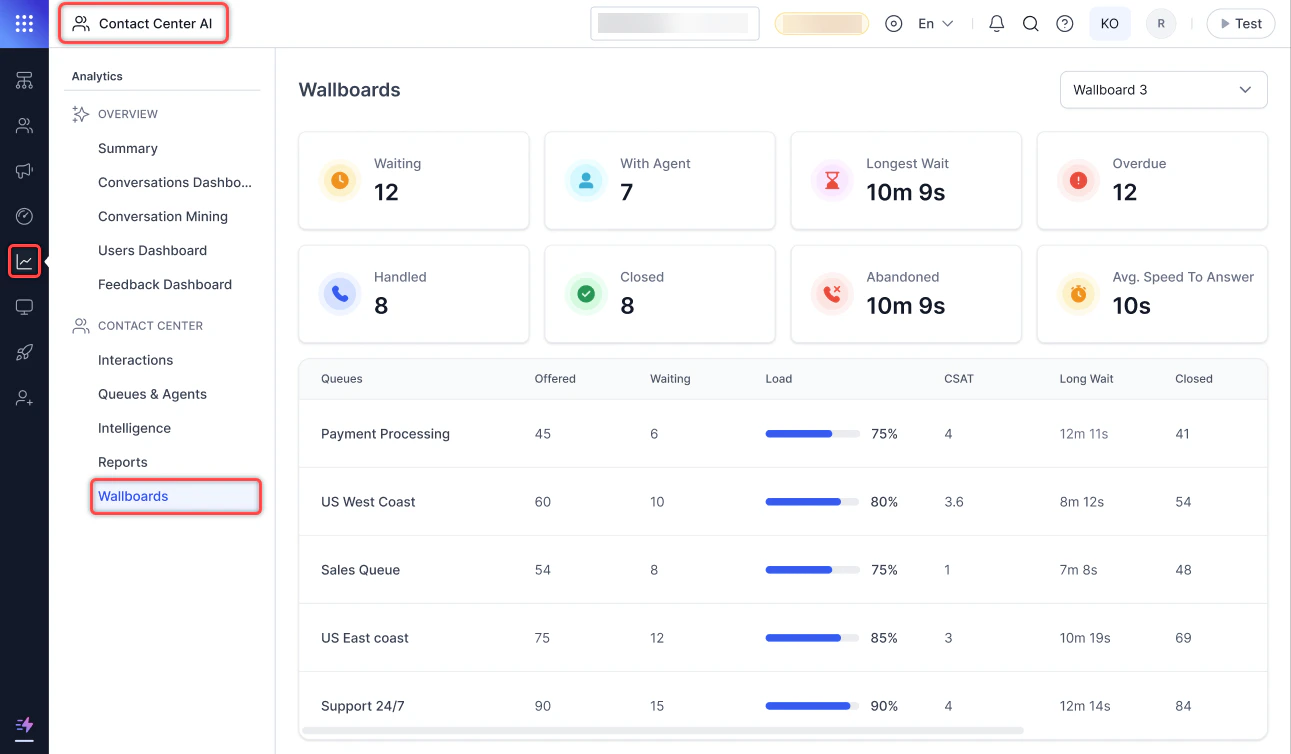 2. Dashboard data refreshes every 60 seconds. Live widget data refreshes every second.
**Center Wide**
2. Dashboard data refreshes every 60 seconds. Live widget data refreshes every second.
**Center Wide**
 **Queue Specific**
 **Center Wide Abandoned**
 Select the icon beside the wallboard selection menu to open the wallboard (Center Wide, Queue Specific, and Center Wide Abandoned) in a new browser window.
 ***
## Wallboard Widgets
The wallboard displays widgets showing KPI data for the contact center over a configured time duration.
***
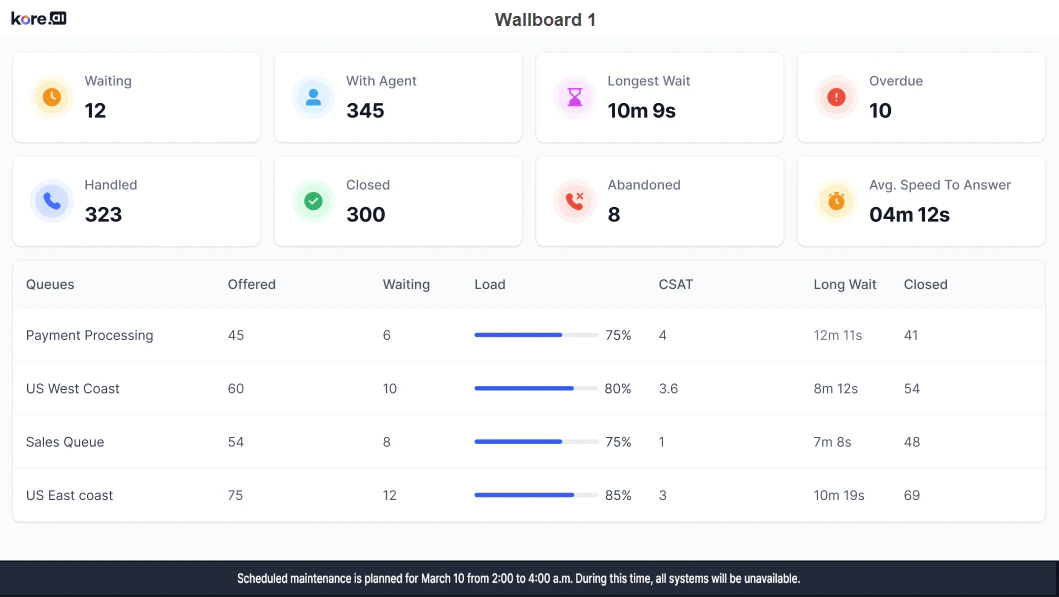
## Center Wide
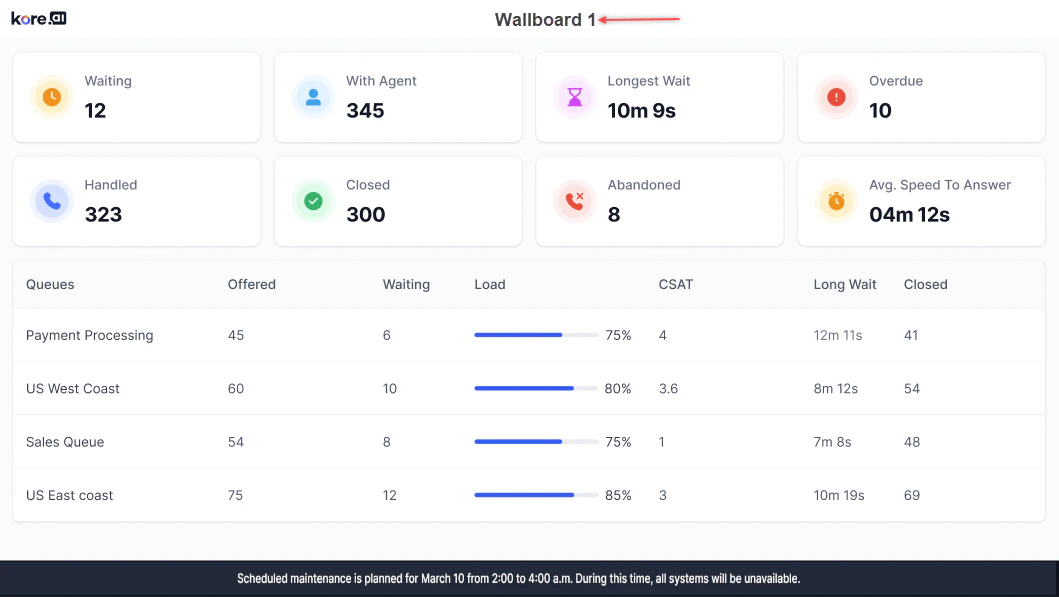
The wallboard name appears at the top.
***
## Wallboard Widgets
The wallboard displays widgets showing KPI data for the contact center over a configured time duration.
***
## Center Wide
The wallboard name appears at the top.
 ***
### Top Section Widgets
***
### Top Section Widgets
 | Name | Live/Time Based | Description |
| :------------------------- | :-------------- | :------------------------------------------------------------------------------ |
| Waiting | Live | Count of all conversations waiting in all queues. |
| With Agent | Live | Count of all conversations currently with agents. |
| Longest Wait | Live | Duration of the longest wait for any conversation currently in a waiting state. |
| Overdue | Live | Count of all conversations currently overdue with agents. |
| Handled | Time-based | Count of all conversations handled (completed) by the contact center. |
| Closed | Time-based | Count of all conversations properly closed by agents. |
| Abandoned | Time-based | Count of all conversations abandoned by users in queues. |
| Avg. Speed To Answer (ASA) | Time-based | Average speed to answer for all conversations. |
***
### Bottom Section-Queue Data
| Name | Live/Time Based | Description |
| :------------------------- | :-------------- | :------------------------------------------------------------------------------ |
| Waiting | Live | Count of all conversations waiting in all queues. |
| With Agent | Live | Count of all conversations currently with agents. |
| Longest Wait | Live | Duration of the longest wait for any conversation currently in a waiting state. |
| Overdue | Live | Count of all conversations currently overdue with agents. |
| Handled | Time-based | Count of all conversations handled (completed) by the contact center. |
| Closed | Time-based | Count of all conversations properly closed by agents. |
| Abandoned | Time-based | Count of all conversations abandoned by users in queues. |
| Avg. Speed To Answer (ASA) | Time-based | Average speed to answer for all conversations. |
***
### Bottom Section-Queue Data
 | Name | Live/Time Based | Description |
| :-------- | :-------------- | :---------------------------------------------------------------------------------------------- |
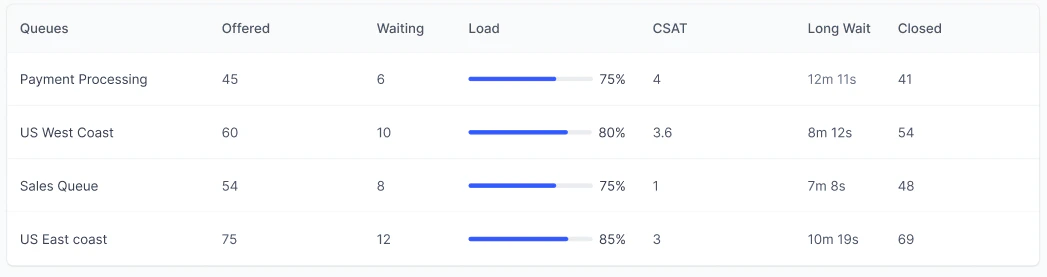
| Queues | NA | Names of the configured queues. |
| Offered | Time-based | Count of all conversations offered in the queue. |
| Waiting | Live | Count of all conversations waiting in the queue. |
| Load | Live | Current load on the queue as a percentage. |
| CSAT | Time-based | Average CSAT of all conversations in the queue / count of conversations with CSAT in the queue. |
| Long Wait | Live | Longest wait duration for any conversation currently waiting in the queue. |
| Closed | Time-based | Count of conversations properly closed in the queue. |
***
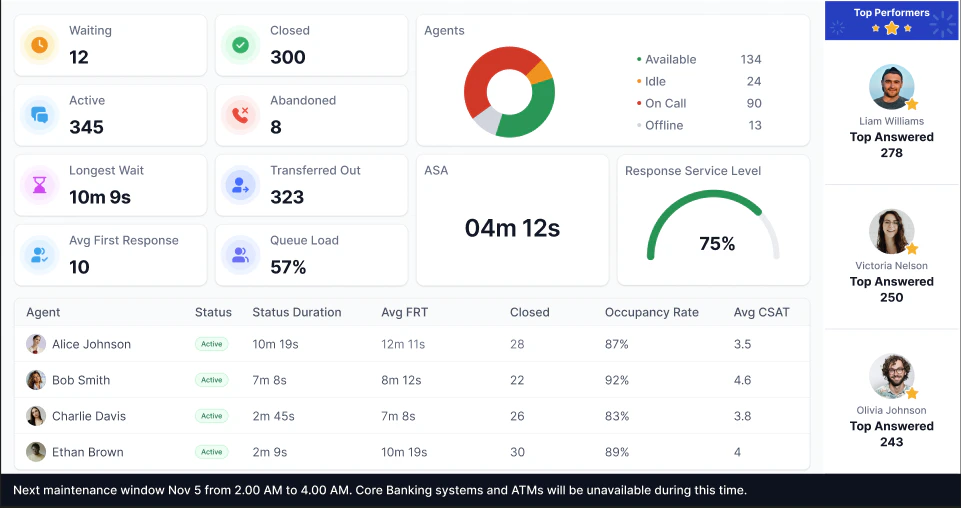
## Queue Specific
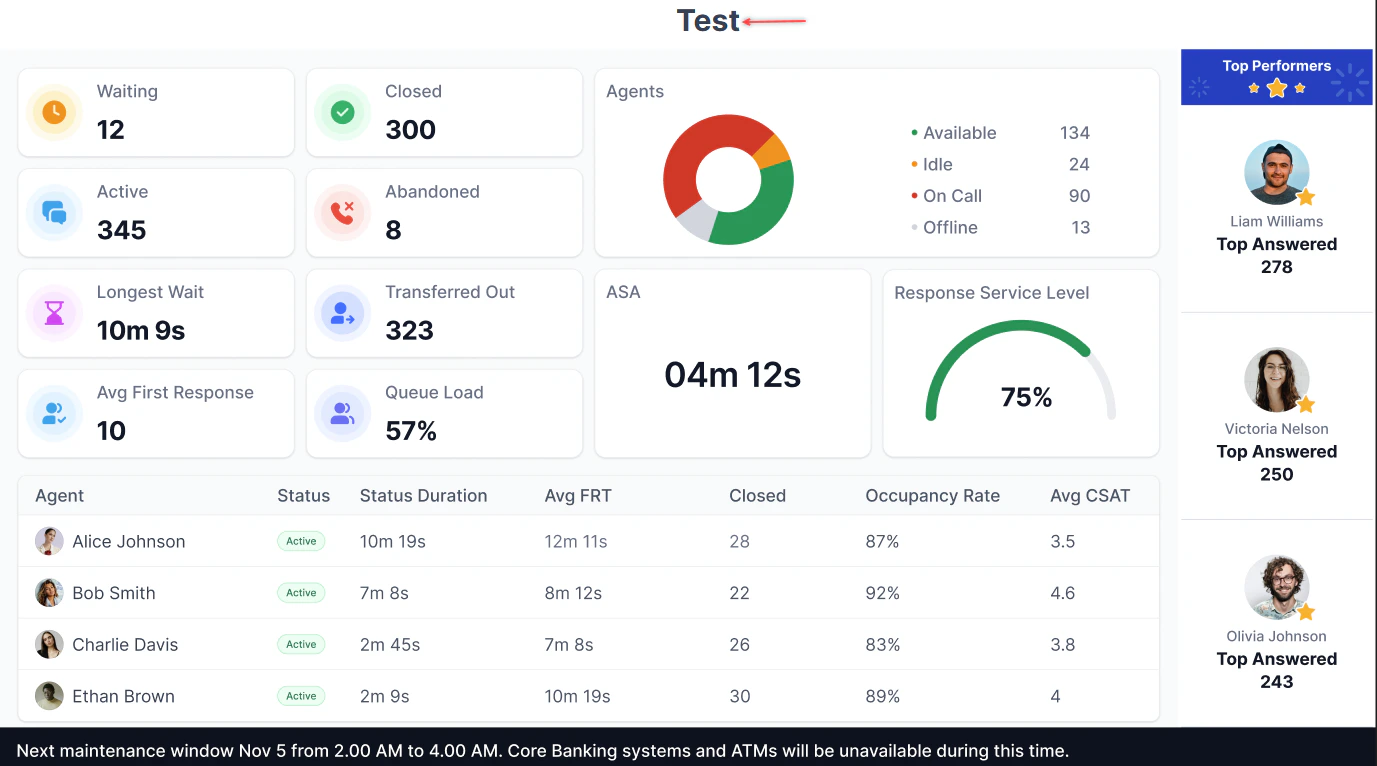
The wallboard name appears at the top.
| Name | Live/Time Based | Description |
| :-------- | :-------------- | :---------------------------------------------------------------------------------------------- |
| Queues | NA | Names of the configured queues. |
| Offered | Time-based | Count of all conversations offered in the queue. |
| Waiting | Live | Count of all conversations waiting in the queue. |
| Load | Live | Current load on the queue as a percentage. |
| CSAT | Time-based | Average CSAT of all conversations in the queue / count of conversations with CSAT in the queue. |
| Long Wait | Live | Longest wait duration for any conversation currently waiting in the queue. |
| Closed | Time-based | Count of conversations properly closed in the queue. |
***
## Queue Specific
The wallboard name appears at the top.
 ***
### Top Section Widgets
**Multiple Insights**
***
### Top Section Widgets
**Multiple Insights**
 **One Insight**
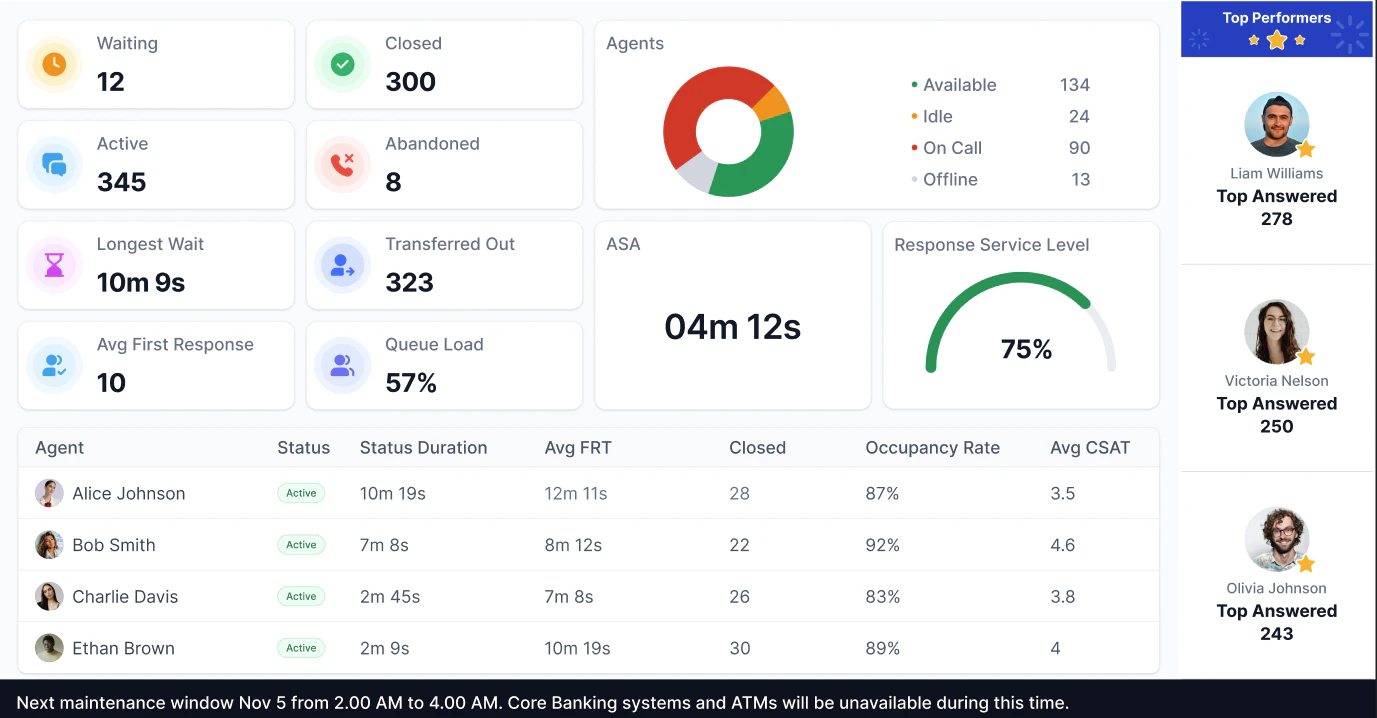
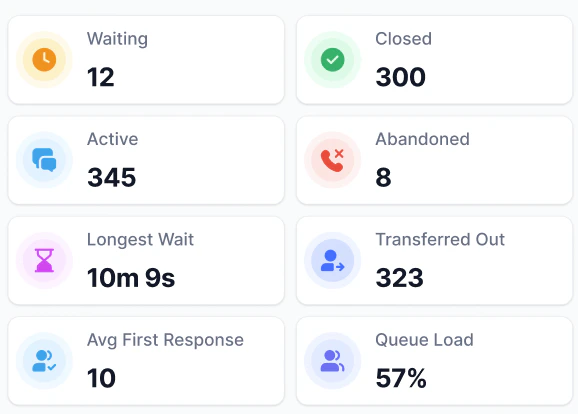 | Name | Description |
| :----------------------------- | :------------------------------------------------------------------------------------------------------------------------------------------------------------------------------------------------ |
| Waiting | Number of conversations waiting in the selected queue. |
| Closed | Number of conversations properly closed by agents in the selected queue. |
| Active | Number of conversations in active conversations with agents in the selected queue. |
| Abandoned | Number of conversations abandoned in the selected queue. |
| Longest Wait | Longest wait time for all conversations in the selected queue (format: `NNNh NNm NNs`). |
| Transferred Out | Number of conversations transferred to other queues from the selected queue. |
| Avg. First Response Time (FRT) | Average first response time for all conversations in the selected queue. |
| Queue Load Percentage | Ratio of current queue demand to queue handling capacity, as a percentage. Formula: (Waiting conversations + Active conversations) / (Available agents \* Target conversations per agent) \* 100% |
***
### Right Section Widgets
| Name | Description |
| :----------------------------- | :------------------------------------------------------------------------------------------------------------------------------------------------------------------------------------------------ |
| Waiting | Number of conversations waiting in the selected queue. |
| Closed | Number of conversations properly closed by agents in the selected queue. |
| Active | Number of conversations in active conversations with agents in the selected queue. |
| Abandoned | Number of conversations abandoned in the selected queue. |
| Longest Wait | Longest wait time for all conversations in the selected queue (format: `NNNh NNm NNs`). |
| Transferred Out | Number of conversations transferred to other queues from the selected queue. |
| Avg. First Response Time (FRT) | Average first response time for all conversations in the selected queue. |
| Queue Load Percentage | Ratio of current queue demand to queue handling capacity, as a percentage. Formula: (Waiting conversations + Active conversations) / (Available agents \* Target conversations per agent) \* 100% |
***
### Right Section Widgets
 | Name | Range | Description |
| :-------------------------------- | :-------------------- | :-------------------------------------------------------------- |
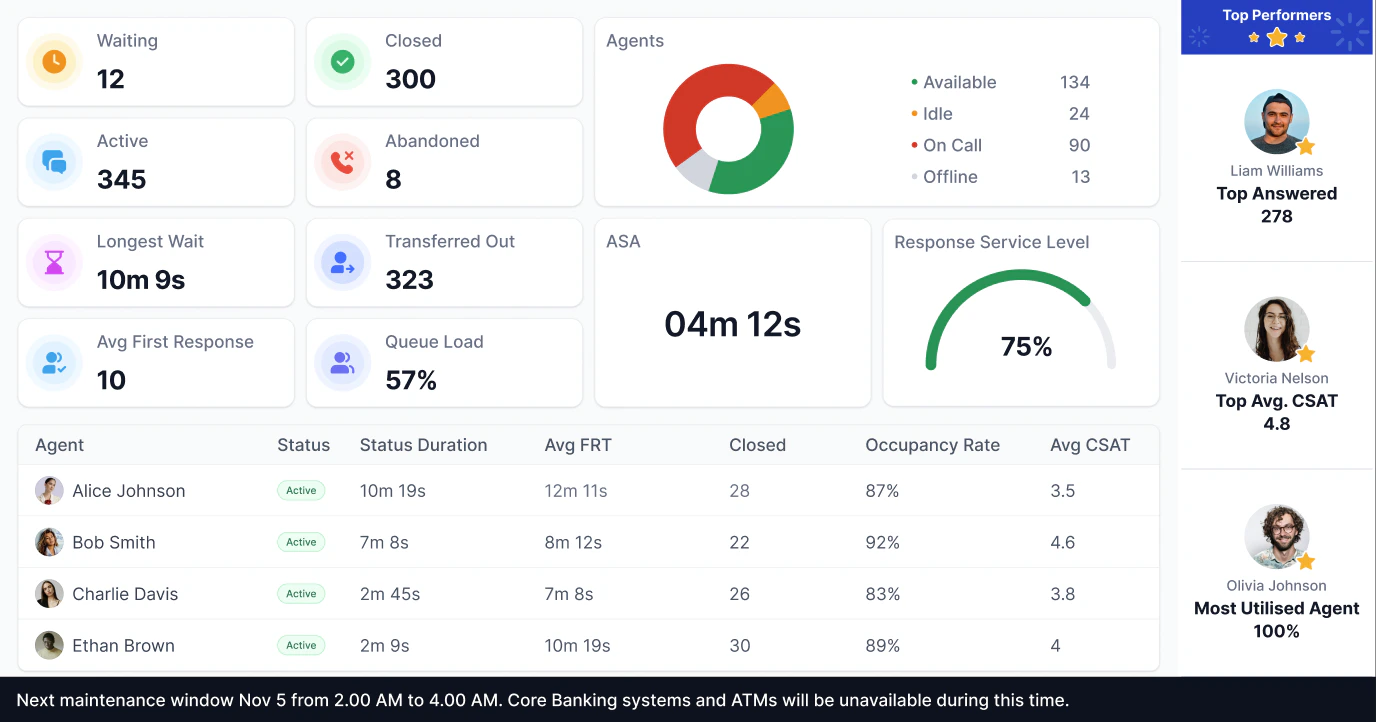
| Top N Closed | N in the range of 1-3 | Shows agents with the highest number of closed conversations. |
| Top N Answered | N in the range of 1-3 | Shows agents with the highest number of accepted conversations. |
| Top N CSAT | N in the range of 1-3 | Shows agents with the highest CSAT. |
| Top N Occupancy Rate | N in the range of 1-3 | Shows agents with the highest occupancy rate. |
| Top N Average First Response Time | N in the range of 1-3 | Shows agents with the lowest Average First Response Time (FRT). |
***
### Bottom Section-Agent Data
| Name | Range | Description |
| :-------------------------------- | :-------------------- | :-------------------------------------------------------------- |
| Top N Closed | N in the range of 1-3 | Shows agents with the highest number of closed conversations. |
| Top N Answered | N in the range of 1-3 | Shows agents with the highest number of accepted conversations. |
| Top N CSAT | N in the range of 1-3 | Shows agents with the highest CSAT. |
| Top N Occupancy Rate | N in the range of 1-3 | Shows agents with the highest occupancy rate. |
| Top N Average First Response Time | N in the range of 1-3 | Shows agents with the lowest Average First Response Time (FRT). |
***
### Bottom Section-Agent Data
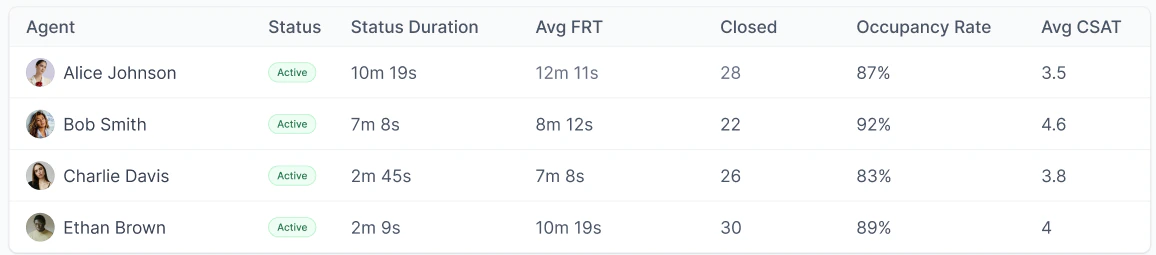 | Name | Description |
| :-------------- | :--------------------------------------------------------------------------------------------------------------------------------------------------------------------------------------- |
| Agent | Name and display picture of agents. |
| Status | Current status of the agent. |
| Status Duration | How long the agent has been in the current status (format: NNNh NNm NNs). |
| Avg. FRT | Average First Response Time of the agent. |
| Closed | Number of conversations properly closed by the agent. |
| Occupancy Rate | Percentage of logged-in time the agent spent actively handling conversations. Formula: (Time spent actively working \[talk + hold + snooze + mute + ACW]) × 100 / (Time spent logged in) |
| Avg. CSAT | Average CSAT of the agent. |
***
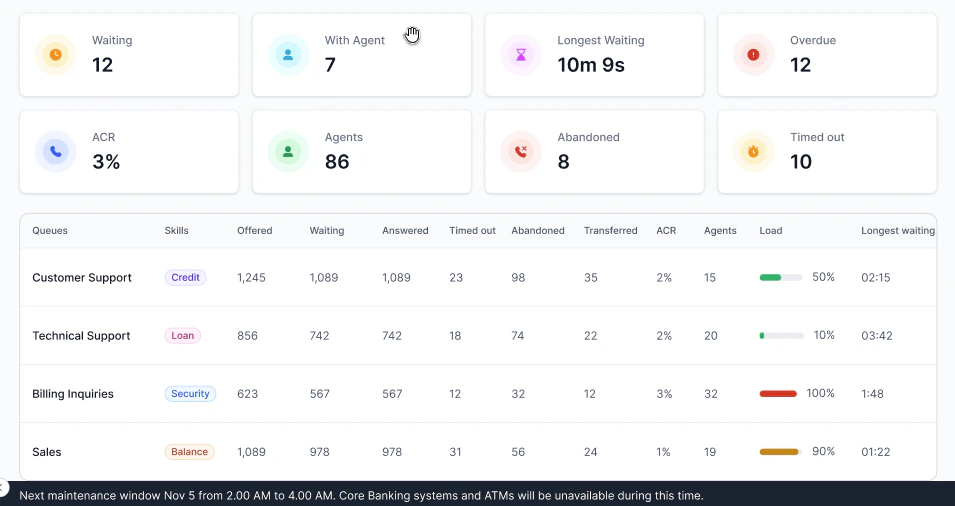
## Center Wide Abandoned
The wallboard name appears at the top.
| Name | Description |
| :-------------- | :--------------------------------------------------------------------------------------------------------------------------------------------------------------------------------------- |
| Agent | Name and display picture of agents. |
| Status | Current status of the agent. |
| Status Duration | How long the agent has been in the current status (format: NNNh NNm NNs). |
| Avg. FRT | Average First Response Time of the agent. |
| Closed | Number of conversations properly closed by the agent. |
| Occupancy Rate | Percentage of logged-in time the agent spent actively handling conversations. Formula: (Time spent actively working \[talk + hold + snooze + mute + ACW]) × 100 / (Time spent logged in) |
| Avg. CSAT | Average CSAT of the agent. |
***
## Center Wide Abandoned
The wallboard name appears at the top.
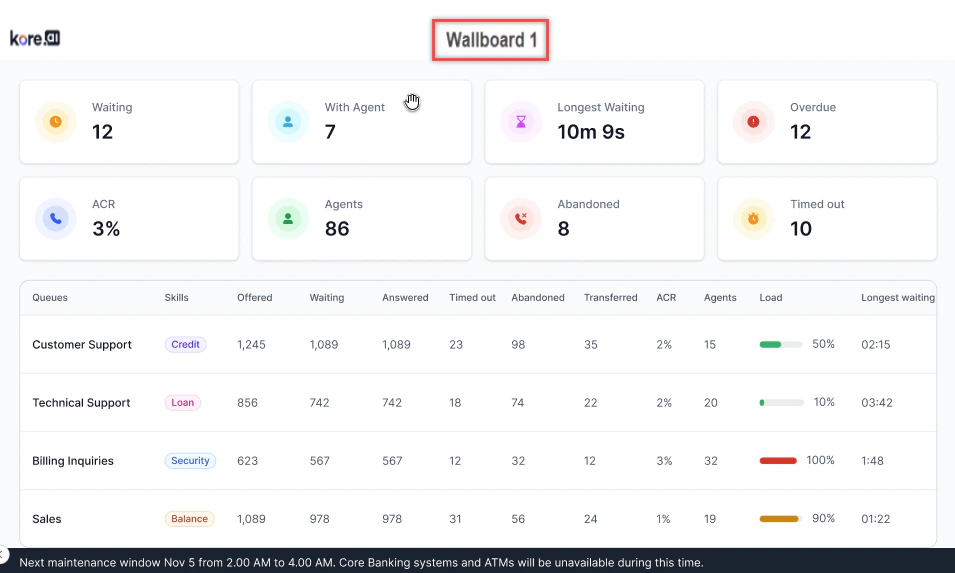 ***
### Top Section Widgets
The top section of the wallboard shows the following widgets:
***
### Top Section Widgets
The top section of the wallboard shows the following widgets:
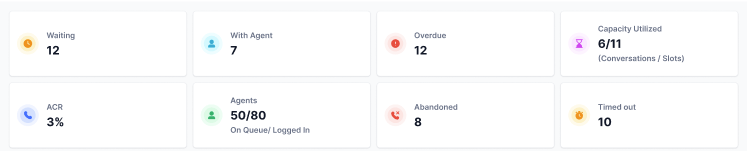 | Name | Live/Time-Based | Description |
| :---------------- | :-------------- | :---------------------------------------------------------------------------------------------------------------------------------------------------------------------------------- |
| Waiting | Live | Count of all conversations waiting in all queues. |
| With Agent | Live | Count of all conversations currently handled by agents. |
| Overdue | Live | Count of all conversations currently overdue with agents. |
| Capacity utilized | Live | Number of conversations being handled by agents (A), out of the total available slots across all agents who are in the Available or System Busy state (B).
| Name | Live/Time-Based | Description |
| :---------------- | :-------------- | :---------------------------------------------------------------------------------------------------------------------------------------------------------------------------------- |
| Waiting | Live | Count of all conversations waiting in all queues. |
| With Agent | Live | Count of all conversations currently handled by agents. |
| Overdue | Live | Count of all conversations currently overdue with agents. |
| Capacity utilized | Live | Number of conversations being handled by agents (A), out of the total available slots across all agents who are in the Available or System Busy state (B).
Displays as A / B. |
| ACR | Time-Based | Percentage of conversations abandoned in the queue or timed out, divided by offered conversations. |
| Agents | Live | Number of agents in the Available or System Busy state (X), out of the total number of agents in the Available, Busy, or Away state (N).
Displays as X / N. |
| Abandoned | Time-Based | Count of conversations abandoned by users in queues. |
| Timed Out | Time-Based | Number of conversations that timed out while waiting in the queue. |
***
### Bottom Section Widgets
The bottom section of the wallboard displays the following queue data.
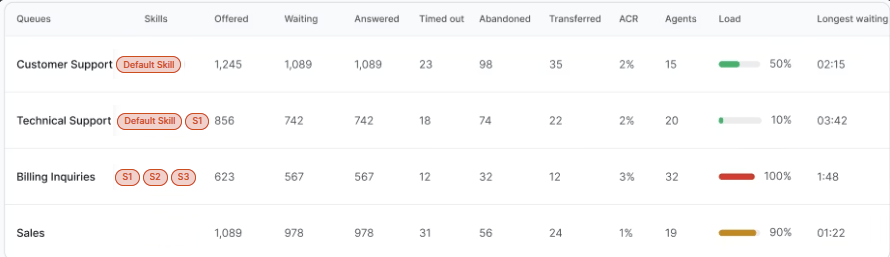 | Name | Live/Time-Based | Description |
| :------------------- | :-------------- | :--------------------------------------------------------------------------------------------------------------------------- |
| Offered | Time-Based | Count of all conversations offered. |
| Waiting | Live | Count of all conversations currently waiting in the queue. |
| Answered | Time-Based | Count of all conversations accepted by any agent. |
| Timed Out | Time-Based | Count of all conversations timed out while waiting in the queue. |
| Abandoned | Time-Based | Count of all conversations abandoned in the queue. |
| Transferred | Time-Based | Count of all conversations transferred from this queue. |
| ACR | Time-Based | Percentage of conversations abandoned in queue or timed out divided by offered conversations. |
| Agents | Live | Count of all available or system-busy agents assigned to the queue with the required skill combination. |
| Load | Live | Queue load calculated using the queue load formula from the Queues and Agents dashboard. Skills are ignored for this metric. |
| Longest Waiting Time | Live | Duration of the longest wait for any conversation currently waiting in the queue with the skill. |
**Queue-Skill Combinations Table**
The Queue-Skill table breaks down abandoned conversation counts by the combination of queue and skill that was active at the moment each conversation entered the queue.
**How rows are assigned**
Each row in the table represents a unique Queue + Skill pair. A conversation is counted against a queue-skill row based on the skill it carried at the time it entered that queue, not the skill associated with it at the end of the call.
If a conversation moves through multiple queues and its skill changes between queues, each queue counts it for the skill it held at entry into that specific queue. The same conversation can appear in multiple rows if it passed through multiple queues with different skills.
Example:
| Queue | Skill | Counted | Reason |
| :---- | :---- | :------ | :----------------------------------------------- |
| Q1 | S1 | ✅ Yes | Conversation C1 had skill S1 when it entered Q1. |
| Q1 | S2 | ❌ No | C1 wasn't linked to S2 when it entered Q1. |
| Q2 | S2 | ✅ Yes | C1 had skill S2 when it entered Q2. |
**Conversations with no skill**
If a conversation enters a queue with no skill assigned, it appears in the table as a separate row with the queue name and a blank skill value.
| Queue | Skill |
| :---- | :---- |
| Q1 | Blank |
Blank-skill rows display only when skill-less conversations exist for that queue. If no such conversations exist, the row is omitted.
***
If the scroll text toggle is enabled, the configured text scrolls at the bottom of the page at the selected speed.
| Name | Live/Time-Based | Description |
| :------------------- | :-------------- | :--------------------------------------------------------------------------------------------------------------------------- |
| Offered | Time-Based | Count of all conversations offered. |
| Waiting | Live | Count of all conversations currently waiting in the queue. |
| Answered | Time-Based | Count of all conversations accepted by any agent. |
| Timed Out | Time-Based | Count of all conversations timed out while waiting in the queue. |
| Abandoned | Time-Based | Count of all conversations abandoned in the queue. |
| Transferred | Time-Based | Count of all conversations transferred from this queue. |
| ACR | Time-Based | Percentage of conversations abandoned in queue or timed out divided by offered conversations. |
| Agents | Live | Count of all available or system-busy agents assigned to the queue with the required skill combination. |
| Load | Live | Queue load calculated using the queue load formula from the Queues and Agents dashboard. Skills are ignored for this metric. |
| Longest Waiting Time | Live | Duration of the longest wait for any conversation currently waiting in the queue with the skill. |
**Queue-Skill Combinations Table**
The Queue-Skill table breaks down abandoned conversation counts by the combination of queue and skill that was active at the moment each conversation entered the queue.
**How rows are assigned**
Each row in the table represents a unique Queue + Skill pair. A conversation is counted against a queue-skill row based on the skill it carried at the time it entered that queue, not the skill associated with it at the end of the call.
If a conversation moves through multiple queues and its skill changes between queues, each queue counts it for the skill it held at entry into that specific queue. The same conversation can appear in multiple rows if it passed through multiple queues with different skills.
Example:
| Queue | Skill | Counted | Reason |
| :---- | :---- | :------ | :----------------------------------------------- |
| Q1 | S1 | ✅ Yes | Conversation C1 had skill S1 when it entered Q1. |
| Q1 | S2 | ❌ No | C1 wasn't linked to S2 when it entered Q1. |
| Q2 | S2 | ✅ Yes | C1 had skill S2 when it entered Q2. |
**Conversations with no skill**
If a conversation enters a queue with no skill assigned, it appears in the table as a separate row with the queue name and a blank skill value.
| Queue | Skill |
| :---- | :---- |
| Q1 | Blank |
Blank-skill rows display only when skill-less conversations exist for that queue. If no such conversations exist, the row is omitted.
***
If the scroll text toggle is enabled, the configured text scrolls at the bottom of the page at the selected speed.
 ***
***