> ## Documentation Index
> Fetch the complete documentation index at: https://koreai.mintlify.site/llms.txt
> Use this file to discover all available pages before exploring further.
# IVR Containment Report
[Back to Reports List](/ai-for-service/analytics/contact-center/reports/reports-list)
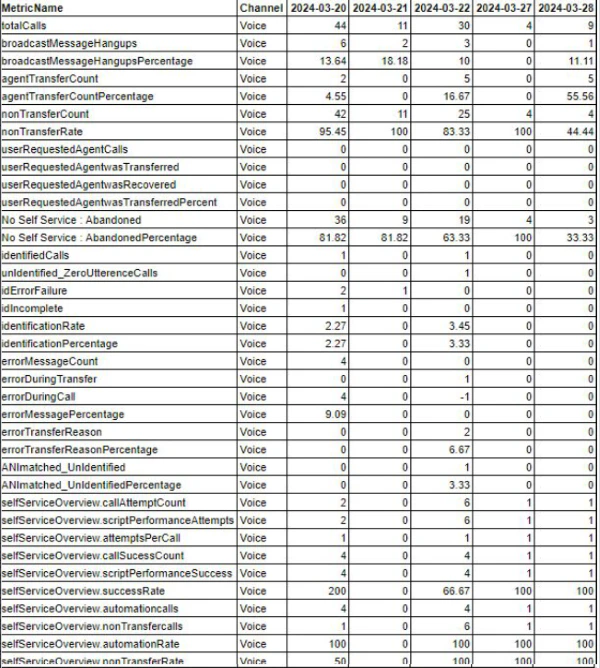
The IVR Containment Report covers all incoming calls, including callers identified and per-intent data and outcomes on a daily basis. This report requires the bot designer to emit predefined message tags during intent execution, and is applicable for voice calls only.
***
## Generate and Manage the Report
Refer to [Creating a New Report](/ai-for-service/analytics/contact-center/reports/introduction-to-reports#creating-a-new-report) for instructions on generating this report.
Refer to [Manage Reports](/ai-for-service/analytics/contact-center/reports/introduction-to-reports#manage-reports) for instructions on managing this report.
The report is available for download.
 ***
## Message Tags for Bots
The bot designer must emit the following predefined message tags at the appropriate points during intent execution for this report to populate correctly.
### Predefined Message Tags
| Message Tag | Where to Emit |
| :------------------------------------------ | :---------------------------------------------------------------------------------------------------------------------------------- |
| `{didUserAskForAgent: true}` | When the caller has made at least one request for an agent. |
| `{wasTransferredOnRequest: true}` | When the caller was transferred after requesting an agent. |
| `{isCallerIdentified: true}` | When the caller was successfully identified. |
| `{isCallerIdentified: false}` | When the caller identification process failed. |
| `{iDFailure: true}` | When caller identification failed with specific errors. |
| `{iDIncomplete: true}` | When caller identification failed with non-specified errors and customer utterances were greater than zero. |
| `{errorMessage: true}` | When a call had at least one system error. |
| `{errorDuringTransfer: true}` | When the first system error occurred during the transfer. |
| `{errorContainsTransferReason: true}` | When the error contained a specified transfer reason. |
| `{ANImatchNotIdentified: false}` | When the caller ID process was unsuccessful but the ANI did match. |
| `{paymentTriggered: true}` | When the call was transferred to payment. |
| `{completedTransactionNotTransfered: true}` | When a self-service transaction was completed AND the call wasn't transferred to payment AND not transferred to the contact center. |
### Per-Intent Message Tags
Use the following tags within every business-relevant dialog task. The intent name is the key (replace `showBalance` with the actual intent name):
| Message Tag | Where to Emit |
| :------------------------- | :--------------------------------------------------- |
| `{showBalance: attempted}` | When the main script for the intent is attempted. |
| `{showBalance: success}` | When the main script for the intent returns success. |
***
***
## Message Tags for Bots
The bot designer must emit the following predefined message tags at the appropriate points during intent execution for this report to populate correctly.
### Predefined Message Tags
| Message Tag | Where to Emit |
| :------------------------------------------ | :---------------------------------------------------------------------------------------------------------------------------------- |
| `{didUserAskForAgent: true}` | When the caller has made at least one request for an agent. |
| `{wasTransferredOnRequest: true}` | When the caller was transferred after requesting an agent. |
| `{isCallerIdentified: true}` | When the caller was successfully identified. |
| `{isCallerIdentified: false}` | When the caller identification process failed. |
| `{iDFailure: true}` | When caller identification failed with specific errors. |
| `{iDIncomplete: true}` | When caller identification failed with non-specified errors and customer utterances were greater than zero. |
| `{errorMessage: true}` | When a call had at least one system error. |
| `{errorDuringTransfer: true}` | When the first system error occurred during the transfer. |
| `{errorContainsTransferReason: true}` | When the error contained a specified transfer reason. |
| `{ANImatchNotIdentified: false}` | When the caller ID process was unsuccessful but the ANI did match. |
| `{paymentTriggered: true}` | When the call was transferred to payment. |
| `{completedTransactionNotTransfered: true}` | When a self-service transaction was completed AND the call wasn't transferred to payment AND not transferred to the contact center. |
### Per-Intent Message Tags
Use the following tags within every business-relevant dialog task. The intent name is the key (replace `showBalance` with the actual intent name):
| Message Tag | Where to Emit |
| :------------------------- | :--------------------------------------------------- |
| `{showBalance: attempted}` | When the main script for the intent is attempted. |
| `{showBalance: success}` | When the main script for the intent returns success. |
***