> ## Documentation Index
> Fetch the complete documentation index at: https://koreai.mintlify.site/llms.txt
> Use this file to discover all available pages before exploring further.
# Agent AI Analytics Overview (Beta)
[Back to Analytics Overview](/ai-for-service/analytics/overview)
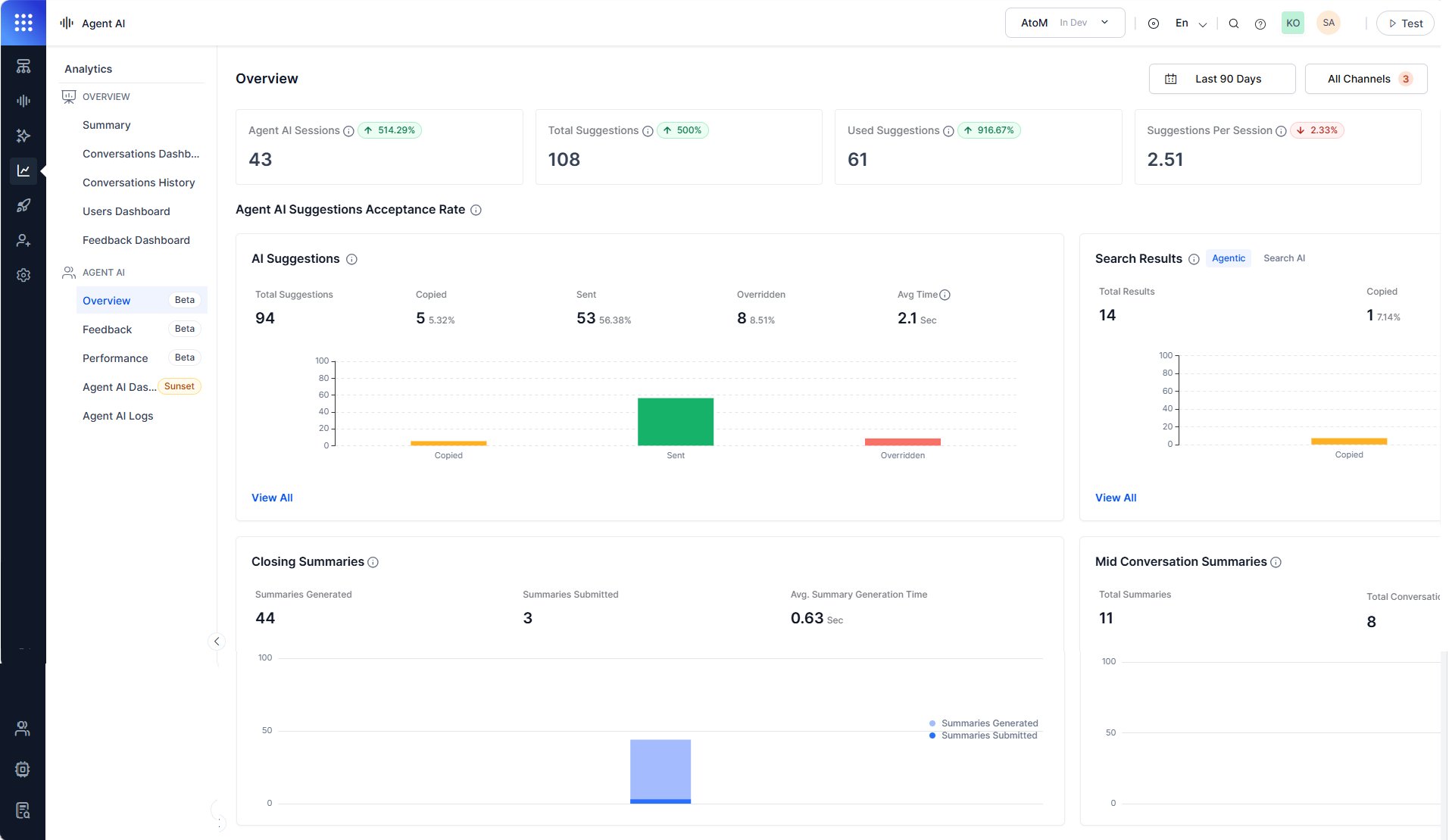
The Overview section gives supervisors and administrators a date and channel-filtered view of how agents interact with the Agentic Copilot suggestions, search results, and conversation summaries.
Use Overview to:
* Monitor suggestion adoption rates.
* Identify override patterns.
* Measure summary generation performance.
## Access Overview
1. Sign in to **AI for Service**.
2. Go to **Agent AI** > **Analytics**.
3. Select **Agent AI** > **Overview**.
4. Filter data based on the following table:
| Filter | Description |
| ---------- | ------------------------------------------------------------------------- |
| Date range | Filters all metrics by the selected time period. Defaults to **Today**. |
| Channels | Filters data by channel—Chat, Voice, Email. Defaults to **All Channels**. |
 ## Session and suggestion metrics
The top of the Overview section shows four summary metrics for the selected date range. Each metric card includes a delta indicator (↑ or ↓) that compares the current period against the previous equivalent period.
| Metric | Description |
| ----------------------- | -------------------------------------------------------------------------------------------------- |
| Agent AI Sessions | Total Agent AI widget sessions—My bot, search, and Agentic Copilot—across the selected time range. |
| Total Suggestions | Total Agentic Copilot suggestions shown to agents across all sessions. |
| Used Suggestions | Total suggestions used—copied or sent—across all sessions. |
| Suggestions Per Session | Average number of suggestions per session. |
## Agent AI suggestions acceptance rate
The **Agent AI Suggestions Acceptance Rate** section breaks down how agents interact with the Agentic Copilot content. It contains two sub-sections:
* **AI Suggestions**: Displays the Agentic Copilot suggestion usage metric.
* **Search Results**: Displays the search result usage metric.
### AI suggestions
The **AI Suggestions** panel displays how agents handle the AI-generated suggestions. A bar chart compares the Copied, Sent, and Overridden values.
| Metric | Description |
| ----------------- | --------------------------------------------------------------------------------------------------------------------------------------------------------------------- |
| Total Suggestions | Total AI-generated suggestions presented to agents. |
| Copied | Suggestions agents copied. Displays as a count and percentage of responses. |
| Sent | Suggestions agents sent directly to customers. Displays as a count and percentage of responses. |
| Overridden | The number of custom requests agents sent to the Agentic app when the AI suggestions didn't meet their expectations. Displays as a count and percentage of responses. |
| Avg Time | Average time the system takes to generate each AI suggestion. |
#### View All
Select **View All** to open the dialog lists per-conversation suggestion data in a table with the following columns:
| Column | Description |
| --------------------------- | ------------------------------------------------------------------------------------------- |
| Conversation ID | The unique identifier for the conversation. |
| Involved App | The Agentic App associated with the conversation. |
| Total Number of Suggestions | The total count of AI-generated suggestions presented to the agent during the conversation. |
| Copied | The number of suggestions the agent copied during the conversation. |
| Sent | The number of suggestions the agent sent directly to the customer. |
| Overridden | The number of times the agent sent a custom request instead of using the AI suggestion. |
| Date & Time | The date and time the conversation occurred. |
## Session and suggestion metrics
The top of the Overview section shows four summary metrics for the selected date range. Each metric card includes a delta indicator (↑ or ↓) that compares the current period against the previous equivalent period.
| Metric | Description |
| ----------------------- | -------------------------------------------------------------------------------------------------- |
| Agent AI Sessions | Total Agent AI widget sessions—My bot, search, and Agentic Copilot—across the selected time range. |
| Total Suggestions | Total Agentic Copilot suggestions shown to agents across all sessions. |
| Used Suggestions | Total suggestions used—copied or sent—across all sessions. |
| Suggestions Per Session | Average number of suggestions per session. |
## Agent AI suggestions acceptance rate
The **Agent AI Suggestions Acceptance Rate** section breaks down how agents interact with the Agentic Copilot content. It contains two sub-sections:
* **AI Suggestions**: Displays the Agentic Copilot suggestion usage metric.
* **Search Results**: Displays the search result usage metric.
### AI suggestions
The **AI Suggestions** panel displays how agents handle the AI-generated suggestions. A bar chart compares the Copied, Sent, and Overridden values.
| Metric | Description |
| ----------------- | --------------------------------------------------------------------------------------------------------------------------------------------------------------------- |
| Total Suggestions | Total AI-generated suggestions presented to agents. |
| Copied | Suggestions agents copied. Displays as a count and percentage of responses. |
| Sent | Suggestions agents sent directly to customers. Displays as a count and percentage of responses. |
| Overridden | The number of custom requests agents sent to the Agentic app when the AI suggestions didn't meet their expectations. Displays as a count and percentage of responses. |
| Avg Time | Average time the system takes to generate each AI suggestion. |
#### View All
Select **View All** to open the dialog lists per-conversation suggestion data in a table with the following columns:
| Column | Description |
| --------------------------- | ------------------------------------------------------------------------------------------- |
| Conversation ID | The unique identifier for the conversation. |
| Involved App | The Agentic App associated with the conversation. |
| Total Number of Suggestions | The total count of AI-generated suggestions presented to the agent during the conversation. |
| Copied | The number of suggestions the agent copied during the conversation. |
| Sent | The number of suggestions the agent sent directly to the customer. |
| Overridden | The number of times the agent sent a custom request instead of using the AI suggestion. |
| Date & Time | The date and time the conversation occurred. |
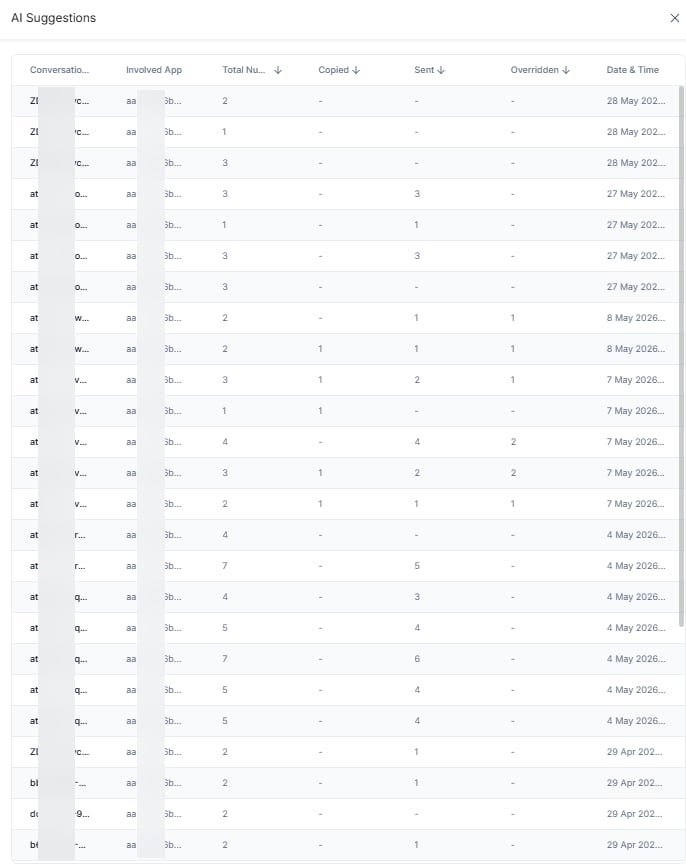 Select a **Conversation ID** to view the Conversation Log. It shows the conversation summary, transcripts of customer-agent interactions, agent feedback on widget performance and AI suggestions, and conversation identifiers. For more details, see [Conversation Log](/ai-for-service/analytics/contact-center/agentai-conversation-logs#conversation-log).
### Search results
The **Search Results** panel displays how many search responses agents received, copied, and sent to customers from the **Search** tab. The panel contains two tabs: **Agentic** and **Search AI**. Both tabs display the following metrics:
| Metric | Description |
| ------------- | ----------------------------------------------------------------------------------------- |
| Total Results | Total search results displayed to agents. |
| Copied | Search results agents copied. Displays as a count and percentage of responses. |
| Sent | Search results agents sent to customers. Displays as a count and percentage of responses. |
* **Agentic tab**: Displays search result metrics for Agentic Copilot interactions.
* **Search AI tab**: Displays search result metrics for Search AI interactions.
#### View All
Select **View All** to open a dialog that lists per-conversation search data in a table with the following columns:
| Column | Description |
| ------------------- | ---------------------------------------------------------------------- |
| **Conversation ID** | The unique identifier for the conversation. |
| **Involved App** | The Agentic app associated with the conversation. |
| **Search Query** | The query the agent submitted in the Search tab. |
| **Search Result** | The result the system returned for the query. |
| **Source** | The source of the search result, such as FAQ, Dialog Task, or Answers. |
| **Actions Taken** | The action the agent took on the result, such as **Copy** or **Sent**. |
| **Feedback** | The feedback the agent submitted on the search result. |
| **Date & Time** | The date and time the conversation occurred. |
The Search AI tab doesn’t include the **Involved App** column.
Select a **Conversation ID** to view the Conversation Log. For more details, see [Conversation Log](/ai-for-service/analytics/contact-center/agentai-conversation-logs#conversation-log).
### Closing summaries
The **Closing Summaries** panel displays how agents handled AI-generated end-of-conversation summaries. A bar chart tracks Summaries Generated and Summaries Submitted over the selected date range.
| Metric | Description |
| ---------------------------- | ------------------------------------------------------------------ |
| Summaries Generated | Total end-of-conversation summaries the Agent AI widget generated. |
| Summaries Submitted | Summaries agents submitted. |
| Avg. Summary Generation Time | Average time, in seconds, to generate a summary. |
### Mid-conversation summaries
The **Mid Conversation Summaries** panel displays metrics for intermittent summaries agents generate during active conversations. A bar chart tracks Total Summaries and Total Conversations over the selected time range.
| Metric | Description |
| ----------------------------------------- | -------------------------------------------------------------------------- |
| Total Summaries | Total intermittent summaries agents generated. |
| Total Conversations | Conversations in which agents generated at least one intermittent summary. |
| Avg. Summaries Generated Per Conversation | Average intermittent summaries agents generated per conversation. |
Select a **Conversation ID** to view the Conversation Log. It shows the conversation summary, transcripts of customer-agent interactions, agent feedback on widget performance and AI suggestions, and conversation identifiers. For more details, see [Conversation Log](/ai-for-service/analytics/contact-center/agentai-conversation-logs#conversation-log).
### Search results
The **Search Results** panel displays how many search responses agents received, copied, and sent to customers from the **Search** tab. The panel contains two tabs: **Agentic** and **Search AI**. Both tabs display the following metrics:
| Metric | Description |
| ------------- | ----------------------------------------------------------------------------------------- |
| Total Results | Total search results displayed to agents. |
| Copied | Search results agents copied. Displays as a count and percentage of responses. |
| Sent | Search results agents sent to customers. Displays as a count and percentage of responses. |
* **Agentic tab**: Displays search result metrics for Agentic Copilot interactions.
* **Search AI tab**: Displays search result metrics for Search AI interactions.
#### View All
Select **View All** to open a dialog that lists per-conversation search data in a table with the following columns:
| Column | Description |
| ------------------- | ---------------------------------------------------------------------- |
| **Conversation ID** | The unique identifier for the conversation. |
| **Involved App** | The Agentic app associated with the conversation. |
| **Search Query** | The query the agent submitted in the Search tab. |
| **Search Result** | The result the system returned for the query. |
| **Source** | The source of the search result, such as FAQ, Dialog Task, or Answers. |
| **Actions Taken** | The action the agent took on the result, such as **Copy** or **Sent**. |
| **Feedback** | The feedback the agent submitted on the search result. |
| **Date & Time** | The date and time the conversation occurred. |
The Search AI tab doesn’t include the **Involved App** column.
Select a **Conversation ID** to view the Conversation Log. For more details, see [Conversation Log](/ai-for-service/analytics/contact-center/agentai-conversation-logs#conversation-log).
### Closing summaries
The **Closing Summaries** panel displays how agents handled AI-generated end-of-conversation summaries. A bar chart tracks Summaries Generated and Summaries Submitted over the selected date range.
| Metric | Description |
| ---------------------------- | ------------------------------------------------------------------ |
| Summaries Generated | Total end-of-conversation summaries the Agent AI widget generated. |
| Summaries Submitted | Summaries agents submitted. |
| Avg. Summary Generation Time | Average time, in seconds, to generate a summary. |
### Mid-conversation summaries
The **Mid Conversation Summaries** panel displays metrics for intermittent summaries agents generate during active conversations. A bar chart tracks Total Summaries and Total Conversations over the selected time range.
| Metric | Description |
| ----------------------------------------- | -------------------------------------------------------------------------- |
| Total Summaries | Total intermittent summaries agents generated. |
| Total Conversations | Conversations in which agents generated at least one intermittent summary. |
| Avg. Summaries Generated Per Conversation | Average intermittent summaries agents generated per conversation. |