> ## Documentation Index
> Fetch the complete documentation index at: https://koreai.mintlify.site/llms.txt
> Use this file to discover all available pages before exploring further.
# Summary Settings
Turn on the **Landing Summary** toggle, configure how the system generates an Intermittent and End of Conversation summary, auto-generate the transferring agent's exit summary when a cold or warm transfer occurs during a conversation, and select a summary generation model. Agents can copy the summary into the Notes or Remark field when closing the conversation.
## Configure Intermittent and End of Conversation Summaries
| Option | Description |
| --------------------------------------------------------- | ------------------------------------------------------------------------ |
| **Generate full conversation summary (bot + all agents)** | Summary of bot-user and agent-user conversations. |
| **Generate agent’s conversation summary only** | Summary of only the agent-user conversation. |
| **Show Submit button** | Controls the visibility of the **Submit** button. |
| **Max no. of summaries** | Sets the maximum number of intermittent summaries an agent can generate. |
Steps to configure Intermittent and End of Conversation Summaries:
1. Sign in to Platform > **Agent AI**.
2. Go to **Configurations** > **Summary Settings**.
3. Select a channel — Chat, Voice, or Email.
4. Select a language from the **Language** list.
5. Turn on the **Landing Summary** toggle.
6. Turn on the **Intermittent Summary** toggle.
Ensure **Generate Intermittent Summary** is on in [Widget Theming](/ai-for-service/agentai/configuration/widget-theming-layout-customization).
1. Select **Generate full conversation summary (All agents)** or **Generate current agent’s conversation summary** only.
2. Select **Show Submit**.
3. Set how many times an agent can generate intermittent summaries in the **Max no. of summaries** field.
7. Turn on the **End of Conversation Summary** toggle.
8. Select **Generate full conversation summary (Bot + all agents)** or **Generate agent’s conversation summary only**.
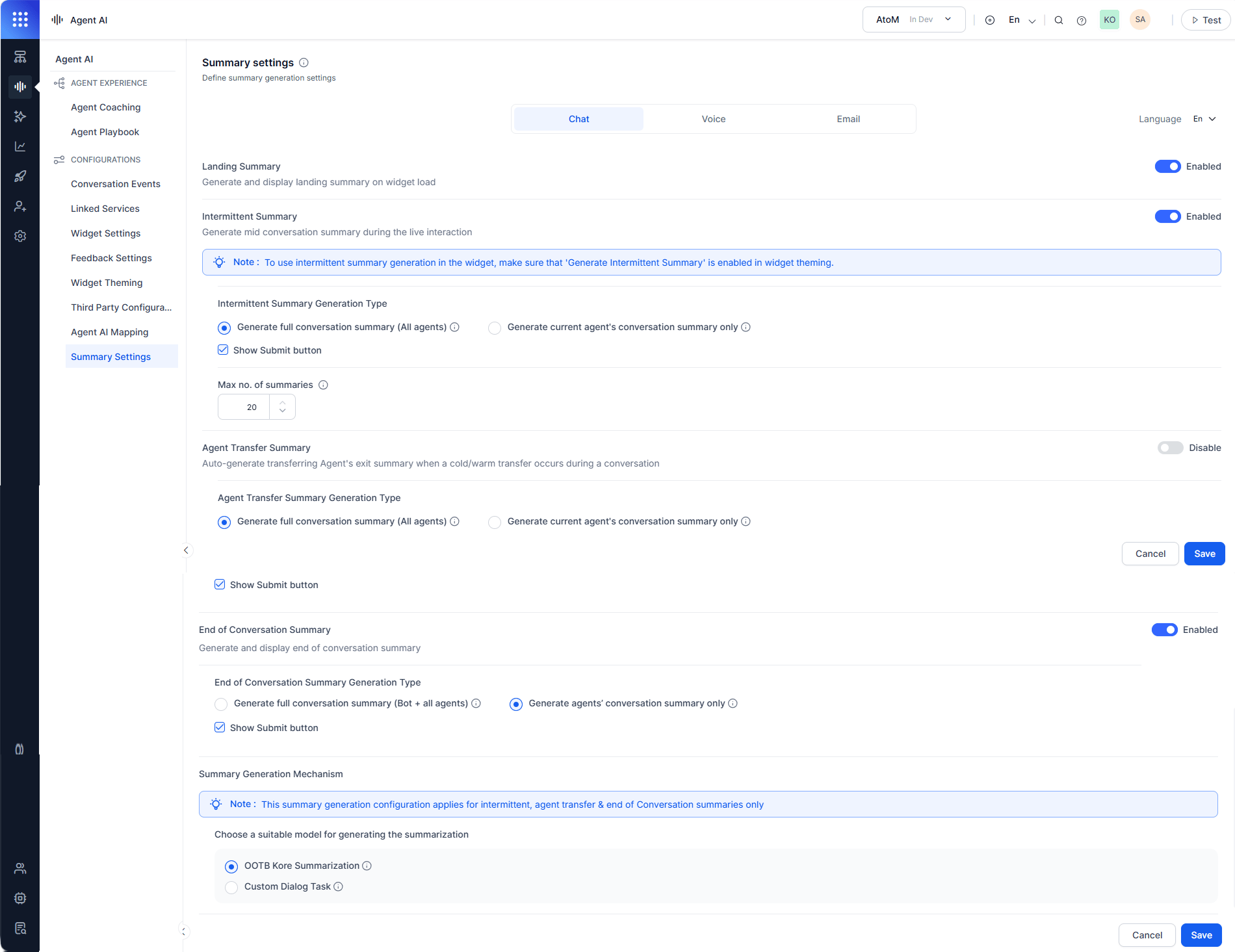 ## Configure Agent Transfer Summary
Select to generate conversation summaries of all participating agents or only the current transferring agent during warm or cold transfers.
| Option | Description |
| -------------------------------------------------- | ----------------------------------------------------------------------------------------------- |
| Generate full conversation summary (All agents) | Conversation summary of all participating agents before a warm or cold transfer to a new agent. |
| Generate current agent's conversation summary only | Summary of only the current agent's conversation before the transfer. |
| Show Submit button | Controls the visibility of the Submit button. |
## Summary Generation Mechanism
Select how to generate the conversation summary:
| Option | Description |
| ----------------------- | ------------------------------------------------------------------------------------------------------- |
| OOTB Kore Summarization | Default auto-summarization using the built-in model. |
| Custom Dialog Task | Use a custom dialog task for summarization. Displays dialog tasks or child apps based on app selection. |
The Summary Generation Mechanism applies to Intermittent and End of Conversation Summaries only.
Steps to configure Summary Generation:
1. Select **OOTB Kore Summarization** or **Custom Dialog Task**.
1. If you select **Custom Dialog Task** and the **Configure End of Conversation Dialog Task** is on, a **Confirm Action** window appears.
2. Select **Yes, Proceed**.
3. Select a dialog task from the **Select Dialog** list.
2. Select **Save**.
To use the Custom Dialog Task, you must turn off **Configure End of Conversation Dialog Task** in [Conversation Events](/ai-for-service/agentai/configuration/conversation-events#configure-end-of-conversation-dialog-task).
## Configure Agent Transfer Summary
Select to generate conversation summaries of all participating agents or only the current transferring agent during warm or cold transfers.
| Option | Description |
| -------------------------------------------------- | ----------------------------------------------------------------------------------------------- |
| Generate full conversation summary (All agents) | Conversation summary of all participating agents before a warm or cold transfer to a new agent. |
| Generate current agent's conversation summary only | Summary of only the current agent's conversation before the transfer. |
| Show Submit button | Controls the visibility of the Submit button. |
## Summary Generation Mechanism
Select how to generate the conversation summary:
| Option | Description |
| ----------------------- | ------------------------------------------------------------------------------------------------------- |
| OOTB Kore Summarization | Default auto-summarization using the built-in model. |
| Custom Dialog Task | Use a custom dialog task for summarization. Displays dialog tasks or child apps based on app selection. |
The Summary Generation Mechanism applies to Intermittent and End of Conversation Summaries only.
Steps to configure Summary Generation:
1. Select **OOTB Kore Summarization** or **Custom Dialog Task**.
1. If you select **Custom Dialog Task** and the **Configure End of Conversation Dialog Task** is on, a **Confirm Action** window appears.
2. Select **Yes, Proceed**.
3. Select a dialog task from the **Select Dialog** list.
2. Select **Save**.
To use the Custom Dialog Task, you must turn off **Configure End of Conversation Dialog Task** in [Conversation Events](/ai-for-service/agentai/configuration/conversation-events#configure-end-of-conversation-dialog-task).