> ## Documentation Index
> Fetch the complete documentation index at: https://koreai.mintlify.site/llms.txt
> Use this file to discover all available pages before exploring further.
# Role Management
[Back to Admin Console](/ai-for-service/administration/overview)
Roles and Permissions help in organizing the developer community based on the scope of their work.
* By default the roles of **Master Admin**, **App Owner**, **App Developer** and **App Tester** are created by the system.
* Each role has set of permissions allowed.
* You can edit the permission settings for App Developer and App Tester but not for Master Admin and App Owner roles.
* Users can be assigned to these roles, except App Owner which gets assigned when a User creates an App.
Apart from these the role of **Primary Master Admin** is created and assigned to the creator of the account.
These roles can be classified into:
* **[Admin Roles](#admin-roles)** which help in account management, and
* **[App Roles](#app-roles)** which help in app development.
## Admin Roles
An admin role is a set of pre-defined permissions for managing the user community. In this section, we talk about Admin roles, the permissions associated with them, how to create and assign these admin roles to users.
### Built-in Admin Role
By default, a Master Admin role is created and this role can be assigned to any user for admin access. The various permissions granted to the Master Admin role are listed below:
| Permission | Master Admin |
| ----------------------------- | ------------ |
| Invite | Yes |
| Import Users / Sync | Yes |
| Directory Sync | Edit |
| Manage Users | Edit |
| Manage User Settings | Edit |
| Manage Groups | Edit |
| Manage Custom Admin Roles | Yes |
| Manage Built-In Admin Roles | Yes |
| Manage App Roles | Yes |
| Manage Deployment | Yes |
| Enterprise Apps | Yes |
| Consumer Apps | Yes |
| Smart Apps | Yes |
| Preferences | Yes |
| Single Sign On | Yes |
| Kore.ai Connector | Yes |
| Enterprise Key | Yes |
| API Scopes | Yes |
| View and Run Audit Reports | Yes |
| View and Run App Chat History | Yes |
### Custom Admin Role
The Master Admin can create custom Admin roles and assign the same to users. The following permissions can be granted to an Admin role.
| Permission | Access Levels | Description |
| ----------------------------- | ------------- | --------------------------------------------------------------------------- |
| Invite | Yes, No | Invite Users via email; Invite users already imported |
| Import Users / Sync | Yes, No | Bulk Import users via files |
| Directory Sync | Yes, No | Enroll users via Directory Sync |
| Manage Users | Yes, No | Manage user profile, user status, and role assignments |
| Manage Groups | Yes, No | Create a local group; manage user membership, view distribution lists (DLs) |
| Manage Custom Admin Roles | Yes, No | Set up and manage Custom Admin Roles. Assign/Revoke users |
| Manage Built-In Admin Roles | Yes, No | Assign users to / revoke users from built-in admin roles |
| Manage App Roles | Yes, No | Set up and manage app roles. assign/revoke users |
| Manage Deployment | Yes, No | Approve & publish app (tasks) deployment requests |
| Enterprise Apps | Yes, No | Assign approved Enterprise app tasks to managed users |
| Consumer Apps | Yes, No | Manage consumer apps, tasks, and channels |
| Smart Apps | Yes, No | Manage smart apps, tasks, and channels |
| Preferences | Yes, No | Manage auto deployments and assignments |
| Single Sign On | Yes, No | Configure and manage Single Sign On |
| Kore.ai Connector | Yes, No | Initiate, enable & disable Kore.ai connector |
| Enterprise Key | Yes, No | View key used for encrypting enterprise data |
| API Scopes | Yes, No | Setup API scopes to manage all users, roles, and in your account |
| View and Run Audit Reports | Yes, No | Access Audit Reports; Ability to run reports; filter criteria, etc |
| View and Run App Chat History | Yes, No | View chat history from all of your account |
#### Creating an Admin role
3. On the upper-right corner of the Roles window, select **+Add New**.
4. Enter **Role Name** and **Role Description**.
5. Under **Role Type**, select **Admin Role** and select the necessary permissions for the role.
6. You can retain the default permission settings or modify them as per your requirements.
7. Select **Save**.
Once created, you can assign roles to individual users or to user groups. You can edit the roles from the Admin Console.
#### Assigning Admin role
1. Open the Admin Console, select **User Management > Users**.
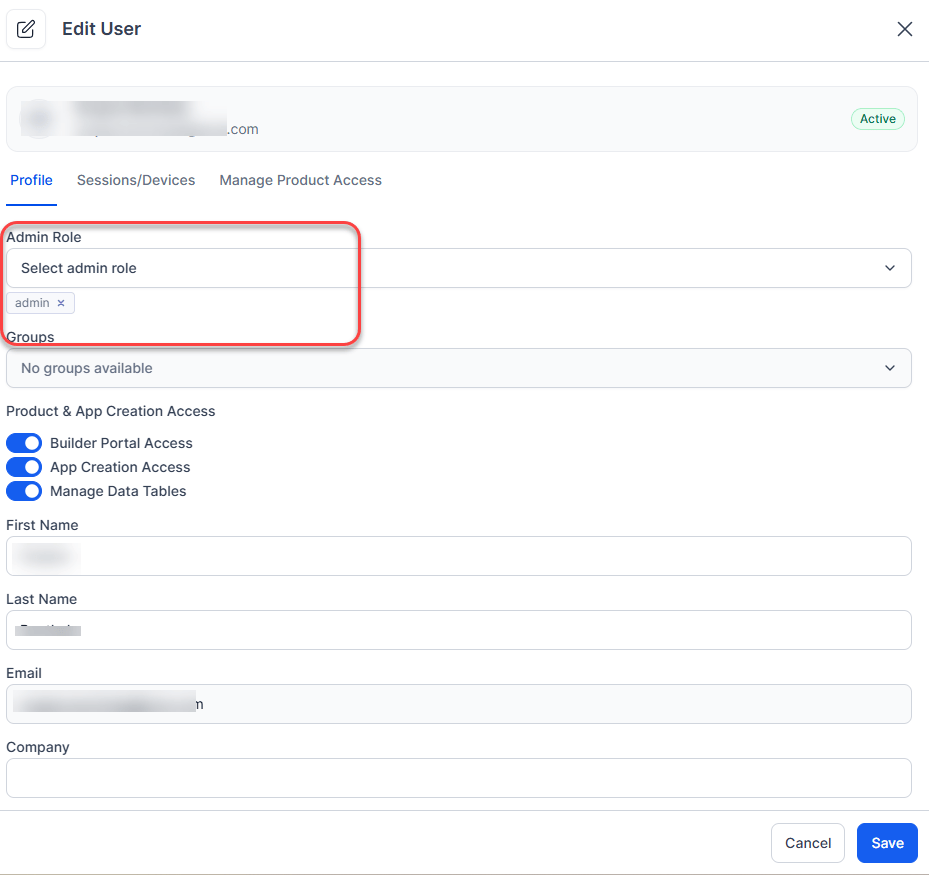
2. Select a user's record for which you want to add an app role. The user's profile slides opens.
3. Under the **Profile** tab, **edit Admin Role.**
1. Select the appropriate Admin role from the dropdown with the available roles.
2. You can assign multiple admin roles to the selected user.
 #### Assigning Admin Role to a User Group
1. Open the Admin Console, select **User Management > Roles**.
2. Locate the required role from the list, click the three-dot menu (⋮) at the right end of the row, and select Edit Role.
3. Select **Assignments > Assign Role**.
4. Open the **Select Groups** drop-down list and select all the groups for which you want to assign the app role, one after another.
5. You can assign users also from this dialog from the **Select Users** type ahead input box.
6. Select **Save**.
The default Master Admin role can be assigned to users (not groups) by the Primary Master Admin.
## App Roles
This section illustrates various App Roles, their permissions, steps to create custom App role and assign users to the same.
**App Roles** can be used to define permissions for accessing various components of a bot. These permissions include the ability to create tasks, train the bot, enable channels, enable extensions via SDKs, publish the app and view usage analytics.
**App Owner**, **App Developer**, and **App Tester** are the three in-built app roles that are available for all accounts. Creators of are automatically assigned to the *App Owner* role.
You may create additional custom app roles to meet your specific requirements. You can assign app roles to app developers either from App Builder or from the Admin Console.
Following is the list of permissions that can be assigned to a App role:
| Permission | Access Levels | Description |
| ---------------- | -------------- | -------------------------------------------------------------------------------------------------------------------------------------------------------------------------------------------------------------------------------------------------------------------------------------------------------------------------- |
| Tasks | Full, View, No | Ability to add, modify, upgrade and delete dialog, action, alert and info tasks. |
| Natural Language | Full, View, No | Ability to add, modify, and delete utterances, synonyms, patterns and standard responses. Ability to manage Default Dialog, Ignore Words, Field Memory, and Advanced Settings. Note: The Natural Language settings that can be modified from inside Dialog Tasks and App Analytics pages also adhere to these permissions. |
| Knowledge Graph | Full, View, No | Ability to add and modify Knowledge Collection |
| Batch Testing | Full, View, No | Ability to add and manage test suites. In 'view' mode, users can only review the results and not be able to run test suites |
| App Developers | Full, View, No | Ability to invite users to the app and assign them roles |
| App Settings | Full, View, No | Ability to manage General Settings, Language Management, Authorization Profiles, PII Settings, IVR Settings, App Variables, App Export, Advanced Settings, ChangeLogs, Delete App |
| App Import | Yes, No | Ability to upgrade a app by importing a new app definition file |
| Extensions | Yes, No | Ability to associate apps for BotKit, WebSDK, Agent Transfer, and Events. Note: App creation and management are allowed for all app developers. However, the association of app against an extension is controlled via this permission. |
| API Scopes | Yes, No | Ability to manage API Scopes |
| Publish App | Yes, No | Ability to publish app |
| Channels | Yes, No | Ability to enable and manage channel configurations |
| Dashboard | Yes, No | View dashboard data |
| App Analytics | Yes, No | View app analytics. |
### Built-in App Roles
The following App roles are created by default. These roles are applicable for standard apps, sample, and smart apps.
| Permission | App Owner | App Developer | App Tester |
| ---------------- | --------- | ------------- | ---------- |
| Tasks | Edit | Edit | View |
| Natural Language | Edit | Edit | View |
| Knowledge Graph | Edit | Edit | View |
| Batch Testing | Edit | Edit | View |
| App Developers | Edit | View | View |
| App Settings | Edit | Edit | No Access |
| App Import | Yes | Yes | No |
| Extensions | Yes | Yes | No |
| API Scopes | Yes | Yes | No |
| Publish App | Yes | Yes | No |
| Channels | Yes | Yes | No |
| Dashboard | Yes | Yes | Yes |
| App Analytics | Yes | Yes | Yes |
### Custom App Roles
Admin can create custom App roles and set the App permissions to these roles.
#### Creating custom App role
3. On the upper-right corner of the Roles window, select **+Add New**.
4. Enter **Role Name** and **Role Description**.
5. Under Select Role Type, select **App Role** and select the necessary permissions for the role.
#### Assigning Admin Role to a User Group
1. Open the Admin Console, select **User Management > Roles**.
2. Locate the required role from the list, click the three-dot menu (⋮) at the right end of the row, and select Edit Role.
3. Select **Assignments > Assign Role**.
4. Open the **Select Groups** drop-down list and select all the groups for which you want to assign the app role, one after another.
5. You can assign users also from this dialog from the **Select Users** type ahead input box.
6. Select **Save**.
The default Master Admin role can be assigned to users (not groups) by the Primary Master Admin.
## App Roles
This section illustrates various App Roles, their permissions, steps to create custom App role and assign users to the same.
**App Roles** can be used to define permissions for accessing various components of a bot. These permissions include the ability to create tasks, train the bot, enable channels, enable extensions via SDKs, publish the app and view usage analytics.
**App Owner**, **App Developer**, and **App Tester** are the three in-built app roles that are available for all accounts. Creators of are automatically assigned to the *App Owner* role.
You may create additional custom app roles to meet your specific requirements. You can assign app roles to app developers either from App Builder or from the Admin Console.
Following is the list of permissions that can be assigned to a App role:
| Permission | Access Levels | Description |
| ---------------- | -------------- | -------------------------------------------------------------------------------------------------------------------------------------------------------------------------------------------------------------------------------------------------------------------------------------------------------------------------- |
| Tasks | Full, View, No | Ability to add, modify, upgrade and delete dialog, action, alert and info tasks. |
| Natural Language | Full, View, No | Ability to add, modify, and delete utterances, synonyms, patterns and standard responses. Ability to manage Default Dialog, Ignore Words, Field Memory, and Advanced Settings. Note: The Natural Language settings that can be modified from inside Dialog Tasks and App Analytics pages also adhere to these permissions. |
| Knowledge Graph | Full, View, No | Ability to add and modify Knowledge Collection |
| Batch Testing | Full, View, No | Ability to add and manage test suites. In 'view' mode, users can only review the results and not be able to run test suites |
| App Developers | Full, View, No | Ability to invite users to the app and assign them roles |
| App Settings | Full, View, No | Ability to manage General Settings, Language Management, Authorization Profiles, PII Settings, IVR Settings, App Variables, App Export, Advanced Settings, ChangeLogs, Delete App |
| App Import | Yes, No | Ability to upgrade a app by importing a new app definition file |
| Extensions | Yes, No | Ability to associate apps for BotKit, WebSDK, Agent Transfer, and Events. Note: App creation and management are allowed for all app developers. However, the association of app against an extension is controlled via this permission. |
| API Scopes | Yes, No | Ability to manage API Scopes |
| Publish App | Yes, No | Ability to publish app |
| Channels | Yes, No | Ability to enable and manage channel configurations |
| Dashboard | Yes, No | View dashboard data |
| App Analytics | Yes, No | View app analytics. |
### Built-in App Roles
The following App roles are created by default. These roles are applicable for standard apps, sample, and smart apps.
| Permission | App Owner | App Developer | App Tester |
| ---------------- | --------- | ------------- | ---------- |
| Tasks | Edit | Edit | View |
| Natural Language | Edit | Edit | View |
| Knowledge Graph | Edit | Edit | View |
| Batch Testing | Edit | Edit | View |
| App Developers | Edit | View | View |
| App Settings | Edit | Edit | No Access |
| App Import | Yes | Yes | No |
| Extensions | Yes | Yes | No |
| API Scopes | Yes | Yes | No |
| Publish App | Yes | Yes | No |
| Channels | Yes | Yes | No |
| Dashboard | Yes | Yes | Yes |
| App Analytics | Yes | Yes | Yes |
### Custom App Roles
Admin can create custom App roles and set the App permissions to these roles.
#### Creating custom App role
3. On the upper-right corner of the Roles window, select **+Add New**.
4. Enter **Role Name** and **Role Description**.
5. Under Select Role Type, select **App Role** and select the necessary permissions for the role.
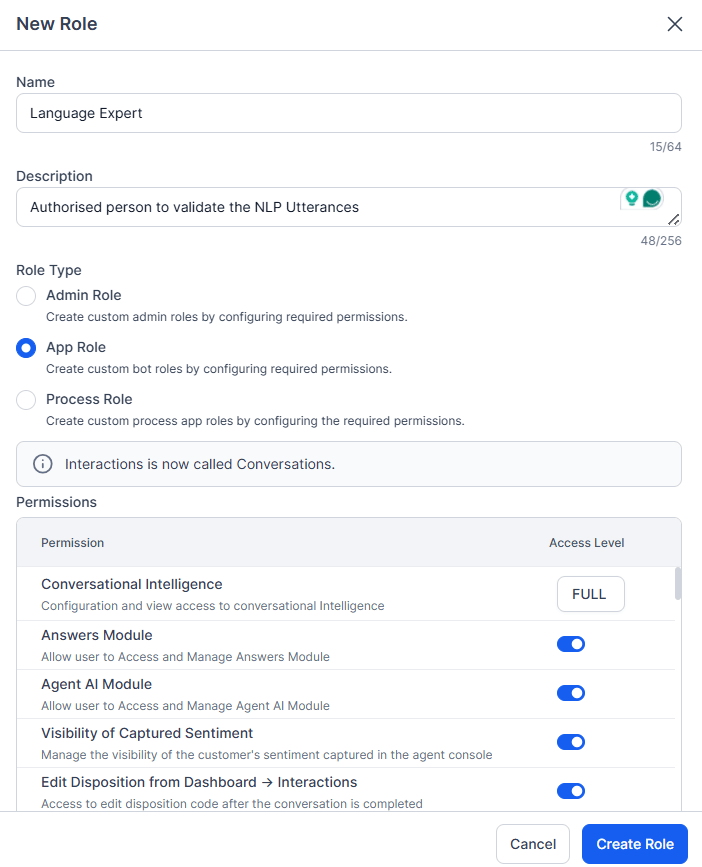 6. You can retain the default **permission** settings or modify them as per your requirements.
7. Select **Save**.
After creating a custom role, you can access more information about that role, change its name and description, add permissions to it, or assign this role to specific users.
#### Assigning App Role
You can assign roles to individual users or to user groups. You can add and edit the roles from the Admin Console. Also, you can assign an App role to a user while sharing the app with them from the Platform.
**Assign App Role to a User from the Admin Console**
1. 1. Open the Admin Console, select **User Management > Users**.
2. Select a user's record for which you want to add an app role. The user's profile slides opens.
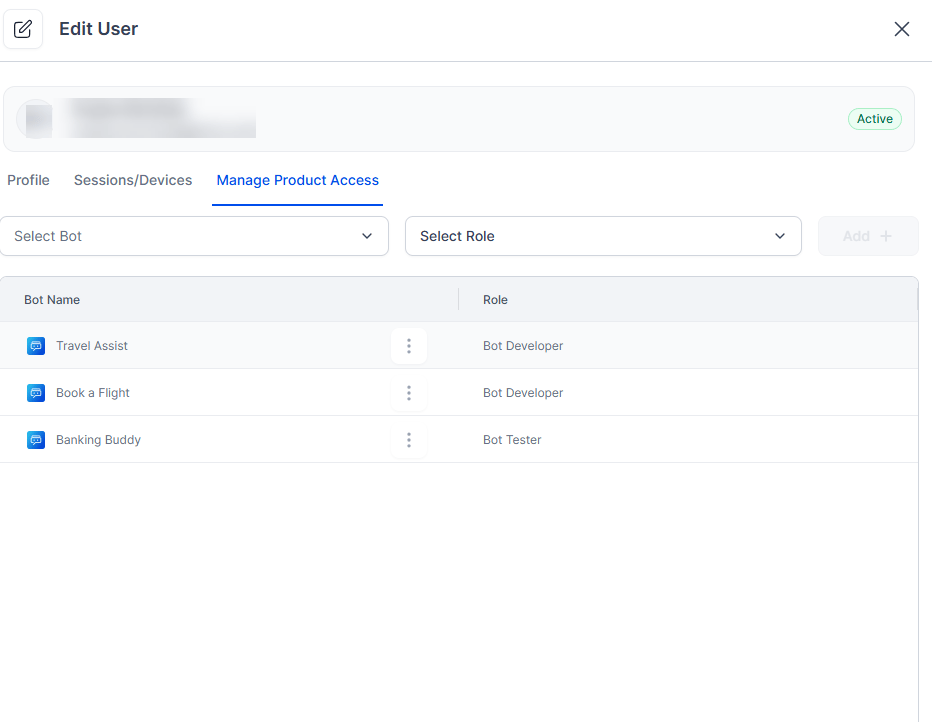
3. Select **Manage Product Access** and do the following:
1. From the first drop-down list select an App.
2. From the second drop-down list, select the role you want to assign the user for the selected app.
4. Select **Add +**. The app name and app role appears below.
6. You can retain the default **permission** settings or modify them as per your requirements.
7. Select **Save**.
After creating a custom role, you can access more information about that role, change its name and description, add permissions to it, or assign this role to specific users.
#### Assigning App Role
You can assign roles to individual users or to user groups. You can add and edit the roles from the Admin Console. Also, you can assign an App role to a user while sharing the app with them from the Platform.
**Assign App Role to a User from the Admin Console**
1. 1. Open the Admin Console, select **User Management > Users**.
2. Select a user's record for which you want to add an app role. The user's profile slides opens.
3. Select **Manage Product Access** and do the following:
1. From the first drop-down list select an App.
2. From the second drop-down list, select the role you want to assign the user for the selected app.
4. Select **Add +**. The app name and app role appears below.